djay App For iPad – Updated
djay transforms your iPad into a full–fledged DJ system and seamlessly integrates with your iPod library, giving you direct access to all your favorite tracks and playlists. A hyper–realistic touchscreen interface and ultra low–latency converge to offer you a true professional mixing experience, all with your own music. You can perform live, record mixes on–the–go, or enable Automix mode and let djay mix your favorite playlist from your iPod library auto–magically!
With unprecedented ease–of–use and innovative multi–touch mixing features, djay for iPad brings DJ’ing to the next level, offering a unique experience for beginners and professionals alike.
djay has received worldwide acclaim and also featured in Apple’s iPad TV commerical. It has now had an extensive update. Read below to find out more…
What’s New
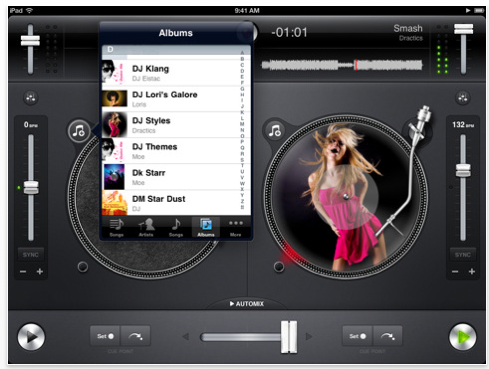
– Added advanced BPM editing: half/double/tap (tap on BPM label to bring up the menu)
– Added localizations: French, German, Japanese, Italian, Spanish
– Improved Split Mode: Audio enhanced stereo mix down of channels
– Improved performance of audio analysis (BPM, waveforms): 2x faster!
– Improved iPod library: now auto-refresh djay’s built-in library on-the-fly if it was changed externally (e.g. new playlist created)
– Improved crossfader swiping and tapping: double tap on knob to reset, supports dragging after manual cut, easier to quickly slide from side to side
– Improved Automix while running in background
– Improved accessibility with VoiceOver
– Various minor bug fixes and improvements
Feature highlights from the previous update: Looping, multiple Cue Points, level meter swipe, BPM displayed in library, enhanced support for Bluetooth audio devices, extended support for .wav and .aiff audio files.
Tips and tricks:
★ Looping, cue points, and EQs are accessible through the tools sheet that you can open with the button above the speed slider.
★ BPM editing (half, double, tap, restore) is accessible by tapping on the BPM label next to the speed slider.
$19.99/Download here

Joanne Carter
Joanne Carter BA (Hons), ARPS is a British photographer, photography journalist, editor and curator, and the founder and editorial director of TheAppWhisperer.com, an independent international photography publication established in 2009.She holds a First Class Honours degree in Photography and is an Associate of the Royal Photographic Society (ARPS).Her journalism, criticism and editorial work have appeared in The Times, The Sunday Times, The Guardian, Financial Times, BBC, Vogue Italia, LensCulture, Popular Photography and NikonPro, among other international publications.Through TheAppWhisperer, she brings together academic knowledge, professional photographic expertise and more than 17 years of specialist editorial experience to examine contemporary photography, mobile imaging, computational photography, photographic applications and emerging imaging technologies.