HoneyGram: Instagram Browser For Honeycomb – New
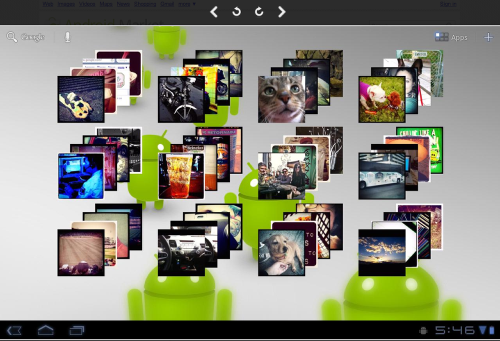
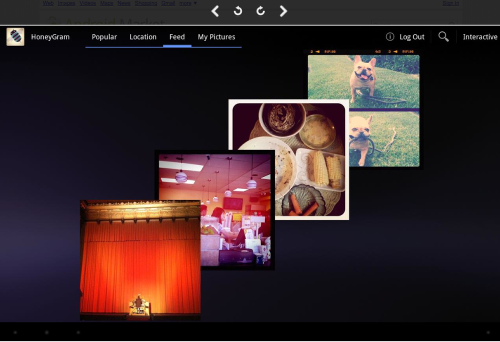
HoneyGram is an image browser for the popular image sharing service Instagram, created with great care for the Honeycomb platform. This is a wonderful application that allows everyone to view the popular feed on instagram, as well as query images nearby your location, and search through tagged images. Authenticated Instagram users can view their friend feed, their own pictures, favorite images, comment on images, and follow/unfollow other users.
It allows all users to view popular images, browse images nearby, do tag searches, view images through an interactive multi-touch interface, and embed a "popular" pictures widget on your dashboard.
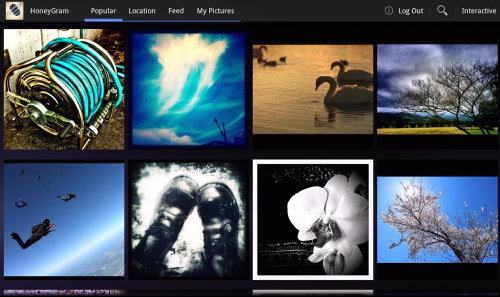
Many more features are unlocked when you log in with your Instagram account. Authenticating allows you to view your images, your friend feed, view other user’s images, follow/unfollow users, view more results for tag searches, and add 3 more types of widgets to your dashboard. (my friends, tag search, my pictures.
Multi-Touch Interface Visualization
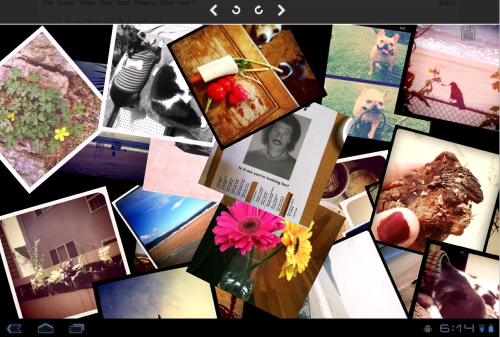
To view any photo strip with this interface just press the "interactive" button. Once the images load you can manipulate the images with multitouch.
Single touch: move an image around(
Two Touches: rotate the image (hold down with one finger and move the other finger to rotate)(
Three Touches: bring image to the top of the screen(
Four Touches: Hide Image(
Five Touches: Show all hidden images
You can save your creations by pressing the Save button in the upper right. This will let you save your work to the image gallery as well as share it through social networking applications on your device.
Attention
1. Currently the only way to create an Instagram account is through the official application on iOS. Find one and create an account.
2. This application will not/can’t let you upload images to Instagram

Joanne Carter
Joanne Carter is a British photography journalist, editor, curator, and the founder of *TheAppWhisperer.com*, one of the world’s leading platforms dedicated to mobile photography and art. Since its launch in 2009, TheAppWhisperer has become an international hub for artists of all levels to discover, learn, exhibit, and engage with contemporary photographic practice.Built on principles of inclusivity, accessibility, and artistic excellence, Joanne has spent almost two decades championing mobile photography as a serious artistic medium. Through interviews, critical essays, exhibitions, competitions, and education, she has helped shape and document the evolution of mobile art on a global scale.Her work has taken her internationally, lecturing on photography and mobile art at institutions and events including the Museum of Art in Seoul, South Korea, alongside appearances in the UK and Europe. She has served as a juror for international photography and mobile art awards across Portugal, Canada, the United States, South Korea, Italy, and the UK.Joanne is also the founder of *TheAppWhispererPrintSales.com*, one of the first online galleries dedicated exclusively to collectible mobile art, connecting artists with collectors across Europe, the United States, and Asia.Before founding TheAppWhisperer, Joanne worked extensively in print journalism and photographic publishing, including roles at a paparazzi photo agency and as deputy editor of a leading photography magazine. Her freelance journalism, criticism, and commentary have been published widely in both the UK and the US, with bylines in *The Times*, *The Sunday Times*, *The Guardian*, *Popular Photography*, *NikonPro*, *DPReview*, *Which?*, *Vogue Italia*, *LensCulture*, the *BBC*, and more recently, the *Financial Times*, where her published letters on photography continue to contribute to wider conversations around the medium.Alongside her editorial and curatorial work, Joanne’s own photographic practice has been exhibited internationally across the UK, Europe, South Korea, and the United States. Her work increasingly explores themes of grief, loss, death, memory, and the body.Her current research interests centre on grief, death, and poverty, with forthcoming postgraduate study leading towards doctoral research in these areas.Joanne is currently developing new long-form writing and photographic projects and is available for commissions, editorial projects, speaking engagements, and collaborations.Contact: joannetheappwhisperer@gmail.com)