iCloud – Photo Stream – What Is It?
With iCloud, when you take a photo on one device, it automatically appears on all your other devices. No syncing. No sending. Your photos are just there. Everywhere you want them.
Take a photo on an iOS device or import a photo from your digital camera to your computer, and iCloud automatically sends a copy of the photo over any available Wi-Fi network (or Ethernet) to the Photos app on your iOS devices, iPhoto on your Mac, the Pictures Library on your PC, and the Photo Stream album on your Apple TV. So you can show off your shots to friends and family from whichever device you’re using at the time.
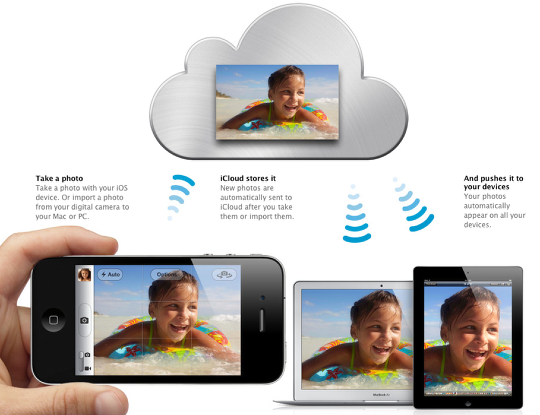
iCloud helps you manage your photos efficiently so you don’t run out of storage space on your iPhone, iPad, or iPod touch. When photos are sent to your iOS device, they appear in a Photo Stream album that holds a rolling collection of your last 1000 photos. iCloud stores new photos for 30 days, so you have plenty of time to connect your device to Wi-Fi and get your most recent shots. Once they appear in your Photo Stream, you can save your favorite shots to your Camera Roll or any other album on your device.
Master photo library. On your Mac or PC.
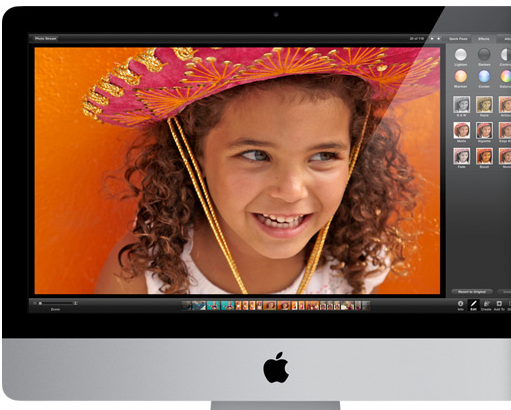
Keeping a complete set of your photos is as simple as turning on Photo Stream on your Mac or PC. Since your computer has more storage than your iOS device, it automatically keeps all the photos you take on your iPhone, iPad, or iPod touch.
Photo Stream And Apple TV
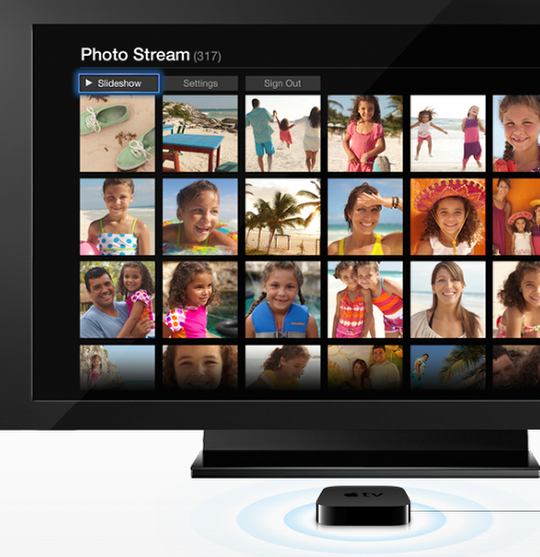
With Photo Stream and Apple TV, you can view your recent photos on your HDTV for some truly entertaining reality television. A special Photo Stream album lets you access photos stored in iCloud. So you can, say, take pictures during your daughter’s softball game, then watch a photo play-by-play with the family gathered around the big-screen TV.

Joanne Carter
Joanne Carter is a British photography journalist, editor, curator, and the founder of *TheAppWhisperer.com*, one of the world’s leading platforms dedicated to mobile photography and art. Since its launch in 2009, TheAppWhisperer has become an international hub for artists of all levels to discover, learn, exhibit, and engage with contemporary photographic practice.Built on principles of inclusivity, accessibility, and artistic excellence, Joanne has spent almost two decades championing mobile photography as a serious artistic medium. Through interviews, critical essays, exhibitions, competitions, and education, she has helped shape and document the evolution of mobile art on a global scale.Her work has taken her internationally, lecturing on photography and mobile art at institutions and events including the Museum of Art in Seoul, South Korea, alongside appearances in the UK and Europe. She has served as a juror for international photography and mobile art awards across Portugal, Canada, the United States, South Korea, Italy, and the UK.Joanne is also the founder of *TheAppWhispererPrintSales.com*, one of the first online galleries dedicated exclusively to collectible mobile art, connecting artists with collectors across Europe, the United States, and Asia.Before founding TheAppWhisperer, Joanne worked extensively in print journalism and photographic publishing, including roles at a paparazzi photo agency and as deputy editor of a leading photography magazine. Her freelance journalism, criticism, and commentary have been published widely in both the UK and the US, with bylines in *The Times*, *The Sunday Times*, *The Guardian*, *Popular Photography*, *NikonPro*, *DPReview*, *Which?*, *Vogue Italia*, *LensCulture*, the *BBC*, and more recently, the *Financial Times*, where her published letters on photography continue to contribute to wider conversations around the medium.Alongside her editorial and curatorial work, Joanne’s own photographic practice has been exhibited internationally across the UK, Europe, South Korea, and the United States. Her work increasingly explores themes of grief, loss, death, memory, and the body.Her current research interests centre on grief, death, and poverty, with forthcoming postgraduate study leading towards doctoral research in these areas.Joanne is currently developing new long-form writing and photographic projects and is available for commissions, editorial projects, speaking engagements, and collaborations.Contact: joannetheappwhisperer@gmail.com)