Photo Editor – New Mac App
Photo Editor is an easy-to-use photo editing tool that enables you to edit, adjust and filter your photos. Photo Editor gives you the rich graphics toolset for digital photography and supplies of a professional graphic design studio. With the Photo Editor,you can obtain many different effect on the photos and save them as different format which will promote your productivity.
This is a brand new app that’s just arrived on the Mac App Store. It retails for $29.99/£20.99 and you can download it here.
Read more about the features of this app below…
Features
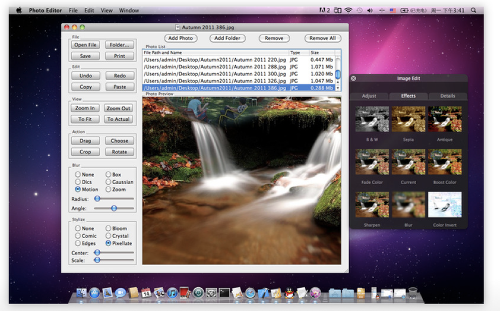
-Support loading and saving as TIFF,JPEG,PNG,BMP,ICNS,GIF,PDF,etc. Also support adding folder that contains photos.
-Preview the selected photo on Photo List,support copy,paste,zoom in,zoom out,zoom to fit size,zoom to actual size.
-Support drag,choose,crop,rotate action.
-Support adjust the photo including exposure,contrast,saturation,temperature,tint,sepia,sharpness.
-Support some color effects on photo including B&W,sepia,antique,fade color,boost color,sharpen,color invert.
-Support blur filter including box blur,disc blur,gaussian blur,motion blur and zoom blur.
✭ Box Blur:Blurs an image using a box-shaped convolution kernel.
✭ Disc Blur:Blurs an image using a disc-shaped convolution kernel.
✭ Gaussian Blur:Spreads source pixels by an amount specified by a Gaussian distribution.
✭ Motion Blur:Blurs an image to simulate the effect of using a camera that moves a specified angle and distance while capturing the image.
✭ Zoom Blur:Simulates the effect of zooming the camera while capturing the image.
-support stylize filter including bloom,comic,crystallize,edges,pixellate.
✭ Bloom:Softens edges and applies a pleasant glow to an image
✭ Comic:Simulates a comic book drawing by outlining edges and applying a color halftone effect
✭ Crystallize:Creates polygon-shaped color blocks by aggregating source pixel-color values.
✭ Edges:Finds all edges in an image and displays them in color.
✭ Pixellate:Makes an image blocky by mapping the image to colored squares whose color is defined by the replaced pixels.

Joanne Carter
Joanne Carter BA (Hons), ARPS is a British photographer, photography journalist, editor and curator, and the founder and editorial director of TheAppWhisperer.com, an independent international photography publication established in 2009.She holds a First Class Honours degree in Photography and is an Associate of the Royal Photographic Society (ARPS).Her journalism, criticism and editorial work have appeared in The Times, The Sunday Times, The Guardian, Financial Times, BBC, Vogue Italia, LensCulture, Popular Photography and NikonPro, among other international publications.Through TheAppWhisperer, she brings together academic knowledge, professional photographic expertise and more than 17 years of specialist editorial experience to examine contemporary photography, mobile imaging, computational photography, photographic applications and emerging imaging technologies.
You May Also Like