iOS – iPlanmyTime – New
Time is money and we all need to manage our tasks in order meet our deadlines. Mismanagement of time can effect the quality of our work as well as jeopardizing our relationship with our clients. Project management is not pretty, and traditionally the available tools have been geared towards large projects making them too cumbersome to be used for small proposals or by individuals. Also to use a calendar to plan out a project is awkward and lacks the required flexibility. In any project things change, they always do. If a client moves a meeting from Monday to Thursday which effects the rest of the project, manually reseting the dates in a calendar would be inefficient, laborious and time consuming.
This is a brand new app that looks absolutely stunning. It retails for $1.99/£1.49 and you can download it here
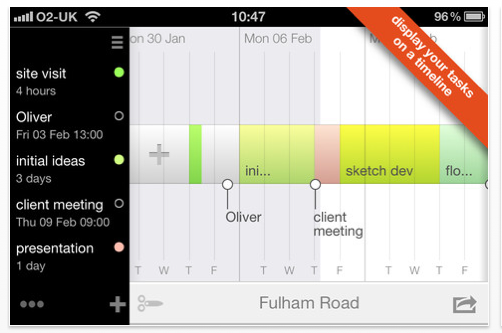
"iPlan myTime" helps you to structure and organize your time by firstly operating within your working day and secondly by graphically representing your tasks on a simple editable timeline. In "iPlan myTime" you set the number of working days for each week and then each working day is further divided into 8 working hours. In this way when a task spreads across multiple days or weeks, "iPlan myTime" automatically adjusts the end date taking into consideration the number of working hours. Also to graphically represent your timeline is huge, helping you to visualize the whole of your project or how each part relates to each other. This combined with the power of on screen editing makes "iPlan myTime" an essential tool for managing projects as they develop and change.
Video Demonstration
iPlan myTime Overview from Reza Farhad on Vimeo.
Main Features
• Create multiple project
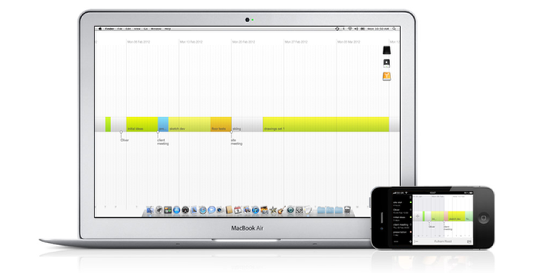
• Edit projects visually
◦ change the length of a task,
◦ reorder tasks as they relate to each other
◦ move a group of tasks up or down the timeline.
• Display Calendar as a timeline
• Share your timelines or export them as Desktop image

Joanne Carter
Joanne Carter is a British photographer, photography journalist, editor and curator and the founder and editorial director of TheAppWhisperer.com, an independent international photography publication established in 2009.Her journalism, criticism and commentary have appeared in The Times, The Sunday Times, The Guardian, Financial Times, BBC, Vogue Italia, LensCulture, Popular Photography, Android Magazine, NikonPro, DPReview, Which Digital Camera and Which Camera. She has lectured internationally on photography and mobile art, served as a juror for international photography awards, and exhibited her own photographic work across the UK, Europe, South Korea and the United States.Alongside her editorial work, Joanne's photographic and postgraduate research explores death, grief, memory, representation and social inequality through contemporary photography, participatory practice and visual research methods, with the longer-term aim of developing this work through doctoral research.Through TheAppWhisperer, she continues to publish independent photography journalism spanning contemporary photographic practice, mobile imaging, photographic apps, computational photography and emerging imaging technologies.Joanne is available for editorial commissions, photography projects, judging, curatorial work, speaking engagements, consultancy and selected collaborations.