Repix – Updated
Repix is quite a new app but has already proven itself to be popular with over 2 million downloads in just 3 weeks. We previously published a tutorial on how to get started with this app. If you missed that, please go here.
Repix has just bee updated and now includes stunning new filters, a new ‘+” style to select brushes/toggle, direct access to all the albums and streams, a new cropping tool and a new Starters section to inspire creativity.
“Since our launch last month the reaction of users has been truly amazing”, said Ilkka Teppo, CEO, Sumoing. “We’ve listened the feedback and wanted to make it even easier and faster to be creative with photos. By adding new filters, styles and zero-friction design, we think Repix is the smoothest and most creative photo editor on the market. With this update we remove the need for people to use multiple photo editing apps. We’re looking forward to seeing the creations and hearing the feedback.”
This is a free update to an already free app, if you haven’t already downloaded it, you can do so here.
Recap On What’s New
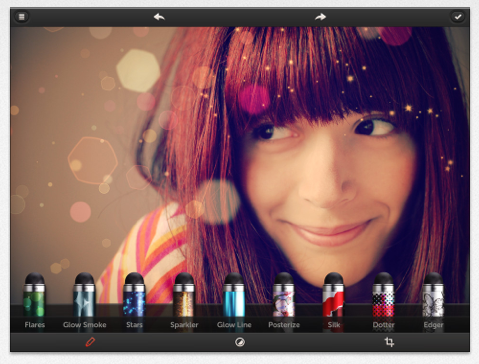
– NEW – 8 new filters to apply to images for stunning look or final finish
– NEW – Smooth cropping tool with 6 presets
– NEW – New ‘+ style’ feature for selected brushes. Click + to see a new type of effect
– NEW – ‘Starter’ section with images available for users to start editing
– NEW – Direct access to all albums, streams & Facebook
– NEW – Seamless zero-friction design guarantees smooth experience
– Carefully handcrafted selection of 20 brushes include state-of-the art effect, color boosting and artistic styles
– Repix comes with real-time RebecaTM processing engine that seamlessly integrates the power of the CPU and GPU enabling insane performance
– Full resolution 4096×4096 support for iPhone5 and iPad3+
– Studio-grade technology alongside a slick and intuitive interface to inspire new levels of creativity; zero-friction design with ability to switch between tools easily
– Share creations with #repix to Twitter, Tumblr, Instagram or Facebook
– Free to use with a selection of brushes, with an option to purchase more brushes

Joanne Carter
Joanne Carter BA (Hons), ARPS is a British photographer, photography journalist, editor and curator, and the founder and editorial director of TheAppWhisperer.com, an independent international photography publication established in 2009.She holds a First Class Honours degree in Photography and is an Associate of the Royal Photographic Society (ARPS).Her journalism, criticism and editorial work have appeared in The Times, The Sunday Times, The Guardian, Financial Times, BBC, Vogue Italia, LensCulture, Popular Photography and NikonPro, among other international publications.Through TheAppWhisperer, she brings together academic knowledge, professional photographic expertise and more than 17 years of specialist editorial experience to examine contemporary photography, mobile imaging, computational photography, photographic applications and emerging imaging technologies.