iOS – Photogene for iPad – Updated
With Photogene you can easily browse, improve and export multiple photos. It’s a great companion to the camera connection kit. Photogene can open up for editing very large files and supports an export resolution of up to 21 MP on iPad 2 and the new iPad (max export resolution on iPad 1 is 8 MP).
What’s New?
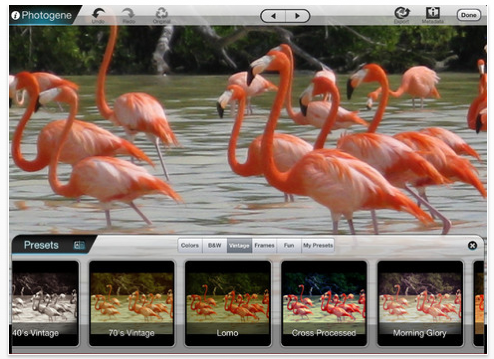
– Support for retina display on the new iPad.
- Greatly improved resolution during editing (on iPad 2 and above).
- Now taking advantage of dual-core on iPad 2 and above. Save/export takes much less time.
New editing tools:
– Gradients. Add color adjustments or filters as gradient transitions (in the "enhance" section).
- Annotations: new tool for adding arrows and markers on the photo (in the "text" section).
- Can now rotate text boxes.
- New curves algorithm: makes curves much easier to control.
- Geo-tagging: can add or modify geo-tagging of photos.
- Textual watermarking (available with the GO-PRO upgrade).
- New filter: oil-painting.
Bug fixes:
- Fixed bug that prevented uploading more than 2 photos at once to Dropbox.
- Fixed bug when using "original filenames" with FTP.
- Improved stability throughout the app.

Joanne Carter
Joanne Carter is a British photographer, photography journalist, editor and curator and the founder and editorial director of TheAppWhisperer.com, an independent international photography publication established in 2009.Her journalism, criticism and commentary have appeared in The Times, The Sunday Times, The Guardian, Financial Times, BBC, Vogue Italia, LensCulture, Popular Photography, Android Magazine, NikonPro, DPReview, Which Digital Camera and Which Camera. She has lectured internationally on photography and mobile art, served as a juror for international photography awards, and exhibited her own photographic work across the UK, Europe, South Korea and the United States.Alongside her editorial work, Joanne's photographic and postgraduate research explores death, grief, memory, representation and social inequality through contemporary photography, participatory practice and visual research methods, with the longer-term aim of developing this work through doctoral research.Through TheAppWhisperer, she continues to publish independent photography journalism spanning contemporary photographic practice, mobile imaging, photographic apps, computational photography and emerging imaging technologies.Joanne is available for editorial commissions, photography projects, judging, curatorial work, speaking engagements, consultancy and selected collaborations.