iOS – AutoPainter 3 – New
We know that so many of ‘our’ iPhone photographers use the AutoPainter series and now with this new release they’re going to be very excited indeed. This new collection of Autopainter styles continue to amaze you with its impressive artificial inteligence to automatically paint your photos. This is not just a filter, it uses styles based on the works of worlds best known painters. The first volume of AutoPainter featured mixed styles of oil and aquarell painting, the volume 2 focused on primarily illustration techniques and this new volume 3 revisits the impressionist and neoclassical styles.
You can read more about the features of this app below. This app retails for $0.99/£0.69 and you can download it here.
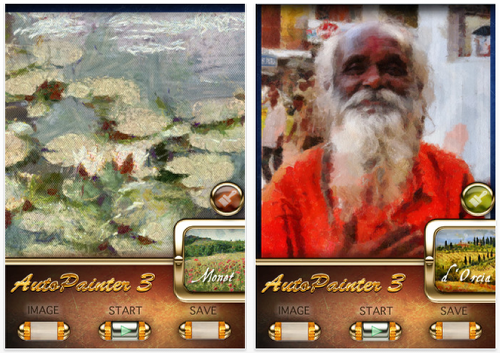
✭Monet✭
Based on real Claude Monet painting style of broken color technique with intense palette to achieve sensation of light in a painting
Tip: This signature style works great for classical impressionistic scenes of landscapes with flowers and plants, lakes and its color reflections.
✭Camille✭
Inspired by: Jean.B. Camille Corot (1796 -1875) and Camille Pissarro (1830 – 1903)
Chunks of heavy paint mixed with patches of under-painted canvas borrows the style from Neo-Calssicism and early Impressionism
Tip: Works for landscapes and buildings, occasionally for people and animals.
✭d’Orcia✭
Inspired by: quick modern brush paintings
Follows Classical Impressionistic style with a modern twist and bright colors. This stile never gets old, and it is popular for paintings of both cities (Paris in rain) and countryside (endless iterations of Tuscany village theme).
Tip: This is a style that works best on large self-descriptive shapes. It loves green yellow and red and uses quick long strokes to hide details
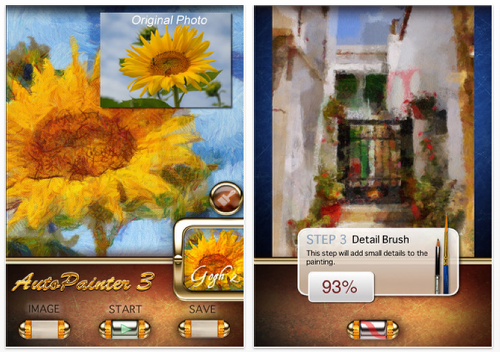
✭Gogh 2✭
Inspired by: Van Gogh’s Sunflower paintings
This high quality style shows one of the signature Van Gogh technique as seen in various
Sunflower paintings even when looking at the brushstroke details.

Joanne Carter
Joanne Carter is a British photography journalist, editor, curator, and the founder of *TheAppWhisperer.com*, one of the world’s leading platforms dedicated to mobile photography and art. Since its launch in 2009, TheAppWhisperer has become an international hub for artists of all levels to discover, learn, exhibit, and engage with contemporary photographic practice.Built on principles of inclusivity, accessibility, and artistic excellence, Joanne has spent almost two decades championing mobile photography as a serious artistic medium. Through interviews, critical essays, exhibitions, competitions, and education, she has helped shape and document the evolution of mobile art on a global scale.Her work has taken her internationally, lecturing on photography and mobile art at institutions and events including the Museum of Art in Seoul, South Korea, alongside appearances in the UK and Europe. She has served as a juror for international photography and mobile art awards across Portugal, Canada, the United States, South Korea, Italy, and the UK.Joanne is also the founder of *TheAppWhispererPrintSales.com*, one of the first online galleries dedicated exclusively to collectible mobile art, connecting artists with collectors across Europe, the United States, and Asia.Before founding TheAppWhisperer, Joanne worked extensively in print journalism and photographic publishing, including roles at a paparazzi photo agency and as deputy editor of a leading photography magazine. Her freelance journalism, criticism, and commentary have been published widely in both the UK and the US, with bylines in *The Times*, *The Sunday Times*, *The Guardian*, *Popular Photography*, *NikonPro*, *DPReview*, *Which?*, *Vogue Italia*, *LensCulture*, the *BBC*, and more recently, the *Financial Times*, where her published letters on photography continue to contribute to wider conversations around the medium.Alongside her editorial and curatorial work, Joanne’s own photographic practice has been exhibited internationally across the UK, Europe, South Korea, and the United States. Her work increasingly explores themes of grief, loss, death, memory, and the body.Her current research interests centre on grief, death, and poverty, with forthcoming postgraduate study leading towards doctoral research in these areas.Joanne is currently developing new long-form writing and photographic projects and is available for commissions, editorial projects, speaking engagements, and collaborations.Contact: joannetheappwhisperer@gmail.com)