
Top Five Photo Apps – Photo App Lounge by Vanessa Vox
Welcome to our Top Five Photo Apps – Photo App Lounge section of theappwhisperer.com. This is an area on our site where we ask highly accomplished mobile photographers what their top five photo apps are and why.
We previously published the Top Five Photo Apps as recommended by Yannick Brice , Cedric Blanchon, Irene Sneddon, Sarah Jarrett, Louise Fryer, Lisa Waddell, Davide Capponi, Ali Jardine, Clint Cline, Elaina Wilcox, France Freeman, Tess Gomm, Lola Mitchell, Vivi, Em Kachouro, Laetitia Harnie-Coussau, MaryJane Sarvis, AlyZen Moonshadow, Ginaluca Ricoveri, Jennifer Sharpe, Natali Prosvetova and David Hayes’ Top Five Photo Apps including accompanying images demonstrating these selections, if you missed those, please go here.
This time Vanessa Vox talks us through her Top Five Mobile photography apps with wonderful imagery and explanations. Don’t miss this, over to you Vanessa (foreword by Joanne Carter).
“For this article I counted my favorite apps and found more than twenty-five! So I asked myself: How can I reduce my selection to five? And how can I illustrate them most well? – And then came the idea: I’ll take only one shot and let my fingers find the five apps intuitively during the editing process.
These are the Top Five Photo Apps (with links) that inspired me to this photo collage called “FEELING ONE“
• Beauty Booth
• Classic Vintage
• Photo Editor
• Vintage Scene
• Superimpose
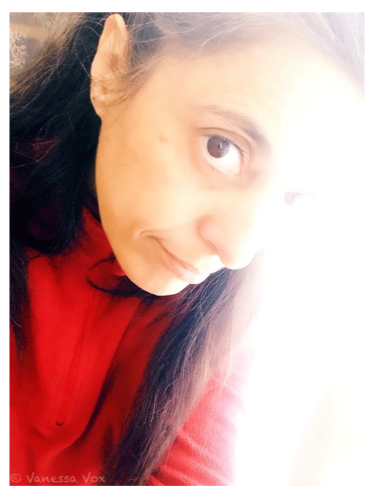
1st Step: Beauty Booth Pro (by JellyBus) : Emphasizing the facial expression
©Vanessa Vox
This app detects faces, smooths and tones the skin. First of all you have to choose one of two suggestions. Afterwards the magic wand offers more presets which you can fine-tune with three sliders: Brightness/Smoothing/Filter opacity. Of course there are more functions in Beauty Booth but I never use them. (A hint: Never forget to push the eye’s glances to the right place or set it to 0 percent, this, I always do.)
I am always searching for something like an icon or archetype when I work on my self-portraits. That’s why I softened and reduced the detail information of the original pic. Especially the eye and the ear were important to me.
Now I’ve got an excellent foundation for the next step using different papers and vintage effects.
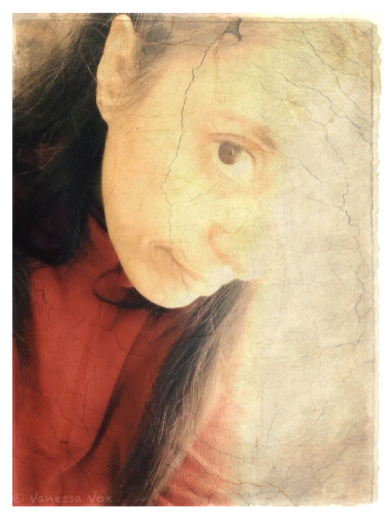
2nd Step: Classic Vintage (by AiNeuron): Transcending the picture
©Vanessa Vox
This app is one of my recent discoveries. I am actually fascinated by Classic Vintage with the beautiful old painting design when you open it. I enjoy the different papers, crackles, borders, and also the sepia tone.
The results are most of the time a little bit excessive but I am surprised how often I use them. But anyway you can always reduce the opacity with predetermined percents for a more delicate or poetic outcome.
I’ve chosen a textured paper and a crackle from the Nevada set, a sepia tone and 0 percent frames. The crackles give a fragile feeling. They break the surface. A symbol of transience and impending loss.
Classic Vintage has a comfortable preview function. You can continue to work or trying out other opacity percents without waiting for the rendering process. (You will see that a fine frame is walking through the picture which means that these parts were rendered in the background).
By the way: I once needed the customer mail service. And it is really fast, competent and friendly.
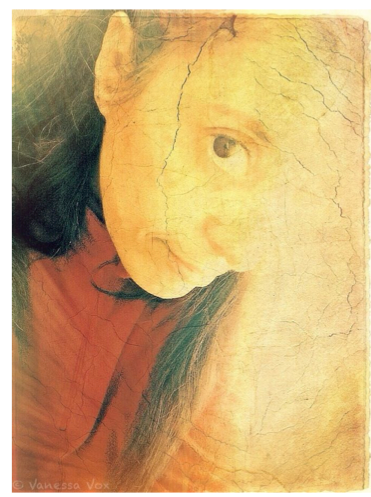
3rd Step: PhotoWizard (by Pankaj Goswami) : My classic editing tool
©Vanessa Vox
I have many favorite editing tools: Photo Toaster, Snapseed, Laminar Pro... But I really don’t know why: PhotoWizard is mostly my day to day app with all the standard tools in the classic form (curves, histogram, sharpness, shadows/highlights…). The effects section is also interesting: In this case I used the light leak option with reduced opacity in my self-portrait. And afterwards the sharpness option. Although this app is not supposed to give a painterly effect it did the job for me. Photo Wizard is really easy to use, fast and absolutely great. It has a full undo and redo function. Honestly I would not want to miss PhotoWizard.
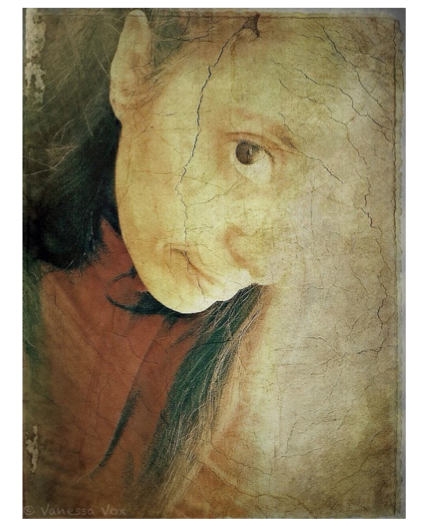
4th Step: Vintage Scene (by JixiPix): Getting a gorgeous vintage look
©Vanessa Vox
I really love all the JixiPix apps! The processing is not the fastest, but I appreciate the possibility to fine-tune the chosen preset and to save the settings as my own preset. It speeds up my workflow next time! There are many fantastic styles in three groups (Vintage style/Antique Photo/Faded Time) and a lot of adjustment possibilities, including the choice of a new papers or frames. You will discover beautiful textures there and many inspiring combinations!
In this case the effect is not so obvious because I used it cautiously.
5th Step: Superimpose (by Pankaj Goswami): Great photo compositing app
For fast blendings Image Blender is easy to use. But for complex compositings I prefer Superimpose. It is great for layering, adjusting, moving, masking etc. But only when you know how! Some of the functions are not very easy to find. So you have to get used to it.
I appreciate the magic wand as an alternative tool to the brush for the mask. A big advantage of this app is that you can save your mask in png.
Very welcome when you want to continue or rebuild your work another day. So your precisely and hard elaborated mask is not lost! I extracted my blackbird and the rose from their original backgrounds, moved them into my pic and chose a blending mode.
This is the end result through my Top Five Apps:
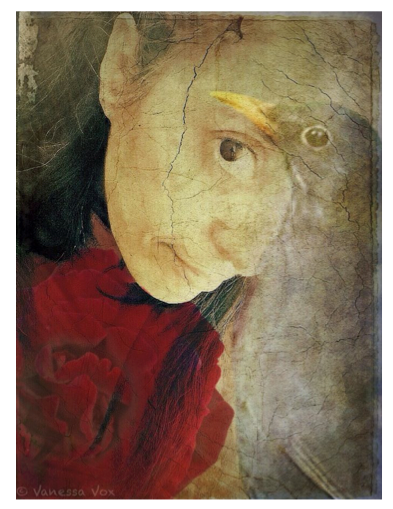
‘FEELING ONE’ – ©Vanessa Vox
A symbiotic feeling with nature. A close encounter of three creatures: Blackbird, rose and human being. A reminder to take care of our beautiful world. A witness of an ancient wisdom. We all belong together. We are all ONE which is symbolized by the pair of eyes.
Thanks to Joanne Carter and theappwhisperer.com for promoting all about iphoneography. Its a fascinating new experience.
TheAppWhisperer has always had a dual mission: to promote the most talented mobile artists of the day and to support ambitious, inquisitive viewers the world over.
As the years pass TheAppWhisperer has gained readers and viewers and found new venues for that exchange. All this work thrives with the support of our community.
Please consider making a donation to TheAppWhisperer as this New Year commences because your support helps protect our independence and it means we can keep delivering the promotion of mobile artists that’s open for everyone around the world.
Every contribution, however big or small, is so valuable for our future.

Joanne Carter
Joanne Carter is a British photography journalist, editor, curator, and the founder of *TheAppWhisperer.com*, one of the world’s leading platforms dedicated to mobile photography and art. Since its launch in 2009, TheAppWhisperer has become an international hub for artists of all levels to discover, learn, exhibit, and engage with contemporary photographic practice.Built on principles of inclusivity, accessibility, and artistic excellence, Joanne has spent almost two decades championing mobile photography as a serious artistic medium. Through interviews, critical essays, exhibitions, competitions, and education, she has helped shape and document the evolution of mobile art on a global scale.Her work has taken her internationally, lecturing on photography and mobile art at institutions and events including the Museum of Art in Seoul, South Korea, alongside appearances in the UK and Europe. She has served as a juror for international photography and mobile art awards across Portugal, Canada, the United States, South Korea, Italy, and the UK.Joanne is also the founder of *TheAppWhispererPrintSales.com*, one of the first online galleries dedicated exclusively to collectible mobile art, connecting artists with collectors across Europe, the United States, and Asia.Before founding TheAppWhisperer, Joanne worked extensively in print journalism and photographic publishing, including roles at a paparazzi photo agency and as deputy editor of a leading photography magazine. Her freelance journalism, criticism, and commentary have been published widely in both the UK and the US, with bylines in *The Times*, *The Sunday Times*, *The Guardian*, *Popular Photography*, *NikonPro*, *DPReview*, *Which?*, *Vogue Italia*, *LensCulture*, the *BBC*, and more recently, the *Financial Times*, where her published letters on photography continue to contribute to wider conversations around the medium.Alongside her editorial and curatorial work, Joanne’s own photographic practice has been exhibited internationally across the UK, Europe, South Korea, and the United States. Her work increasingly explores themes of grief, loss, death, memory, and the body.Her current research interests centre on grief, death, and poverty, with forthcoming postgraduate study leading towards doctoral research in these areas.Joanne is currently developing new long-form writing and photographic projects and is available for commissions, editorial projects, speaking engagements, and collaborations.Contact: joannetheappwhisperer@gmail.com)
11 Comments
Geri
Thanks for the recommendations – I didn’t know about Classic Vintage!
Vanessa
Hi Geri! Classic Vintage is really cool when you adjust the opacity. Thanks for your comment 🙂
Milena
I’ve missed this column! Great app selection. I do love Photowizard! So good! =)
Vanessa
Thank you Milena! I’m very happy that you enjoy this 5 apps.
StickyQuote
Thanks for sharing!
Vanessa
Its a pleasure to share own experiences and feelings with others!
Elaine Taylor (@sunflowerof21)
Really enjoyed reading this. Thanks Vanessa and Joanne.
Classic Vintage is downloading as I type this 🙂
Vanessa
Thank you Elaine for taking the time to read this article! And I am very glad to have win a new Classic Vintage fan 🙂
lee atwell
so wonderful, vanessa! i adore your magical edits and i loved reading your process for this exquisite image of ‘feeling one’ <3
Vanessa
Oh thank you Lee for your kind words. It really touches me ♡
Tracy Mitchell Griggs
PhotoWizard was one of the first apps I downloaded two years ago – I love the sharpening tool, curves and glow. Great app – I have all the other apps as well and STILL can’t figure out how to effectively use Superimpose-tutorial?