Icon Pallet 2.0 is now available in the Mac App Store
Carnation Software has announced Icon Pallet 2.0, its program and document launcher for OS X just released in the Mac App Store. With Icon Pallet, quickly switch between apps, launch documents and folder items. Drag files, folders and documents to the pallet. They will always be there for you. If your desktop is a cluttered mess and you can’t find anything, Icon Pallet is the solution.
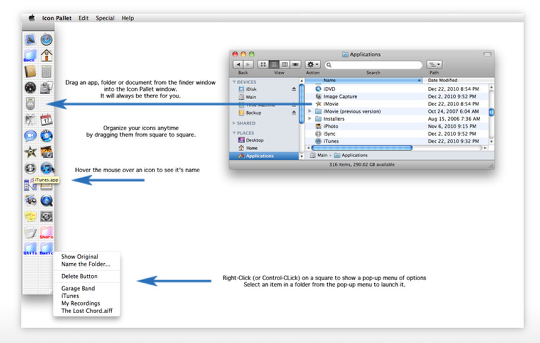
* The perfect complement to your OS X Dock, Icon Pallet keeps your icons in the same location, and at the same size, no matter how many you add (up to 600).
* Be in control of your desktop with Icon Pallet.
* Icon Pallet stores the link to your folders, apps and documents, for launch and access with a single click.
* Organize your programs, files and folders on an expandable pallet instead of cluttering your desktop with icons or squeezing them onto a crowded dock.
* You can add names and colors to your folder icons, making it easier to recognize them on your Icon Pallet without having to roll the mouse over the folder icon to see the full name.
You want easy? Just one click on an icon will…
* Launch a program
* Open a document
* Open a folder
* View and select items within a folder or drive
You can:
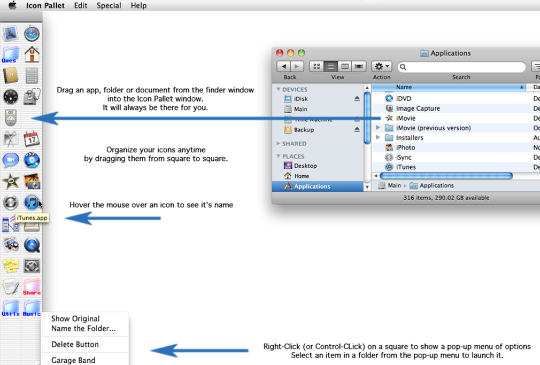
* Drag an icon of any file, folder or program to a blank square to install the link on Icon Pallet.
* Drag a document to one of the application icons on Icon Pallet to open the dragged document within that application.
* Hold the control key down while clicking on an icon on Icon Pallet (or right-click if you have a two-button mouse) to open a document within a folder, or to see menu options for each icon.
* Control-click (or right-click) on a blank square to select from a list of common Mac apps.
* Hover the mouse over an icon on Icon Pallet to see the file name. Hold the command key down while hovering to see the full path name showing where the original file, folder or program is located.
* Drag icons around in the window pallet to organize them.
* Breathe easier with Icon Pallet holding all your favorite Macintosh goodies right where you want them, ready to go.
With Icon Pallet, you’re in control. Coming Soon! Version 2.0.1 will let you type the first letter of a file name to jump to an icon. Hit the tab key to jump to the next icon.
System Requirements:
* Mac OS X 10.6.6 or later
* 1.1 MB
Pricing and Availability:
Icon Pallet 2.0 is $4.99 USD (or equivalent amount in other currencies) and available worldwide exclusively through the Mac App Store in the Productivity category.

Joanne Carter
Joanne Carter BA (Hons), ARPS is a British photographer, photography journalist, editor and curator, and the founder and editorial director of TheAppWhisperer.com, an independent international photography publication established in 2009.She holds a First Class Honours degree in Photography and is an Associate of the Royal Photographic Society (ARPS).Her journalism, criticism and editorial work have appeared in The Times, The Sunday Times, The Guardian, Financial Times, BBC, Vogue Italia, LensCulture, Popular Photography and NikonPro, among other international publications.Through TheAppWhisperer, she brings together academic knowledge, professional photographic expertise and more than 17 years of specialist editorial experience to examine contemporary photography, mobile imaging, computational photography, photographic applications and emerging imaging technologies.
You May Also Like