Download with Dropbox – New iOS Productivity App
Download with Dropbox actually provides more options than Apple’s upcoming iCloud service as users are able to download an audio lecture file from anywhere hosted online as opposed to only being able to sync their iTunes content with iCloud. This fluid app opens up iOS devices in many ways, and could reduce the users need to be tied to a Mac or PC.
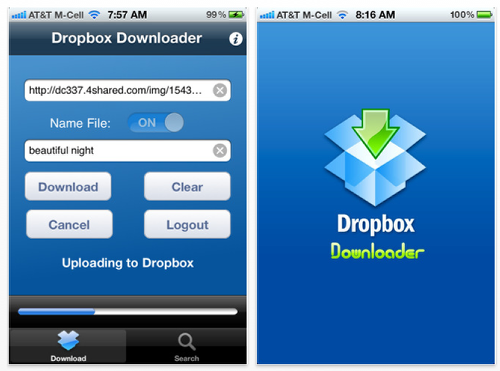
The Universal Download with Dropbox App provides several features that make the downloading and uploading effortless. For instance, the App will automatically paste copied content into the URL field. With less than three taps, the app will begin to download the file, then immediately upload the file to Dropbox. In addition, Download with Dropbox provides a fully functional web browser so the app user does not need to leave the app to search for content to download. The app is fully functional in the background so users have the freedom to continue to use their iOS device while the file transfers to Dropbox.
This handy tool is designed to complement the official Dropbox app. Once the song or document is successfully uploaded via Download with Dropbox, it can then be viewed and saved locally using the official Dropbox app. When the two apps are used together, it could eliminate the need to ever connect your iOS device to your Mac or PC to transfer pictures, music, video, or documents.

Joanne Carter
Joanne Carter BA (Hons), ARPS is a British photographer, photography journalist, editor and curator, and the founder and editorial director of TheAppWhisperer.com, an independent international photography publication established in 2009.She holds a First Class Honours degree in Photography and is an Associate of the Royal Photographic Society (ARPS).Her journalism, criticism and editorial work have appeared in The Times, The Sunday Times, The Guardian, Financial Times, BBC, Vogue Italia, LensCulture, Popular Photography and NikonPro, among other international publications.Through TheAppWhisperer, she brings together academic knowledge, professional photographic expertise and more than 17 years of specialist editorial experience to examine contemporary photography, mobile imaging, computational photography, photographic applications and emerging imaging technologies.