piRAWnha – iPad Photography App Updated
piRAWnha supports raw images transferred to the iPad with the Apple iPad Camera Connection Kit, with iTunes or other transfer programs and works with all raw files supported by Apple (a complete list of cameras is here: http://support.apple.com/kb/ht3825). Because of the considerable memory requirements for raw development, piRAWnha works best when no other iPad apps are running in the background.
This app has just been updated, check out What’s New below. This is a free update but if you haven’t already purchased this app you can do so here. It retails for $9.99/£5.99/download.
Features
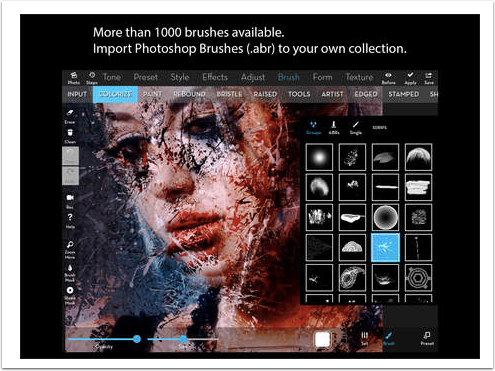
piRAWnha features both raw developing and post-processing options, including:
-Exposure compensation
-White balance correction (automatic, manual, camera-specific)
-Highlight recovery, Gamma correction
-Denoise operations
-Saturation-hue-brightness adjustment
-High-quality contrast adjustment
-Sharpening and Image Blurring
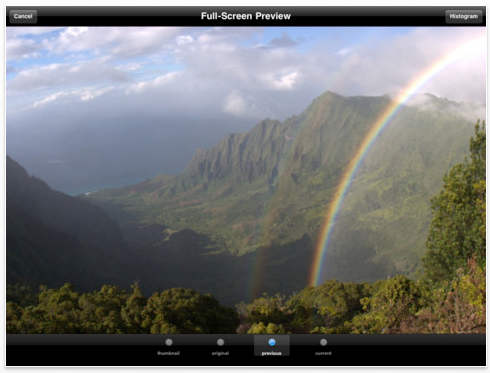
-Updated image histogram (red-green-blue) while editing
-Display of EXIF information (shutter speed, aperture value, ISO, …)
-Ratings/Keywords with XMP file support
-Full size export and full-screen full resolution display for iPad 2
-Custom output file format (jpg, tiff, …)
-Cropping and Rotation
-Vibrance Control
-Current Zoom display
-Ability to open RAW files from other apps such as Mail, Dropbox, Shuttersnitch
What’s New
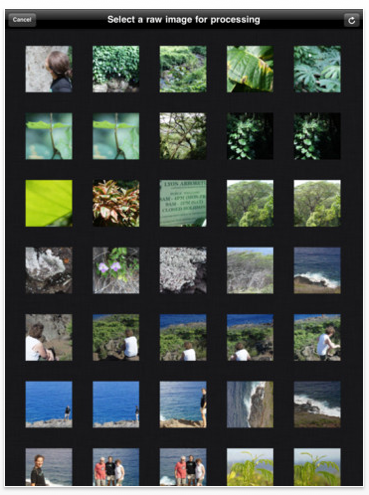
Added White Balance Selector (Eyedropper)
Faster photo library reading
Better performance for large photo libraries
Added more camera support
Minor bug fixes to the live preview.

Joanne Carter
Joanne Carter is a British photography journalist, editor, curator, and the founder of *TheAppWhisperer.com*, one of the world’s leading platforms dedicated to mobile photography and art. Since its launch in 2009, TheAppWhisperer has become an international hub for artists of all levels to discover, learn, exhibit, and engage with contemporary photographic practice.Built on principles of inclusivity, accessibility, and artistic excellence, Joanne has spent almost two decades championing mobile photography as a serious artistic medium. Through interviews, critical essays, exhibitions, competitions, and education, she has helped shape and document the evolution of mobile art on a global scale.Her work has taken her internationally, lecturing on photography and mobile art at institutions and events including the Museum of Art in Seoul, South Korea, alongside appearances in the UK and Europe. She has served as a juror for international photography and mobile art awards across Portugal, Canada, the United States, South Korea, Italy, and the UK.Joanne is also the founder of *TheAppWhispererPrintSales.com*, one of the first online galleries dedicated exclusively to collectible mobile art, connecting artists with collectors across Europe, the United States, and Asia.Before founding TheAppWhisperer, Joanne worked extensively in print journalism and photographic publishing, including roles at a paparazzi photo agency and as deputy editor of a leading photography magazine. Her freelance journalism, criticism, and commentary have been published widely in both the UK and the US, with bylines in *The Times*, *The Sunday Times*, *The Guardian*, *Popular Photography*, *NikonPro*, *DPReview*, *Which?*, *Vogue Italia*, *LensCulture*, the *BBC*, and more recently, the *Financial Times*, where her published letters on photography continue to contribute to wider conversations around the medium.Alongside her editorial and curatorial work, Joanne’s own photographic practice has been exhibited internationally across the UK, Europe, South Korea, and the United States. Her work increasingly explores themes of grief, loss, death, memory, and the body.Her current research interests centre on grief, death, and poverty, with forthcoming postgraduate study leading towards doctoral research in these areas.Joanne is currently developing new long-form writing and photographic projects and is available for commissions, editorial projects, speaking engagements, and collaborations.Contact: joannetheappwhisperer@gmail.com)