
iColorama for iPad – Updated
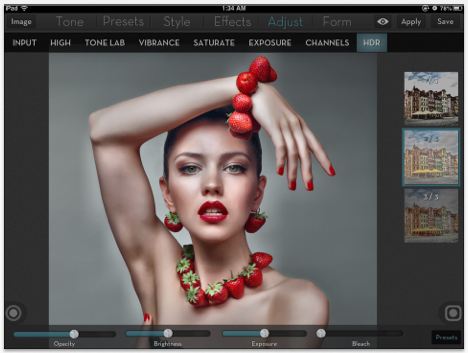
iColorama for iPad is a very popular app for mobile photographers and it has just been updated. It’s now possible to zoom and move the image while applying effects and masks by pressing the button with the hand. There’s also a minitutorial for masking. This is a free upgrade, if you have previously purchased this app. If not, you can do so here. It retails for $1.99/£1.49/download.

Joanne Carter
Joanne Carter BA (Hons), ARPS is a British photographer, photography journalist, editor and curator, and the founder and editorial director of TheAppWhisperer.com, an independent international photography publication established in 2009.She holds a First Class Honours degree in Photography and is an Associate of the Royal Photographic Society (ARPS).Her journalism, criticism and editorial work have appeared in The Times, The Sunday Times, The Guardian, Financial Times, BBC, Vogue Italia, LensCulture, Popular Photography and NikonPro, among other international publications.Through TheAppWhisperer, she brings together academic knowledge, professional photographic expertise and more than 17 years of specialist editorial experience to examine contemporary photography, mobile imaging, computational photography, photographic applications and emerging imaging technologies.
One Comment
Carolyn Hall Young
This is what I just posted on the app store about the update:
January 3, 2013:
I am placing my most current comment here at the top, the prior ones, in oldest to newer order, are below.
I am swooning! The masking brushes in iColorama for the iPad are absolutely elegant. Once again, iColorama has opened up a bigger world of possibilities, and the UI, though great before, is even better! New to this version is the ability to zoom in to refine my masking, and blending placements!
I still need Procreate for free form painting/drawing, skewing, smearing, and some of the layer blend modes, such as luminousity. I can now drop Image Blender from my tool box –iColorama’s many adjustable masking brushes with opacity sliders are light years better than any other app I have found. I will keep TouchRetouch for cloning and retouching minor details, and until I am more fluent in iC darkroom adjustments, Snapseed will remain in my bag of tricks. For sharing to a specific FB album at the highest resolution possible for Facebook, I will keep using Halftone. I love the borders, in iC, especially 4/5 & 5//5, but I continue to return to Photo Toaster for the torn edge frame. Soon enough, iColorama will offer these few things that I look for in other apps.
I am reeling with delight, because of the deliciousness and playfulness of iColorama. I am grateful for the brilliance of Teresa – who I don’t know in real life, but I have grown to love because of what her work has allowed me to do. I can achieve most of what I want without having to strategize while jumping back and forth between so many different art/photo apps. I can immerse more fully. What a joy!
Take your time, explore the power and possibilities, uncover surprises, and exercise your creativity in ways that will thrill you!
OLDER REVIEWS are below. With the 1/3/2013 update, you can feel free to multiply my praise exponentially:
I use this app, every day, for the sheer pleasure of discovery, and for its boundless creative possibilities. The app store description is an understatement of the capabilities of this program. The only way to understand the range of this app is to take the time to explore it.
I fully, completely, and without reservations, recommend iColorama. I downloaded the most recent update, this morning, and had to tear myself away from it, to write this review, out of gratitude.
I have worked In Photoshop, ever since it first appeared for the Mac, using it professionally, for both design and fine art. Move over, Photoshop. iColorama is a deep and rich experience. I am impressed by the elegance of the interface, the thoughtfulness of the developer, the originality of the effects, the abundance of tools for creating, enhancing, masking, layering, enriching, and expressing one’s own vision. The developer continues to upgrade, refine, and expand the features — my appreciation and surprise grows every day.
This is a truly excellent art and photography tool for a mature artist or a curious dabbler. If you care at all about the visual arts, buy iColorama, and watch your own creativity grow.