
Photosmith – An iPad App To Sync With Adobe Lightroom
Photosmith is a fantastic brand new app to hit the App Store that allows you to improve your workflow with Lightroom in situ. Despite Adobe rushing around releasing iPad apps they seem to of overlooked Lightroom. Photosmith allows photographers to take their pictures in the field, download them to the iPad, and use Photosmith to review their images, add to custom collections, filter by certain criteria, assign metadata, and filter by that data. Photosmith also fills a critical gap in the photographer’s current mobile workflow- allowing full 1:1 zoom of even 21 megapixel RAW images.
As C Squared Enterprises put it themselves ‘Photsmith is the culmination of the blood, sweat, and tears from two independent developers over far too many months. We wanted to make a premier photo app, easy enough for the Average Joe and powerful enough for professional photographers. Most of us fall somewhere in between, but many of us have the same need- to organize our photos. Now that everything has gone digital, we have more photos than ever, and a bigger and bigger need to keep them organized’.
Fortunately for us, C Squared have produced a comprehensive grand tour of Photosmith and we have used most of this infomation to generate this first look review. We will be reviewing this app in full very soon, so keep looking out for that published review.
Grid View
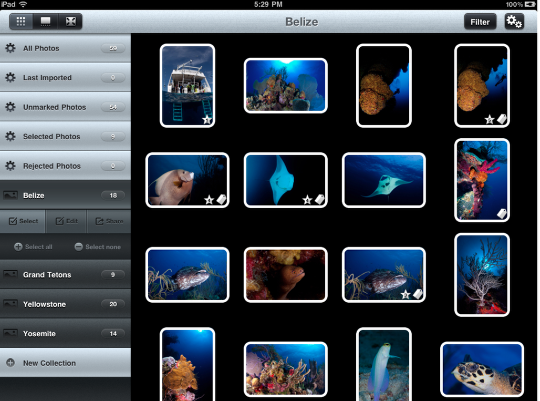
Adobe’s Lightroom has become the number one choice for digital photo management. But it requires a desktop or notebook computer, and while very powerful, isn’t suited for a tablet. The iPad allows you to download your pictures directly from the camera using Apple’s Camera Connection Kit. However, the built-in Photos App doesn’t offer any sorting, categorizing, or practically anything other than viewing, and even that is limited.
The above screenshot demonstrates the Grid View, this main view shows the thumbnails of your current images and your list of collections. The collection list, on the left, has a number of special collections (All Photos, Last Imported, etc), which are created and populated for you, as well as your own collections. You can create as many of your own collections as you’d like, or when you sync with Lightroom, they can be pulled over into Photosmith for you.
Photos can be tagged and keyworded, so it only makes sense to show when that has been done. Small icons for the star rating, keywords, rejected, and selected show up at the bottom of each image, when appropriate. If you assign a color label to a photo (red, yellow, etc), the border color changes.
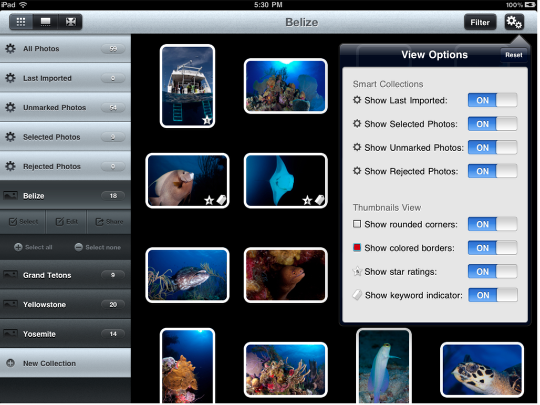
Because you may not always want to see all the special collections or the icons on your images, there’s view options to allow you to turn them on or off as desired. Sometimes it makes sense to see, for example, the remaining unmarked photos (to make sure you’ve gone through everything), and sometimes you just want to keep things clean.
Filter
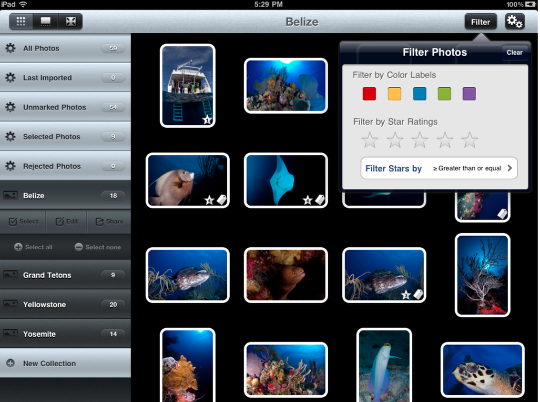
There’s no point in tagging images if you can’t filter them, Photosmith have thought of that and have created a filter, so you can show only certain images by color or star rating. The filter applies in all views and for all screens, so you don’t have to reset it if, for example, you only want to see your 5-star photos.
Drag and Drop
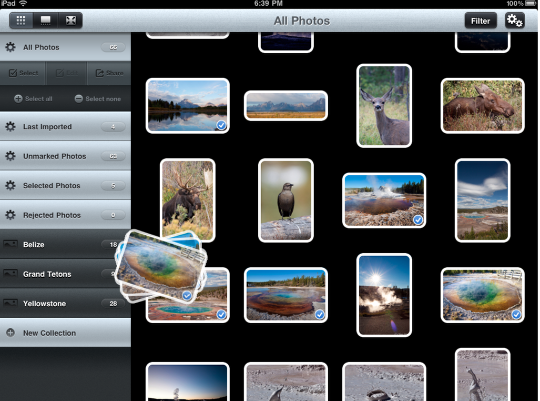
Simply select your photos (by choosing the Select mode under the collection title or simply two-finger tapping on the photo) , and then drag them over to the collection you want to drop them into. To remove, simply drag off the bottom of the list or click “Select / Remove”.
Sync with Adobe Lightroom
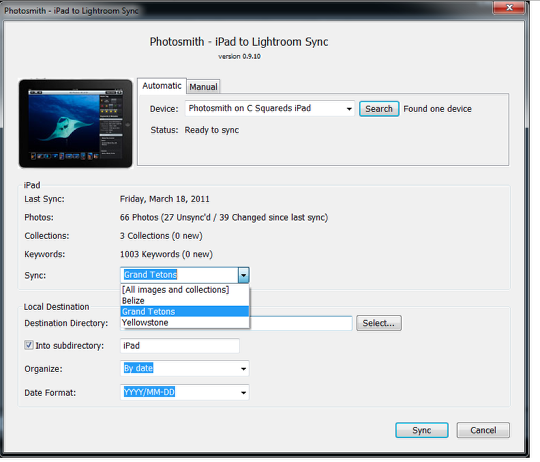
Tag, rate, star, keyword, organize, etc, your pictures in the field. When you’re back at your main computer with Lightroom, simply start the Photosmith Plugin for Lightroom.
The plugin will search for Photosmith running on your iPad, contact it for the latest statistics, and then let you choose whether you want to sync everything, or just a particular collection. Everything includes… well, everything. Even your keywords are sent over to the iPad so you don’t have to recreate them if you’re out in the field. (Your existing pictures aren’t sent to Photosmith just yet- maybe in a future release).
You’re also given the option to choose the destination for your photos. Click Sync, and Photosmith takes over.
Sync Process
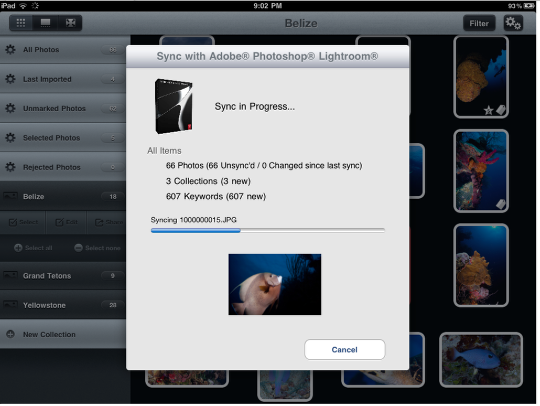
The sync process will start transferring over any new images, and applying the metadata (collections, keywords, stars, ratings, labels, EXIF). Everything is transferred over WiFi, so there’s no need to use iTunes or even plug your iPad in for the sync. Modern cameras take some pretty big pictures, so some files can get pretty large, and WiFi can get slow, so Photosmith will continue to transfer the images even if the iPad goes to sleep. (But not if you switch apps due to restrictions in the current iOS software ).
For those with hundreds (or even thousands) of photos to transfer, there’s an option for advanced users – simply plug in the iPad via USB and import your pictures using Lightroom, and then run the same sync process. Photosmith will match up your photos and apply the metadata correctly.
After the first sync, you can edit the metadata settings on either the iPad or Lightroom, and the changes will be sync’d back to the other (in the case where you update both between syncs, Lightroom wins).
Loupe View
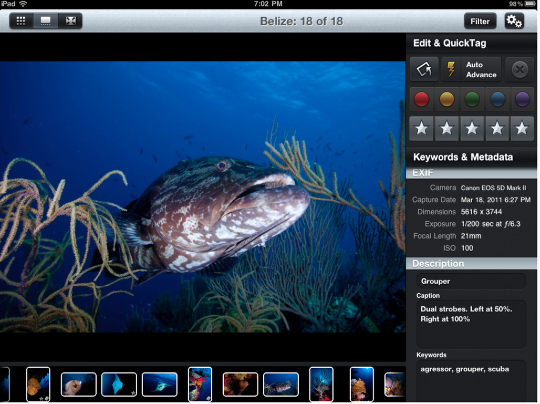
There’s a loupe view, which allows viewing of the image at mostly-full-screen, but also gives you a panel for managing the metadata. In this view, you can:
Rotate the photo (in case your camera didn’t detect you were lying on your side)
Auto Advance (so a single tap moves to the next photo)
Reject (and therefore not sync)
Label (red, yellow, green, blue, purple)
Star (1-5; whatever system works for you)
View the EXIF metadata – shutter speed, aperture, ISO, etc
Edit any of the IPTC fields (Creator, Location city, state, zip, etc)
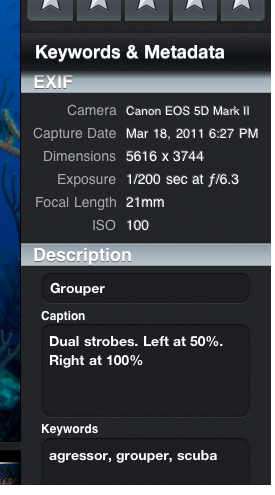
Above is the meta data for the previous image of the friendly grouper.
We’ve got to say this is a wonderful app and if you are a Lightroom user is an absolute no brainer to downlod.
If you would like to give this app a shot, you can download it here for $17.99

Joanne Carter
Joanne Carter is a British photographer, photography journalist, editor and curator and the founder and editorial director of TheAppWhisperer.com, an independent international photography publication established in 2009.Her journalism, criticism and commentary have appeared in The Times, The Sunday Times, The Guardian, Financial Times, BBC, Vogue Italia, LensCulture, Popular Photography, Android Magazine, NikonPro, DPReview, Which Digital Camera and Which Camera. She has lectured internationally on photography and mobile art, served as a juror for international photography awards, and exhibited her own photographic work across the UK, Europe, South Korea and the United States.Alongside her editorial work, Joanne's photographic and postgraduate research explores death, grief, memory, representation and social inequality through contemporary photography, participatory practice and visual research methods, with the longer-term aim of developing this work through doctoral research.Through TheAppWhisperer, she continues to publish independent photography journalism spanning contemporary photographic practice, mobile imaging, photographic apps, computational photography and emerging imaging technologies.Joanne is available for editorial commissions, photography projects, judging, curatorial work, speaking engagements, consultancy and selected collaborations.



3 Comments
Hal
Sounds like they’ve done fantastic job!
Any rumors about a similar app for Aperture? 😉
Hal
J Evans
Looks a useful app.
Is it possible to use it to get certain photos already in Lightroomon the PC synched to the ipad?
e.g. to specify photos with required keywords/collections etc & automatically synch a jpg version of these over to the ipad (mainly have RAW files in LR on the PC) if new photos are added to Lightroom?
Seth
Great info about the photosmith app.