
Streetmate – New iPhoneography App
Streetmate is a simple and powerful black and white photography tool for people who love shooting great moments and creative photos. Streetmate is focused entirely on photography and not on photo editing and image tweaking. There is no distraction between shoots, you set your style for final images and begin shooting. That’s all.
How it Works?
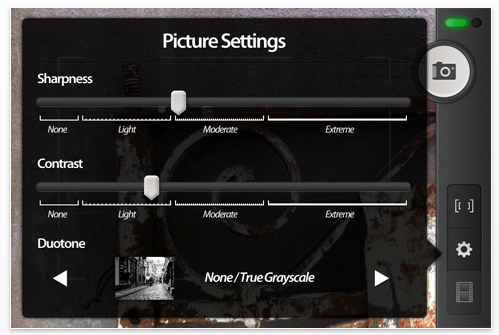
You set up your Streetmate camera and then shoot. You can specify how contrasty and sharp you want images to be. Those settings are sensitive so be careful not to ruin your images. Moderate and light values are recommended in general. You can also specify type of color toning you want to be applied on images.
Color Toning?
Even tho photos are black and white it doesn’t mean they are true grayscale images. You can add warmth or coolness to black and white images too. Color toning is very common when printing black and white prints.
Can I Adjust Exposure?
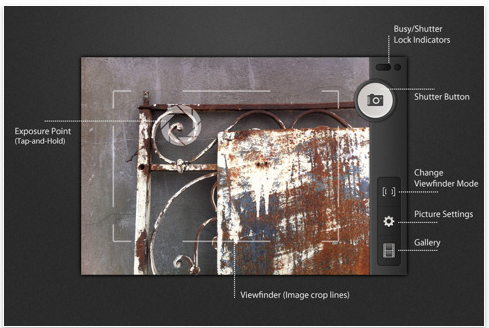
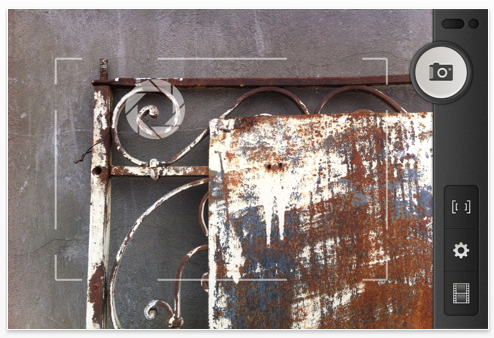
Yes, by tapping and holding on a place where you want to set correct exposure. Aperture blades will appear on that area to help you. Double-tap anywhere to go back to automatic exposure.
Can I Edit My Photos?
No. That’s the whole point of Streetmate. No distractions, just taking great photos. Streetmate allows you to set photo settings before you start shooting, think about it like loading a film roll: if load 36 exposure ISO 800 B/W film that what you’ll have during following 36 shots. That’s it, you select you sharpness, contrast and toning settings and start shooting. Photos will automatically developed and stored into your Streetmate gallery sorted by date taken in background while you are still capturing great and interesting moments.
How Can I Share Photos?
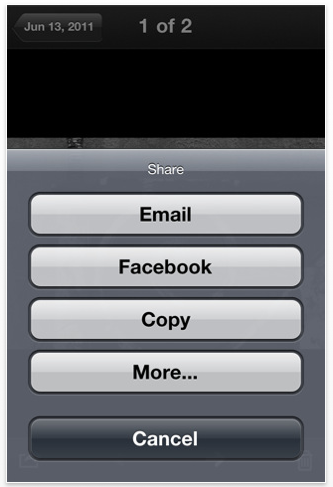
There are many ways you can share your photos:
- Save to main camera roll
- Share to services like: Twitter, Facebook, Flickr, Tumblr
- Copy to Buffer (paste anywhere)
- E-Mail photo
- iCloud and some more advanced sharing modes coming to iOS 5
Can I Save Photos Automatically To Camera Roll?
Yes, you can save images automatically to Camera Roll by changing corresponding setting in your iPhone’s Settings app.
Currently Streetmate is Black and White only, because street photography in most cases is a black and white. I have no plans making it a color camera.

Joanne Carter
Joanne Carter BA (Hons), ARPS is a British photographer, photography journalist, editor and curator, and the founder and editorial director of TheAppWhisperer.com, an independent international photography publication established in 2009.She holds a First Class Honours degree in Photography and is an Associate of the Royal Photographic Society (ARPS).Her journalism, criticism and editorial work have appeared in The Times, The Sunday Times, The Guardian, Financial Times, BBC, Vogue Italia, LensCulture, Popular Photography and NikonPro, among other international publications.Through TheAppWhisperer, she brings together academic knowledge, professional photographic expertise and more than 17 years of specialist editorial experience to examine contemporary photography, mobile imaging, computational photography, photographic applications and emerging imaging technologies.
2 Comments
Steve Michaels
Looks like a really professional take on the camera app. Great for those that have a good eye for a pic, and know what they want.
nina meledandri
anyone using this on an iPhone 5?
all of a sudden, can’t save to camera roll, when emailing an image it freezes and you have to close the app, also has anyone found a way to delete empty albums or batch delete images stored in the app?