
Mobile Photography – Tip Of The Day – Number 26
Welcome to another new section from your favorite mobile photography website and one of the most popular in the world. Today, we’re publishing our twenty sixth Mobile Photography/Art Tip Of The Day to our brand new section of the site.
Each day we publish a short quick tip to help you with your mobile photography, this may be related to editing your image, capturing your image, printing your image, all manner of things, across the complete photographic and art mobile genre – we’ll be featuring great mobile street photography tips, great blending tips, great cloning tips, we will cover it all from some of the greatest mobile photographers and artists in the world. We’ll also have a widget in our right hand column, displaying the Tip of The Day every day, just click on that and you will be taken to our Tip of the Day archive.
This is our 26th Tip Of The Day and has been prepared by Em Kachouro, we’re great admirers of his mobile photography and have featured many images within our weekly Flickr Group Showcase. Over to you Em…(foreword by Joanne Carter).
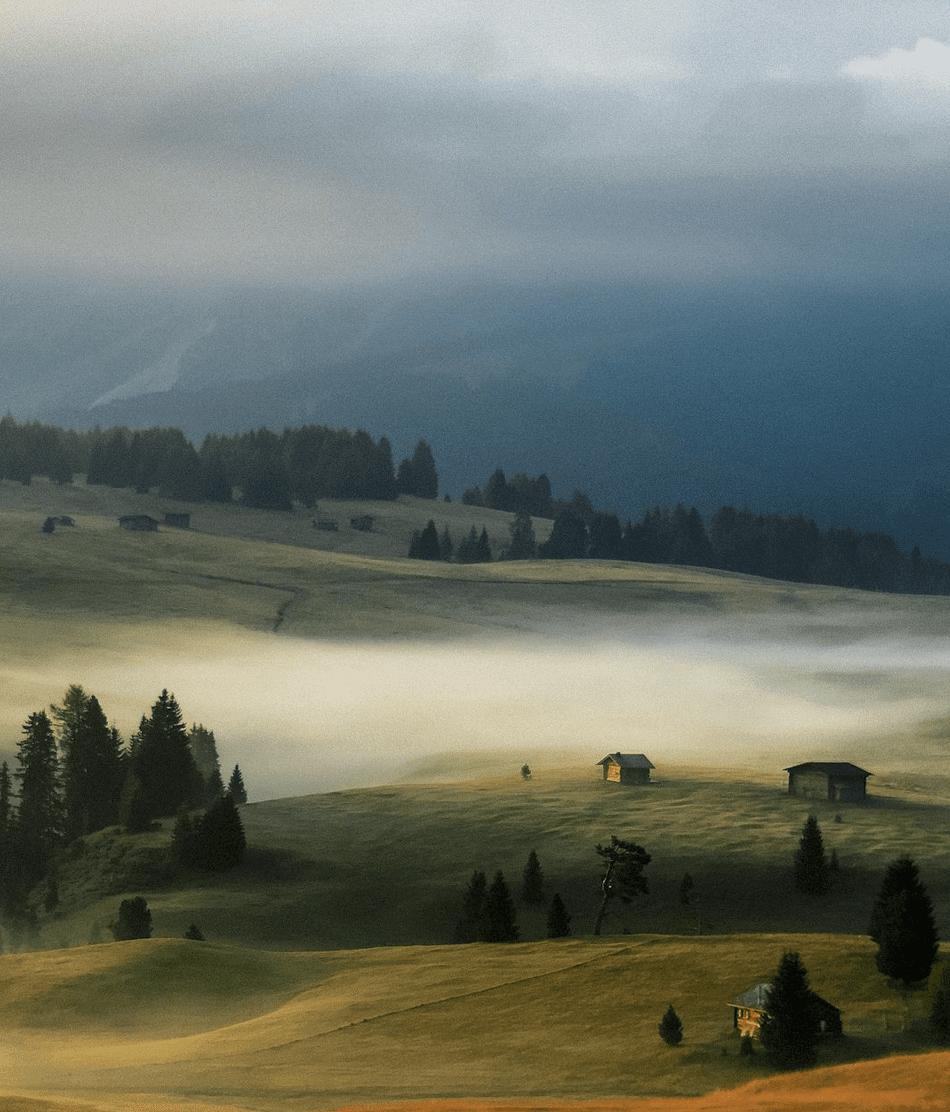
‘Sometimes you’re not able to come close enough to the motive of your desire – or there’s an ugly fence in the foreground, like in the following image. (Okay, I could have tried to climb over the fence, but I wasn’t sure, if there were any wild animals out there who haven’t had their breakfast yet).
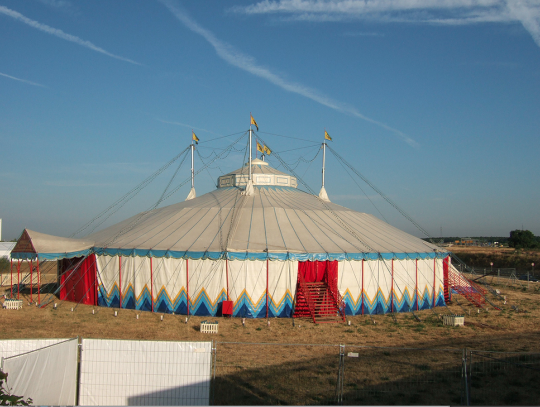
In this case I recommend to mix the original shot with painted parts. In this image with the title “Cirque” I just opened Procreate App – BTW: my favourite app for painting and drawing – inserted the image and painted with a thick paint brush over the fence in the foreground. I chose different modes of opacity for this to get a spatial effect. I repeated this with a blue brush in the upper parts, because I didn’t really like the white stripes in the heaven on the original image.
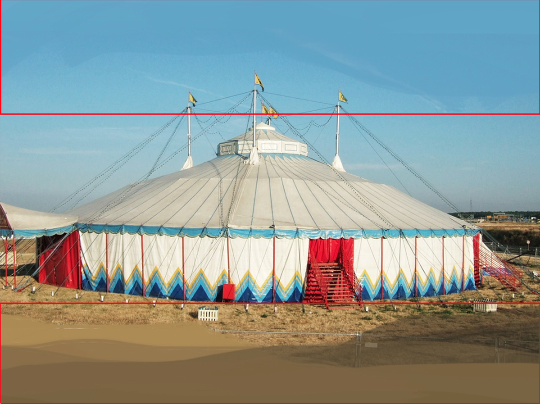
After this, I gave the very special atmosphere to the image with the Distressed FX app.
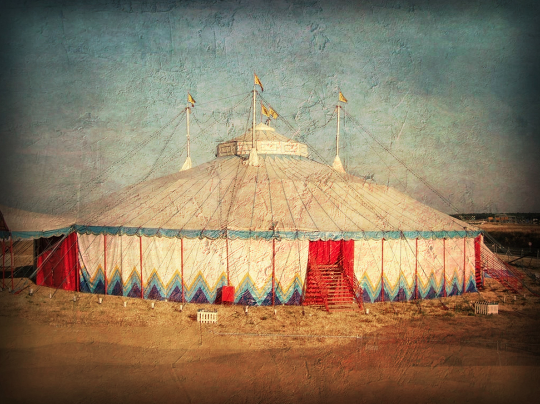
The whole editing took me just 10 minutes’.

Joanne Carter
Joanne Carter is a British photography journalist, editor, curator, and the founder of *TheAppWhisperer.com*, one of the world’s leading platforms dedicated to mobile photography and art. Since its launch in 2009, TheAppWhisperer has become an international hub for artists of all levels to discover, learn, exhibit, and engage with contemporary photographic practice.Built on principles of inclusivity, accessibility, and artistic excellence, Joanne has spent almost two decades championing mobile photography as a serious artistic medium. Through interviews, critical essays, exhibitions, competitions, and education, she has helped shape and document the evolution of mobile art on a global scale.Her work has taken her internationally, lecturing on photography and mobile art at institutions and events including the Museum of Art in Seoul, South Korea, alongside appearances in the UK and Europe. She has served as a juror for international photography and mobile art awards across Portugal, Canada, the United States, South Korea, Italy, and the UK.Joanne is also the founder of *TheAppWhispererPrintSales.com*, one of the first online galleries dedicated exclusively to collectible mobile art, connecting artists with collectors across Europe, the United States, and Asia.Before founding TheAppWhisperer, Joanne worked extensively in print journalism and photographic publishing, including roles at a paparazzi photo agency and as deputy editor of a leading photography magazine. Her freelance journalism, criticism, and commentary have been published widely in both the UK and the US, with bylines in *The Times*, *The Sunday Times*, *The Guardian*, *Popular Photography*, *NikonPro*, *DPReview*, *Which?*, *Vogue Italia*, *LensCulture*, the *BBC*, and more recently, the *Financial Times*, where her published letters on photography continue to contribute to wider conversations around the medium.Alongside her editorial and curatorial work, Joanne’s own photographic practice has been exhibited internationally across the UK, Europe, South Korea, and the United States. Her work increasingly explores themes of grief, loss, death, memory, and the body.Her current research interests centre on grief, death, and poverty, with forthcoming postgraduate study leading towards doctoral research in these areas.Joanne is currently developing new long-form writing and photographic projects and is available for commissions, editorial projects, speaking engagements, and collaborations.Contact: joannetheappwhisperer@gmail.com)

8 Comments
Robert Lancaster
Brilliant edit! Thanks for the tips.
Elaine (sunflowerof21)
Well I’m checking our Procreate for sure! Fabulous outcome. Great tip 🙂
Maria Gjonaj
Thanks so much, Ed. I’ve not yet adventured(read: advanced) to Procreate and your tip today inspires me to inch closer. This is a beautiful edit and great tip.
kachouro
Thank you, Maria! I’m sure, you’ll love it!
Carlos
Option B
Use retouch to remove the white wall. The c,owning tool.
Many ways to achieve the same result.
Thanks for the tip Em.
kachouro
Thank you for your kind comments, Elaine and Robert! I really appreciate it! And thank you, Joanne, for publishing, inspiring, bringing us all together! Kachouro xx
tillie
i agree with robert! brilliant! must try procreate.
thanks for the tips…always helpful.
kachouro
Carlos, I agree, there are many ways to achieve the same result. As I love also painting I often use painting tools – but retouching tools also work to hide white fences 🙂 Thank you for your comment! And thanks also to Tillie! I appreaciate all your comments! Kachouro