
New! Mobile Photography – App Of The Day – ProCamera – New Release and We Have Promotional Codes to Share!
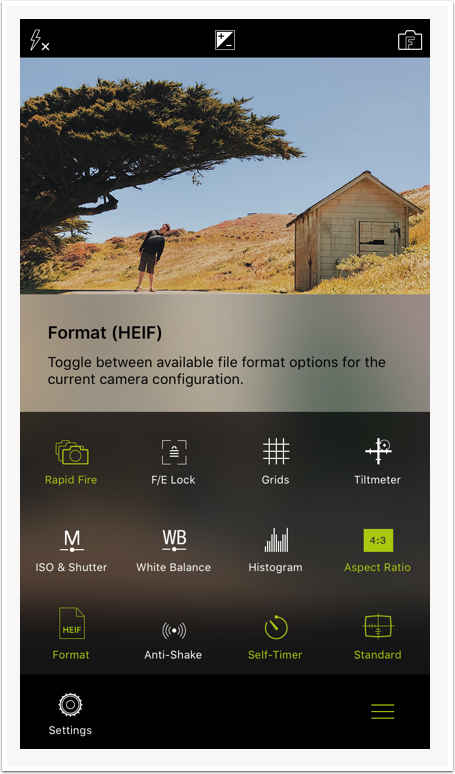
As far as camera replacement apps go, ProCamera should definitely be on your shortlist, if not already on your device. Entering a new era: ProCamera’s first iOS 11 release is all about “high efficiency” and embracing the future. ProCamera now fully supports the HEVC compression standard for videos and also for photos in the form of HEIF files. The new photo file format gives you even better image quality at nearly half the size of a JPEG file. In other words, you can store almost twice as many photos on your device at an even higher quality level! HEIF photo files taken with your iPhone show the file suffix .heic.
In ProCamera, there are two ways to switch file formats:
a) Settings > File Format
b) Open Control Panel (three lines icon) > Toggle “Format” icon
Via Settings > File format, you can also choose your preferred quality level (compression), which is a determining factor for the final file size. For HEIF files, a quality setting of 100% indicates a lossless compression. The HEVC compression for HEIF files is a lot more efficient than JPEG compression and creates less artifacts. This means even lower quality settings will create files of decent quality at very small file sizes.
HEIF is available for all iOS 11 devices with an A10 or A11 Fusion chip (iPhone 7, iPhone 7 Plus, iPhone 8, iPhone 8 Plus and later).
Read about all the other new features below. ProCamera retails for $/£4.99 but we have been given some promotional codes to share with our readers. Would you like one? If so, please join our Twitter followers here, like us on Facebook here and Instagram here then post a comment to this post (so we can obtain your email address), perhaps you’d like to give us some feedback, tell us how we’re doing, what you’d like to see…and hopefully, we will then be able to send you a code. All winners are selected at random.
HEVC: HIGH EFFICIENCY VIDEO CODING
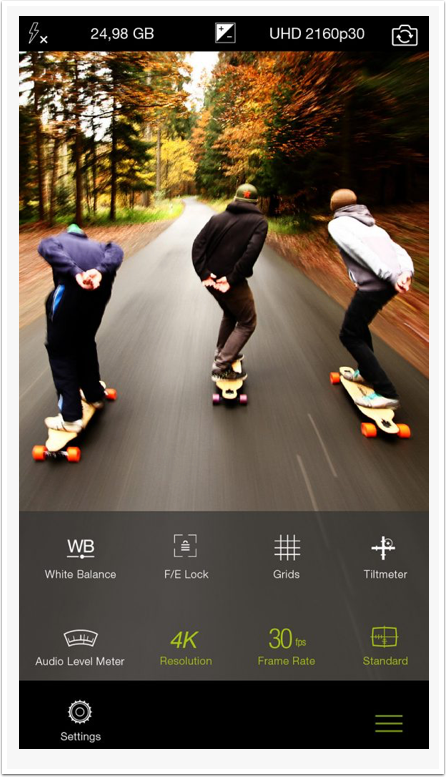
The new compression standard enables you to save up to 50% storage space with increased video image quality. HEVC, also known as H.265, is the successor to the widely used H.264 codec.
HEVC is the future and in many ways better than the older H.264 – but if you need maximum compatibility without re-encoding, choose H.264. You can select the codec via: Settings > Video Mode Options: VideoCodec.
HEVC is supported on all iOS 11 devices with an A10 or A11 Fusion chip (iPhone7, iPhone 7 Plus, iPhone 8, iPhone 8 Plus and later).
HEIF & HEVC: GENERAL INFORMATION
HEIF, .heic, HEVC, H.265? That’s a lot of acronyms, let’s break it down…
- HEVC is a relatively new and very efficient video compression standard
- Simply put, a great compression standard does two things: Ensure a high image quality while keeping the file size small
- HEVC (H.265) is the successor of the widely used H.264 codec
- Using HEVC, you can save around 50% storage space
- For maximum compatibility, ProCamera still supports recording with H.264 (Settings > VideoCodec)
The connection between HEVC and HEIF:
- The new file format for still images is called HEIF: High Efficiency Image File Format
- HEIF was developed by the Moving Picture Experts Group (MPEG)
- HEIF files can be a container for various image data, such as JPEG compressed images
- When HEVC compressed data is saved in a HEIF container, the file extension is “.heic”
- Storing JPEG data in a HEIF container does not really make a lot of sense, yet it is possible. The real potential of HEIF lies in its ability to store HEVC compressed information
- You can use ProCamera’s gallery to check file formats
- Via Settings > File format, you can set the compression rate in ProCamera. For HEIF files, 100% means lossless compression
- When editing a photo in ProCamera, the original photo file format (JPEG/HEIF) remains unchanged
- When experiencing issues when sharing HEIF files, you can use our Export Menu to convert to JPEG (open photo, tap and hold the share extension icon bottom left)
- Via iOS Settings > Photos > Transfer to Mac or PC, you can determine whether the original files are transferred – or photos/videos are transcoded into a compatible format for the receiving device. Using the „Automatic“ setting, you won’t run into compatibility issues.
- Like JPEG files, HEIF files also support the Display P3 color space (wide color)
- All Macs running High Sierra support the new formats
- … and in case you wondered: Most often, HEIF is pronounced “heeef”
MIRRORING OPTIONS
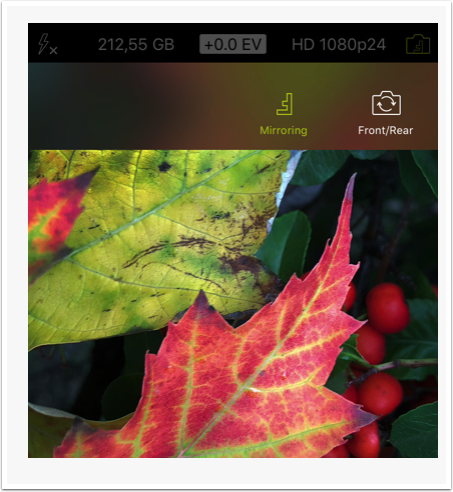
Special add-on lenses require the camera image to be mirrored. With this update, we now offer all possible mirroring options. When enabled, this feature flips/turns the preview in the viewfinder as well as the final photo/video.
How to activate: Settings > Advanced Settings > Mirroring Options Menu
Once activated, you will see that the Front/Rear Camera Switch icon in the top right corner of the capture screen comprises the letter “F”. Simply tap that icon to open the dedicated menu; here you can toggle through the mirroring options – or switch between the front and the rear camera. The letter “F” inside the icon will change its orientation according to the current mirroring configuration (see screenshot).
Hello again…
We wouldn’t ask if it was not necessary for the future of TheAppWhisperer.com… More people than ever are reading TheAppWhisperer.com and we could not be more excited about that. We bring you ad-free journalism every day, so you don’t have to close windows and be distracted with advertisements. We specialise in mobile photography and mobile art and we value all of our readers, writers, contributors and viewers but we do have costs and we do need to ask for your help. We at TheAppWhisperer spend many hours each day, each week and each month to bring you this high quality level of journalism. We do it because we are passionate about it and because we want others to be as passionate too.
If everyone who reads our website, who likes it, helps to support it, our future would be so much more secure. Please help us by offering a contribution or supporting us with a monthly donation of your choosing.
[seamless-donations]

Joanne Carter
Joanne Carter is a British photography journalist, editor, curator, and the founder of *TheAppWhisperer.com*, one of the world’s leading platforms dedicated to mobile photography and art. Since its launch in 2009, TheAppWhisperer has become an international hub for artists of all levels to discover, learn, exhibit, and engage with contemporary photographic practice.Built on principles of inclusivity, accessibility, and artistic excellence, Joanne has spent almost two decades championing mobile photography as a serious artistic medium. Through interviews, critical essays, exhibitions, competitions, and education, she has helped shape and document the evolution of mobile art on a global scale.Her work has taken her internationally, lecturing on photography and mobile art at institutions and events including the Museum of Art in Seoul, South Korea, alongside appearances in the UK and Europe. She has served as a juror for international photography and mobile art awards across Portugal, Canada, the United States, South Korea, Italy, and the UK.Joanne is also the founder of *TheAppWhispererPrintSales.com*, one of the first online galleries dedicated exclusively to collectible mobile art, connecting artists with collectors across Europe, the United States, and Asia.Before founding TheAppWhisperer, Joanne worked extensively in print journalism and photographic publishing, including roles at a paparazzi photo agency and as deputy editor of a leading photography magazine. Her freelance journalism, criticism, and commentary have been published widely in both the UK and the US, with bylines in *The Times*, *The Sunday Times*, *The Guardian*, *Popular Photography*, *NikonPro*, *DPReview*, *Which?*, *Vogue Italia*, *LensCulture*, the *BBC*, and more recently, the *Financial Times*, where her published letters on photography continue to contribute to wider conversations around the medium.Alongside her editorial and curatorial work, Joanne’s own photographic practice has been exhibited internationally across the UK, Europe, South Korea, and the United States. Her work increasingly explores themes of grief, loss, death, memory, and the body.Her current research interests centre on grief, death, and poverty, with forthcoming postgraduate study leading towards doctoral research in these areas.Joanne is currently developing new long-form writing and photographic projects and is available for commissions, editorial projects, speaking engagements, and collaborations.Contact: joannetheappwhisperer@gmail.com)
7 Comments
Katie
Love the diversity of subjects you cover Joanne. Would be interested in trying out ProCamera (I must be one of the few who don’t use it).
Marco Prado
Very good article and informative. I have a few cameras installed on my phone,would love to try this one. I love to shoot with slow shutter, light trail.
Thanks for the updae on this camera.
Eitan Shavit
Love Sweepstakes! Love theAppWhisperer 🙂
Tina
Looks great! Thanks for the heads up you give with apps.
Kob Cyanogen
Hi, I think this app is good for shooting photo with many features.
Steve durbin
Long time follower and would love a code to try this app out
Susan Detroy
What an exciting possibility. It looks as though this app is not a fit for iPhone 6? If it is I would enjoy trying it with the code. Thanks for all your work.