AppArt School – Use albums in Photos on iPhone
AppArt School – Use albums in Photos on iPhone
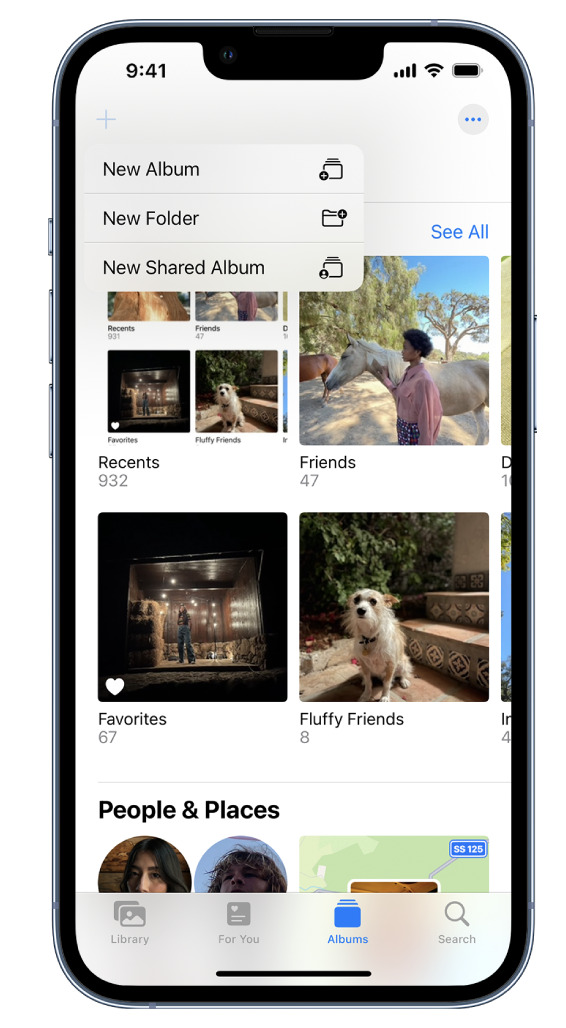
Use albums in the Photos app  to view and organize your photos and videos. Tap Albums to view your photos and videos organized into different categories and media types, like Videos, Portrait, and Slo-mo. You can also look at your photos arranged on a world map in the Places album, or browse your photos based on who’s in them in the People album.
The Recents album shows your entire photo collection in the order that you added them to your library and the Favorites album shows photos and videos that you marked as favorites.
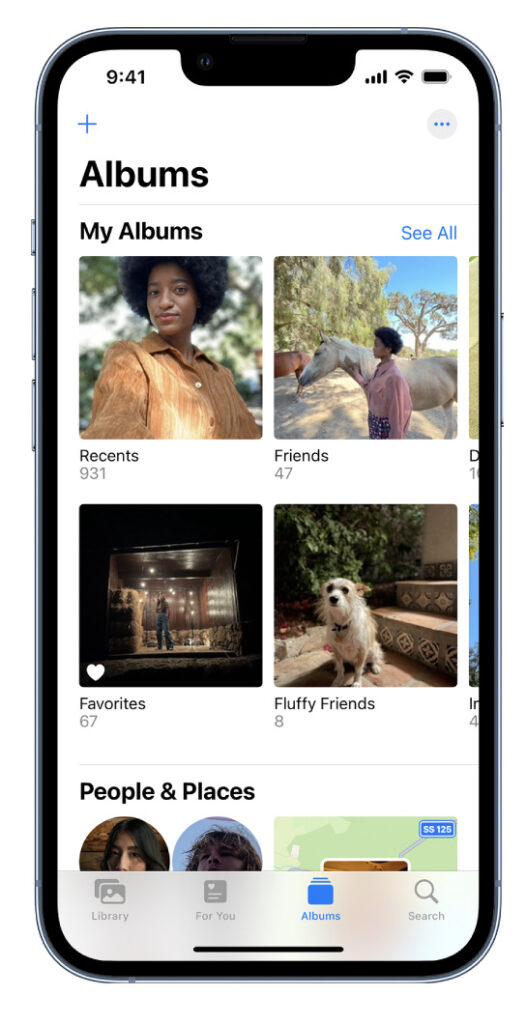
If you use iCloud Photos, albums are stored in iCloud. They’re up to date and accessible on devices where you’re signed in with the same Apple ID. See Use iCloud Photos on iPhone.
Create a new album
- Tap Albums at the bottom of the screen.
- Tap
 , then choose New Album.
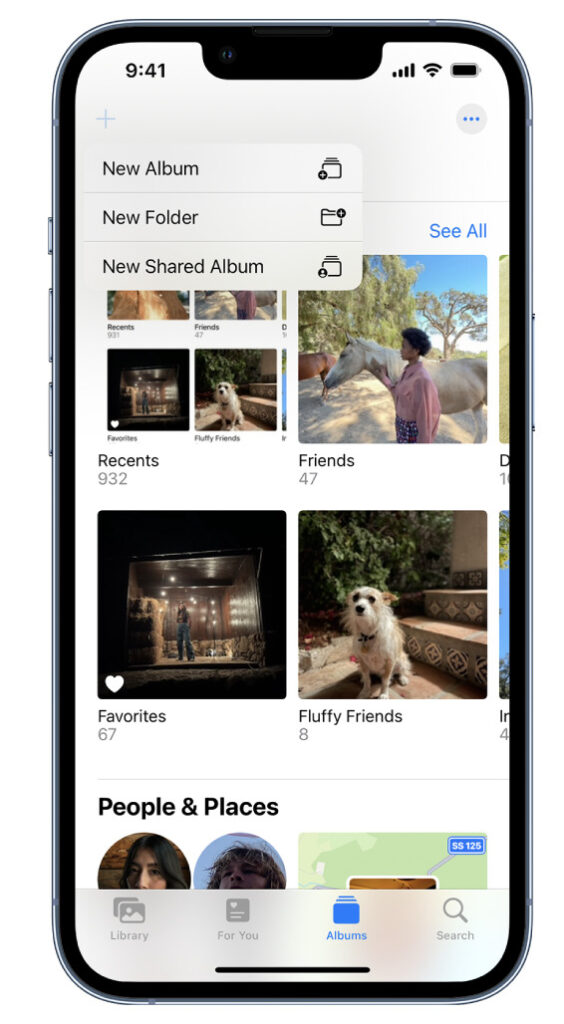
- Name the album, then tap Save.
- Tap the photos you want to add to the album, then tap Add.
To create a shared album, see Share photos with Shared Albums in iCloud.
Add a photo or video to an album
- Open the photo or video in full screen, then tap
 .
. - Tap Add to Album, then do one of the following:
- Start a new album: Tap New Album, then give the album a name.
- Add to an existing album: Tap an existing album under My Albums.
Add multiple photos and videos to an album
- When viewing multiple thumbnails, tap Select at the top of the screen.
- Tap the photo and video thumbnails you want to add, then tap .
- Tap Add to Album, then do one of the following:
- Start a new album: Tap New Album, then give the album a name.
- Add to an existing album: Tap an existing album under My Albums.
Remove photos and videos from an album
- Open the album, then tap the photo or video you want to remove to view it in full screen.
- Tap
 , then choose one of the following:
- Remove from Album: The photo is removed from that album, but remains in other albums and your library.
- Delete from Library: The photo is removed from all albums and your library and moves to the Recently Deleted album.
To remove multiple photos or videos from an album, tap Select, tap the photo and video thumbnails you want to remove, then tap .
Please support us
TheAppWhisperer has always had a dual mission: to promote the most talented mobile artists of the day and to support ambitious, inquisitive viewers the world over. As the years pass TheAppWhisperer has gained readers and viewers and found new venues for that exchange.
All this work thrives with the support of our community.
Please consider donating to TheAppWhisperer as this New Year commences because your support helps protect our independence and we can keep delivering the promotion of mobile artists that’s open for everyone around the world. Every contribution, however big or small, is so valuable for our future.

Joanne Carter
Joanne Carter is a British photographer, photography journalist, editor and curator and the founder and editorial director of TheAppWhisperer.com, an independent international photography publication established in 2009.Her journalism, criticism and commentary have appeared in The Times, The Sunday Times, The Guardian, Financial Times, BBC, Vogue Italia, LensCulture, Popular Photography, Android Magazine, NikonPro, DPReview, Which Digital Camera and Which Camera. She has lectured internationally on photography and mobile art, served as a juror for international photography awards, and exhibited her own photographic work across the UK, Europe, South Korea and the United States.Alongside her editorial work, Joanne's photographic and postgraduate research explores death, grief, memory, representation and social inequality through contemporary photography, participatory practice and visual research methods, with the longer-term aim of developing this work through doctoral research.Through TheAppWhisperer, she continues to publish independent photography journalism spanning contemporary photographic practice, mobile imaging, photographic apps, computational photography and emerging imaging technologies.Joanne is available for editorial commissions, photography projects, judging, curatorial work, speaking engagements, consultancy and selected collaborations.