Best iPhone Filmmaking Apps 2026
Best iPhone Filmmaking Apps in 2026 | Shoot Cinematic Video Like a Pro
Looking for the best iPhone filmmaking apps to shoot cinematic video on your phone? In 2026, the iPhone has evolved into a serious filmmaking tool — capable of capturing professional-quality footage, recording in ProRes and Log formats, and supporting advanced colour grading and editing workflows.
For mobile photographers expanding into video, content creators producing YouTube and social media films, or independent filmmakers embracing agile storytelling, the right iPhone video apps can transform your creative output. With powerful manual camera controls, LUT support, stabilisation tools, and multi-track editing timelines, mobile filmmaking has never been more accessible — or more professional.
In this guide, we explore the top filmmaking apps for iPhone, including the best video camera apps for manual control, cinematic capture tools for advanced users, and the most powerful mobile video editing apps available on iOS.
Whether you’re creating short films, documentaries, experimental art projects, or vertical social content, these apps will help you shoot, edit and publish high-quality video directly from your iPhone.
Let’s take a closer look at the essential tools every mobile filmmaker should consider.
Capture & Camera Apps
FiLMiC Pro – Pro video capture
A cinema-grade video camera app that unlocks manual control over focus, exposure, shutter, ISO and frame rates. It supports ProRes capture, LOG gamma curves, advanced analytics (zebras, false colour, focus peaking) and HDR workflows — making your iPhone feel like a real digital cinema camera.

Blackmagic Camera – Pro-level manual control (Free)
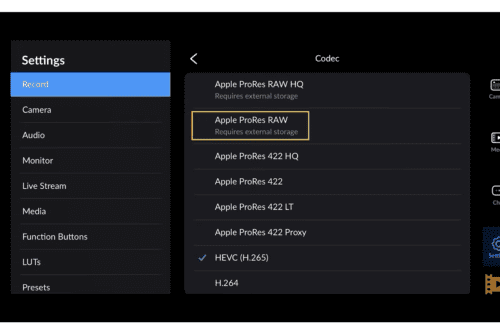
From Blackmagic Design, this free app gives full manual exposure and focus control plus ProRes and Log capture on supported iPhones, with LUT preview and framing tools. It’s a great choice for filmmakers who want pro features without paying upfront.
Final Cut Camera – Apple’s pro capture tool (Free)
Apple’s own manual video capture app adds pro settings like focus peaking, shutter/ISO control, ProRes/Log capture and multicam support that integrates with Final Cut Pro for iPad — excellent for iPhone filmmakers working with Apple’s ecosystem.

Kino – Pro Video Camera – Cinematic presets & toolsA powerful yet approachable camera app focused on cinematic results, with Instant Grade colour looks and manual controls — perfect for creators who want professional output with minimal fuss.

Pro Camera by Moment – Manual capture + hardware support
A versatile still-photo and video capture app with manual control over focus, exposure, white balance and shutter — ideal if you pair it with Moment lenses or accessories.

Editing & Post-Production Apps
LumaFusion – Professional mobile editor
One of the most powerful video editors on iOS, offering multi-track timelines, titles, effects, colour tools, keyframing, and audio mixing — almost like a mini desktop editor right on your iPhone.

Adobe Premiere (Mobile) – Feature-rich editor with AI tools
Adobe’s mobile Premiere app brings a powerful editing suite to iPhone, with multi-track timelines, audio tools, transitions and AI-powered effects — perfect for on-the-go editing and social publishing.

📱 CapCut – Social-friendly editor (Free)
A hugely popular free editing app that makes it easy to add transitions, effects, text, music, and export in vertical formats — great for creators focused on TikTok, Reels and similar formats.

iMovie – Beginner-friendly from Apple (Free)
Apple’s classic video editor offers simple drag-and-drop editing, transitions, green-screen effects, and sound tools — ideal for new filmmakers who want basic editing without complexity.

How to Use These in Your Workflow
Shoot like a pro:
– Use Blackmagic Camera or FiLMiC Pro for manual control.
– Try Kino or Moment for stylish cinematic looks or accessory support.
Edit & polish:
– LumaFusion for deep editing and multicam projects.
– Adobe Premiere for social-ready and studio-quality edits.
– CapCut or iMovie for quick and fun edits that are easy to share.
Frequently Asked Questions About iPhone Filmmaking Apps
What is the best iPhone app for shooting cinematic video?
Apps like Blackmagic Camera and FiLMiC Pro offer manual controls, ProRes recording, and Log profiles, making them ideal for cinematic video capture.
Can you make professional films with an iPhone?
Yes. Modern iPhones support high-resolution video, ProRes recording, and advanced colour workflows. Combined with professional apps and good lighting, they are capable of broadcast-quality results.
What is the best video editing app for iPhone?
LumaFusion is widely regarded as the most powerful professional editing app for iOS, offering multi-track timelines, colour grading, and advanced export options.
Is mobile filmmaking suitable for documentaries?
Absolutely. The iPhone’s lightweight design makes it ideal for documentary, street, and observational filmmaking.
You may also be interested in our other best guides to mobile photography
• Best Camera Apps to Reduce iPhone Processing (2026 Edition)
• Best Mobile Photography Apps (2026 Edition)
• Best Camera Apps to Reduce iPhone Processing (2026 Edition)
• Best Mobile Filmmaking Apps (2026 Edition)
• Best Black and White Photography Apps for iPhone (2026 Edition)
• Best Portfolio Apps and Websites for Photographers (2026 Edition)
• Blackmagic Camera Settings Guide
• Best way to use Blackmagic’s camera remote control (2026)
• Snapseed vs Lightroom Mobile
• Best iPhone Camera Apps for Photographers
• 10 Apps Secretly Draining Your Phone’s Battery – 2026 Edition
• Best Way To Create More Dynamic Travel Photos with Lightroom on Mobile
Please support us
TheAppWhisperer has always had a dual mission: to promote the most talented mobile artists of the day and to support ambitious, interested viewers worldwide. As the years pass, TheAppWhisperer has gained readers and viewers and has found new venues for that exchange.
All this work thrives with the support of our community. Your support helps protect our independence, and we can keep delivering open, global promotion of mobile artists. Every contribution, however big or small, is valuable for our future.

Joanne Carter
Joanne Carter is a British photographer, photography journalist, editor and curator and the founder and editorial director of TheAppWhisperer.com, an independent international photography publication established in 2009.Her journalism, criticism and commentary have appeared in The Times, The Sunday Times, The Guardian, Financial Times, BBC, Vogue Italia, LensCulture, Popular Photography, Android Magazine, NikonPro, DPReview, Which Digital Camera and Which Camera. She has lectured internationally on photography and mobile art, served as a juror for international photography awards, and exhibited her own photographic work across the UK, Europe, South Korea and the United States.Alongside her editorial work, Joanne's photographic and postgraduate research explores death, grief, memory, representation and social inequality through contemporary photography, participatory practice and visual research methods, with the longer-term aim of developing this work through doctoral research.Through TheAppWhisperer, she continues to publish independent photography journalism spanning contemporary photographic practice, mobile imaging, photographic apps, computational photography and emerging imaging technologies.Joanne is available for editorial commissions, photography projects, judging, curatorial work, speaking engagements, consultancy and selected collaborations.