Our App Of The Day – 02/14/11 – HelloPhoto
As our App of Day, all our regular readers know the trailer for this app will feature on every page of our site for a whole day. Just scroll to the bottom of this page to take a look.
Whether you are nostalgic, a photo purist, or have boxes of slides and negatives and have no idea what to do with them, HelloPhoto can rescue your film from dust.
Using the various functions of HelloPhoto, you can simply do the following:
• Use the light table function to view, sort, and photograph your slides and negatives.
• Use the light table’s adjustments to enhance your slides and negatives before photographing them.
• Use the camera to take photos of your slides and negatives, thus freeing them from obscurity and allowing you to share and post them.
Or you can get creative and really bring HelloPhoto to life!
DIGITIZE
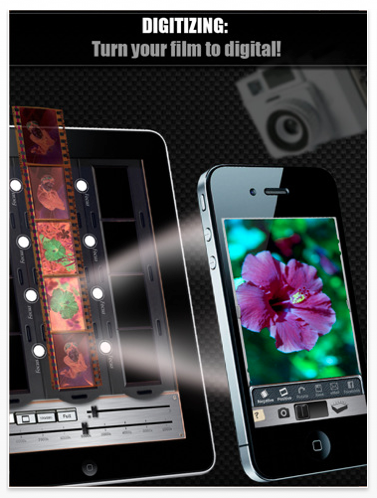
Turn your film to digital by doing the following:
(To perform this specific feature of the app, you need two devices. See Notes at the bottom.)
1. Place your slide or negative on an iPhone or iPad in HelloPhoto’s light table mode.
2. Using another iPhone running HelloPhoto, take a picture of the slide or negative. Hello, photo! You now have a digital copy of your slide or negative!
SHARE

• Show off your film pics.
• Email your newly digitized photos to friends and family.
• Post them on Facebook.
• Save your photos for sharing later on sites like Flickr, Twitter, or MobileMe.
LIGHT TABLE
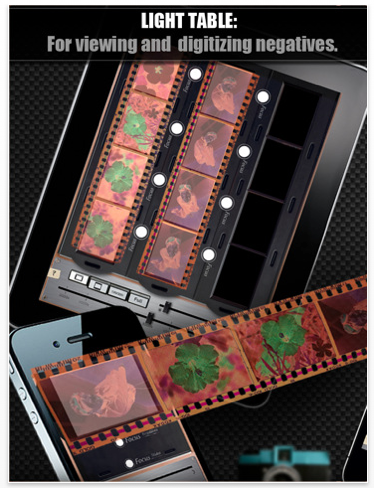
View your slides and negatives as they are.
1. Place your slides and negatives on top of an iPhone or iPad that’s running light table mode.
2. White balance and/or color correct the film using HelloPhoto’s color correction sliders.
3. Darken the appearance of your slide or negative by using the brightness controls.
4. Photograph the enhanced slide or negative, or make note of these enhancements for use later.
CONTACT SHEETS
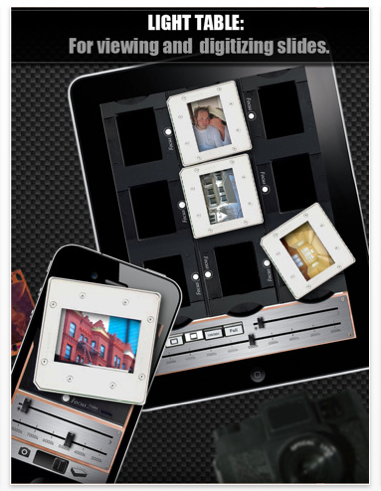
Save paper and time by digitizing your contact sheets.
1. Simply fill up the iPad with slides and negatives.
2. Take a photo of your film on the iPad. Hello, photo! You now have a full contact sheet.
If you would like to give this app a try it’s $1.99 and you can download it here

Joanne Carter
Joanne Carter BA (Hons), ARPS is a British photographer, photography journalist, editor and curator, and the founder and editorial director of TheAppWhisperer.com, an independent international photography publication established in 2009.She holds a First Class Honours degree in Photography and is an Associate of the Royal Photographic Society (ARPS).Her journalism, criticism and editorial work have appeared in The Times, The Sunday Times, The Guardian, Financial Times, BBC, Vogue Italia, LensCulture, Popular Photography and NikonPro, among other international publications.Through TheAppWhisperer, she brings together academic knowledge, professional photographic expertise and more than 17 years of specialist editorial experience to examine contemporary photography, mobile imaging, computational photography, photographic applications and emerging imaging technologies.