Evernote For Android – Updated – For Tablets – Find Out All About It Here
The latest update to Evernote for Android now includes an all new table interface and allows you to create rich text notes and more, take a look at the updates below…
This is a must app for your Android Tablet – download it here for free.
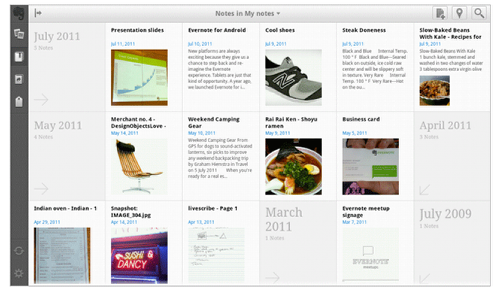
The home screen puts everything you need right in front of your eyes. The screen is dominated by the new Snippet View, which lets you quickly browse through your notes. Along the left edge, you can choose to view notebooks, tags, as well as those notebooks that have been shared with you. Along to top edge, you’ll find the New Note button, Map View and Search.
New Notes
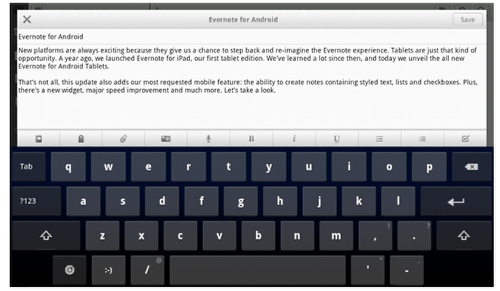
Tap on the New Note button to launch a blank note. Along the bottom of the note area (above the keyboard), you’ll see a row of buttons. The first ones allow you to choose a notebook and assign tags; the next two allow you take a snapshot, record audio or attach a file
Search

Tap the magnifying glass in the top-right corner to bring up the Search popover. If you know what you’re looking for type in the keyword. You can also select a recent or saved search. The Advanced Search option gives you even more ways to find what you’re looking for. There, you can choose to search for notes near your current location, notes containing checkbox to-dos and lots of other parameters. Make sure to explore Advanced Search, there are some useful options there that you don’t want to miss.
Single note view
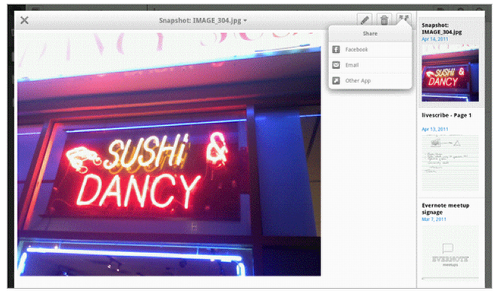
The single note view shows you the note you’ve selected, along with a scrollable sidebar of additional notes. The sidebar allows you to quickly jump to another note without having to return to the home screen. The single note screen also allows you to share the note to Facebook, email or send it any other Android app, such as your favorite Twitter application.
Map View
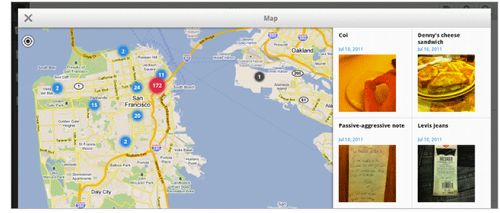
Sometimes, all you remember is where you were when you captured a memory, Map View is great way to recall it. Tap on the map icon in the top right of the interface to view your notes by location. The notes that are displayed to the right of the map correspond to the region you are viewing.
New for all Android devices: Creating rich text
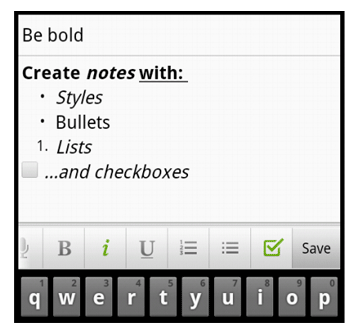
Whenever you create or edit a note on any Android device, you’ll see a new bar above the keyboard. That bar lets you assign a notebook and tags to the note, attach images and files and also style the text. Swipe the bar to show all the text formatting options: bold, italic, underline, bullet list, numbered list, and checkbox. Tap on the option(s) you like, and type away. Lists and checkboxes will continue when you go to the next line.
Editing rich text
Evernote for Android allows you to edit notes that contain rich text. If a note was created on the Android device, then the editing experience will usually be just like the note creation experience. You can also edit notes containing complex styling, such as web clips, by tapping into each element that you wish to change.
New Evernote Widget
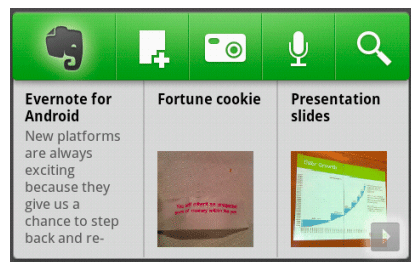
Another great update for all Android devices, is the new, larger widget. Tap and hold on the home screen of your Android device, then go to the widget menu. You’ll now see two Evernote widget options—small and large. In addition to letting you jump to core Evernote features, you now see snippets of your recently-accessed notes. This means you no longer need to launch Evernote in order to find a recent note, just tap on the note in the widget.
In addition to all the goodness above, Evernote have also managed to make the app dramatically faster. You’ll notice that notes sync and scroll faster than ever. We’ve also improved the messaging to be more informative, revamped some screens, and made the app more stable overall.

Joanne Carter
Joanne Carter is a British photographer, photography journalist, editor and curator and the founder and editorial director of TheAppWhisperer.com, an independent international photography publication established in 2009.Her journalism, criticism and commentary have appeared in The Times, The Sunday Times, The Guardian, Financial Times, BBC, Vogue Italia, LensCulture, Popular Photography, Android Magazine, NikonPro, DPReview, Which Digital Camera and Which Camera. She has lectured internationally on photography and mobile art, served as a juror for international photography awards, and exhibited her own photographic work across the UK, Europe, South Korea and the United States.Alongside her editorial work, Joanne's photographic and postgraduate research explores death, grief, memory, representation and social inequality through contemporary photography, participatory practice and visual research methods, with the longer-term aim of developing this work through doctoral research.Through TheAppWhisperer, she continues to publish independent photography journalism spanning contemporary photographic practice, mobile imaging, photographic apps, computational photography and emerging imaging technologies.Joanne is available for editorial commissions, photography projects, judging, curatorial work, speaking engagements, consultancy and selected collaborations.