PicTools – iPhoneography App – Free For Today
PicTools lets you quickly manipulate your photo using a set of intuitive tools. You may create your own effects by adjusting the RGB curves and overlaying another image with a blend mode of your choice.
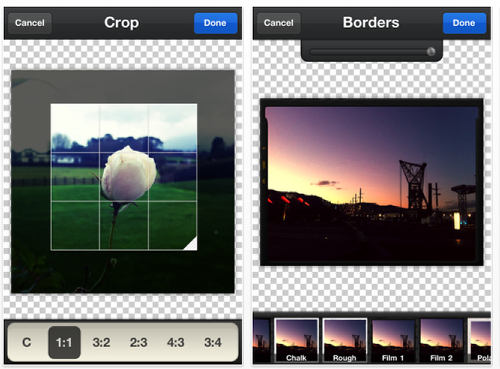
Among other things PicTools also offers crop and transform controls as well as the ability to save your image into a square format with white or black padding.
This app is temporarily free and you can pick it up by clicking here.
Feature List
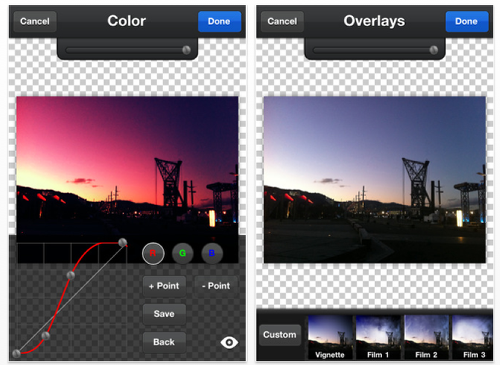
- Real time color curves adjustment
- Preset curves that can be tweaked
- Save your own custom curves
- Overlays to give your photos texture
- Use your own photos as an overlay and set the blending mode and opacity
- Crop your photo with preset ratios or free form
- Rotate and mirror your photo
- Antique black & white and sepia effects
- Quick mode will combine effects when you don’t have time to tweak it yourself
- Keep adding as many overlays and effects as you want
- A selection of borders to choose from to give the photo a perfect finish
- Save at full resolution
- Optionally resize your photos
- Save your photo to square format with black or white padding to keep the original ratio, this means you don’t need to crop your image for Instagram etc.
- Post your photos to Facebook
- Undo any change you make right back to the original photo

Joanne Carter
Joanne Carter BA (Hons), ARPS is a British photographer, photography journalist, editor and curator, and the founder and editorial director of TheAppWhisperer.com, an independent international photography publication established in 2009.She holds a First Class Honours degree in Photography and is an Associate of the Royal Photographic Society (ARPS).Her journalism, criticism and editorial work have appeared in The Times, The Sunday Times, The Guardian, Financial Times, BBC, Vogue Italia, LensCulture, Popular Photography and NikonPro, among other international publications.Through TheAppWhisperer, she brings together academic knowledge, professional photographic expertise and more than 17 years of specialist editorial experience to examine contemporary photography, mobile imaging, computational photography, photographic applications and emerging imaging technologies.