Best Camera Apps for Street Photography (2026): The Complete Guide
The Best Camera Apps for Street Photography (2026): The Complete Guide to Photographing the Decisive Moment
There is a peculiar irony at the heart of contemporary street photography. Never before have so many people carried cameras capable of producing extraordinary photographs, yet never before has it become so difficult to make images that feel genuinely observed rather than merely processed. Smartphones now perform astonishing feats of computational wizardry, blending exposures, removing unwanted objects, sharpening details that scarcely existed in the original scene and brightening shadows until every alleyway resembles a studio. The results are often technically impressive, but technical perfection has never been the ambition of street photography. If anything, the genre has traditionally found its power in uncertainty: a face half concealed by reflected light, the blur of someone stepping hurriedly into frame, or the awkward geometry of strangers who briefly occupy the same pavement before disappearing into different lives.
That tension between technological sophistication and photographic restraint has become increasingly significant as camera applications multiply. Every year promises another collection of revolutionary features, artificial intelligence and automated enhancements, yet many photographers continue to search for something rather simpler. They want an application that responds immediately when lifted from a pocket, offers sufficient control to avoid surrendering every creative decision to an algorithm and then quietly gets out of the way. Good street photography has always depended upon attention rather than technology, and the best camera apps recognise this by placing observation ahead of automation.
Choosing between them, however, has become considerably more complicated than selecting the one with the longest specification sheet. Some applications have been designed for photographers who approach the smartphone as though it were a professional camera, expecting manual control over shutter speed, focus, exposure and RAW capture. Others deliberately recreate the slower, more contemplative experience associated with analogue photography, encouraging careful composition rather than rapid bursts of images. A growing number now position themselves somewhere between those two traditions, combining computational intelligence with interfaces that remain reassuringly unobtrusive.
This guide is not simply a catalogue of features or another annual ranking assembled from marketing claims. Every application discussed here has been considered from the perspective of street photography itself: how quickly it responds, how naturally it encourages photographers to work, how convincingly it renders colour and monochrome, whether its controls become second nature after prolonged use, and, perhaps most importantly, whether it allows the photographer to remain engaged with the life unfolding around them rather than trapped inside a glowing rectangle of menus and settings. The finest camera app is rarely the one that does the most. More often, it is the one that asks least of the photographer while quietly expanding what becomes photographically possible.
How I Assessed These Camera Apps
Any article that claims to identify the “best” camera applications inevitably raises a simple question: best for whom? A landscape photographer working from a tripod, a wedding photographer needing rapid access to exposure compensation, and a documentary photographer wandering unfamiliar streets will all judge software according to entirely different criteria. Street photography, perhaps more than any other genre, places its own distinctive demands upon the tools we use, and those demands have shaped every recommendation in this guide.
It would have been easy simply to compare specification sheets. Most developers are eager to advertise manual exposure, RAW capture, focus peaking or computational enhancements, and there is certainly value in understanding which features each application offers. Specifications alone, however, reveal remarkably little about what it actually feels like to photograph with an application once you step into a busy street where light shifts unpredictably, pedestrians constantly interrupt compositions and opportunities appear and disappear in the space of a heartbeat.
The most successful street photography software is rarely the application with the longest list of features. More often, it is the application that disappears from conscious thought altogether. Good software becomes almost transparent, allowing the photographer to remain immersed in observation rather than repeatedly consulting menus, icons and technical settings. The relationship between photographer and camera should feel instinctive. Every unnecessary tap introduces hesitation, and hesitation is often enough to lose the photograph entirely.
For that reason, usability has been given greater weight than novelty throughout this guide. Applications that offered impressive technical capabilities but required excessive interaction scored less highly than those whose controls quickly became second nature. Street photography rewards familiarity. After several hours of shooting, the photographer should no longer need to think about the interface because attention belongs entirely to the people, architecture and fleeting relationships unfolding within the frame.
Image quality has also been assessed somewhat differently from the approach taken by many technology websites. Contemporary smartphone photography has become increasingly dominated by computational processing, producing images that are brighter, sharper and more saturated than the scene originally witnessed. These files often appear impressive when viewed briefly on social media, yet prolonged examination sometimes reveals an unsettling artificiality. Skin can lose its natural texture, shadows become uniformly illuminated and colours drift towards exaggeration rather than subtlety.
Street photography has traditionally embraced ambiguity rather than perfection. Garry Winogrand’s photographs are not celebrated because every highlight is perfectly controlled. Daidō Moriyama’s work is not revered because every shadow retains immaculate detail. Documentary photography has always accepted imperfection as part of visual truth, recognising that uncertainty often communicates experience more honestly than technical precision. Consequently, applications that preserved natural tonal relationships and avoided excessive computational intervention were consistently favoured throughout this assessment.
Responsiveness proved equally important. Every application was considered from the perspective of spontaneous photography rather than carefully constructed compositions. How quickly could the camera be launched? Were manual controls immediately accessible or hidden beneath multiple screens? Could exposure compensation be adjusted instinctively while continuing to observe the street? Did autofocus remain reliable under changing conditions? These seemingly small considerations accumulate over the course of an afternoon’s photography and ultimately shape both the experience of working and the photographs themselves.
Manual control remains valuable, although perhaps not always for the reasons commonly suggested. Many photographers assume manual settings exist primarily to demonstrate technical expertise, yet experienced street photographers frequently employ them to simplify decision-making rather than complicate it. Establishing exposure before entering a scene, selecting an appropriate focus distance or locking white balance can reduce uncertainty, allowing complete concentration upon timing and composition. Applications that made these adjustments both logical and unobtrusive were consistently more satisfying to use than those which buried essential functions beneath elaborate interface design.
Equally significant was the quality of each application’s RAW workflow. Smartphone sensors have improved dramatically over the past decade, and RAW capture now provides sufficient latitude for serious post-processing, particularly when working in difficult lighting where bright reflections coexist with deep shadow. Applications producing flexible, well-rendered RAW files naturally appealed to photographers accustomed to editing in Adobe Lightroom, Capture One or Darkroom, while software that relied primarily upon aggressive JPEG processing felt considerably less adaptable.
The recommendations that follow should therefore be understood less as an attempt to crown a single universal winner than as an exploration of different photographic philosophies. Some applications encourage restraint, others reward meticulous manual control, while several attempt to recreate the slower, more deliberate experience traditionally associated with analogue photography. None will transform an ordinary photograph into an extraordinary one. They merely provide different ways of engaging with the endlessly unpredictable theatre of public life.
That distinction is worth remembering before considering any software recommendation. The history of street photography has never been shaped by equipment alone. Henri Cartier-Bresson carried a Leica because it suited the way he wished to work, not because it guaranteed remarkable photographs. Vivian Maier remained largely unknown throughout her lifetime despite producing one of the twentieth century’s most extraordinary documentary archives. Garry Winogrand famously exposed thousands of rolls of film without seeing many of the images until years later. Their photographs continue to endure because of the intelligence, curiosity and patience they brought to the street rather than the cameras they happened to carry.
The smartphone has altered many aspects of photography, but it has not changed that fundamental truth. The best camera application is not the one that promises the greatest number of features or the most sophisticated artificial intelligence. It is the one that quietly supports your own way of seeing before withdrawing almost completely from conscious thought, leaving you free to notice the world as it unfolds.
Leica LUX Pro Manual Camera: Rediscovering the Discipline of Seeing
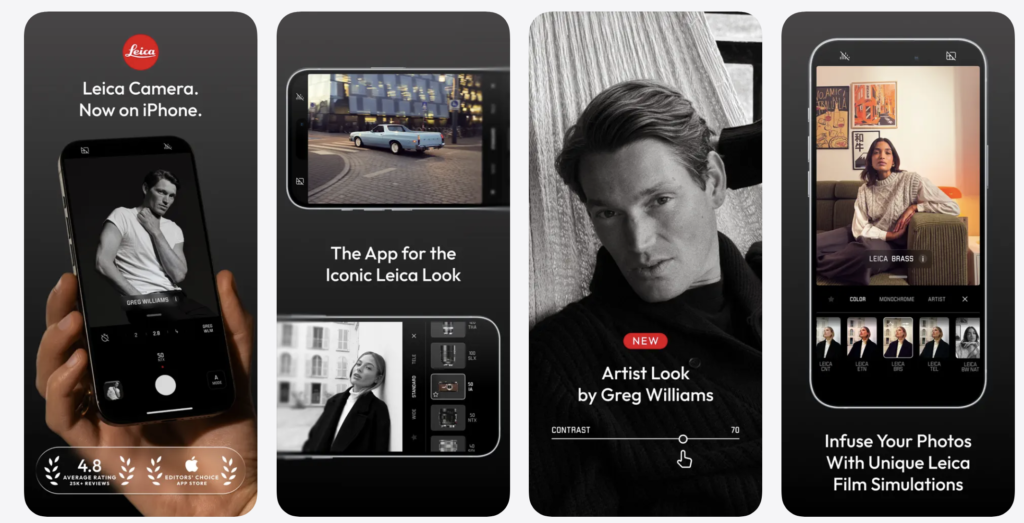
It is tempting to think of Leica LUX as little more than a smartphone application carrying one of photography’s most recognisable names. Leica has, after all, become one of those brands whose reputation extends far beyond the cameras themselves, symbolising a particular way of thinking about photography as much as a particular way of making it. Yet to dismiss Leica LUX as clever branding would be to misunderstand both the application and the philosophy that underpins it.
Leica has never competed by promising photographers the greatest number of features. For much of its history, the company has done almost the opposite. Its cameras have generally asked photographers to slow down, to trust their judgement and to accept responsibility for every decision made before pressing the shutter. That philosophy runs quietly throughout Leica LUX. Rather than overwhelming users with pages of technical options, it presents a remarkably calm interface that encourages concentration on the street rather than on the screen.
That distinction may sound subtle, but it becomes increasingly significant after an hour or two of walking through a city. Street photography is an exercise in sustained attention. The photographer is constantly reading the environment, noticing how light shifts across buildings, anticipating how strangers will move through the frame and recognising visual relationships that exist for only a fraction of a second. Every unnecessary glance towards a complicated interface interrupts that concentration. Leica LUX appears to understand this instinctively. Its controls remain accessible without insisting upon constant interaction, allowing the photographer’s awareness to remain directed outward instead of inward.
The application’s colour rendering is perhaps its greatest strength. Many contemporary smartphone camera apps seem anxious to demonstrate how much processing they can perform, producing images with aggressively bright skies, unnaturally vivid foliage and a degree of sharpening that often strips surfaces of their natural texture. Initially these photographs can appear impressive, particularly on small screens, but they frequently become less convincing the longer one looks at them. Leica LUX takes a noticeably different approach. Colours feel measured rather than exaggerated, highlights retain a gentler transition into shadow, and skin tones avoid the synthetic warmth that characterises much computational photography. The result is not dramatic in the conventional sense, yet it is remarkably persuasive because it feels closer to the experience of standing in the street itself.
This restraint is especially valuable for documentary work. Street photography has never depended upon spectacle alone. Some of the genre’s most enduring photographs derive their emotional force from ordinary moments observed with extraordinary sensitivity rather than from scenes of obvious visual drama. Excessive processing can easily distract from those quieter qualities, encouraging viewers to admire the software instead of the photograph. Leica LUX largely avoids that trap by producing files that remain open to interpretation rather than insisting upon a predetermined aesthetic.
Black and white photography has always occupied a special place within Leica’s history, and the monochrome rendering available within Leica LUX reflects that heritage with considerable sophistication. Rather than relying upon harsh contrast or artificially deep blacks, the application preserves a broad tonal scale that allows light to describe form gradually. Pavements glisten after rain without appearing metallic, faces retain subtle modelling, and architectural detail emerges naturally instead of being forced forward through excessive local contrast. The photographs invite careful viewing because they leave space for nuance, something increasingly uncommon in an age of algorithmically enhanced imagery.
Working with Leica LUX also encourages a slower rhythm of photography. That observation should not be mistaken for criticism. The application remains perfectly capable of responding quickly when required, but its overall design subtly discourages indiscriminate shooting. There is little sense of racing through hundreds of frames in the hope that one might succeed. Instead, the experience feels closer to carrying a traditional camera whose limitations encourage greater deliberation. Whether this influences the photographs themselves is impossible to measure objectively, yet many photographers would recognise the psychological shift immediately. When technology ceases to compete for attention, observation naturally occupies more of it.
There are, inevitably, limitations. Leica LUX is not intended to satisfy photographers who expect complete manual authority over every technical parameter. Those accustomed to controlling shutter speed, ISO, focus distance and exposure independently may find the application comparatively restrained, particularly when working in difficult lighting or pursuing highly specific visual effects. Nor is it presently available beyond the Apple ecosystem, which inevitably limits its audience despite the growing sophistication of Android photography.
These criticisms, however, arise largely because Leica LUX pursues different ambitions from applications such as Halide or ProCamera. Its objective is not to provide every conceivable tool but to refine the experience of photographing until technology becomes almost imperceptible. That is an entirely legitimate design philosophy, particularly for street photography, where excessive choice can become a surprisingly effective distraction.
It would therefore be misleading to recommend Leica LUX solely to photographers who admire the Leica name. Its real appeal lies elsewhere. It is for photographers who value subtle colour, thoughtful design and an interface that encourages prolonged observation rather than constant adjustment. In an era when many applications compete by adding ever more features, Leica LUX stands apart by recognising that the most useful tool is often the one that knows when to remain silent.
Verdict: Leica LUX is less concerned with reproducing the appearance of Leica photography than with encouraging the habits that have long defined it: patience, restraint and sustained attention. For street photographers who believe that seeing matters more than processing, it is one of the most satisfying camera applications currently available.
Halide Mark II: Precision Without Pretension
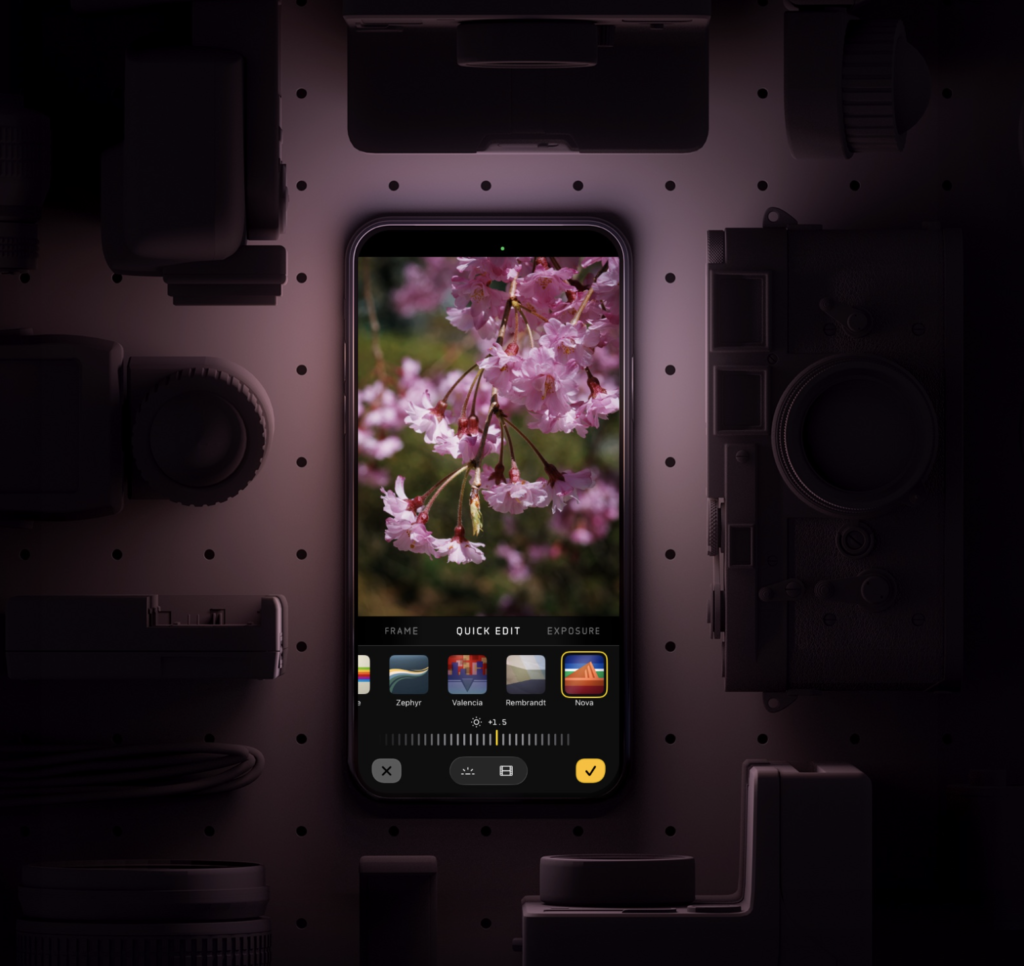
There is a tendency among photography software developers to confuse complexity with professionalism. Every new release promises additional controls, deeper menus and increasingly elaborate workflows, as though the accumulation of features alone were evidence of seriousness. Halide has always resisted that temptation. Although it offers one of the most sophisticated photographic experiences available on a smartphone, it rarely feels complicated. Instead, it reflects a principle that has long guided the design of good cameras: the controls you need should always be close to hand, while those you rarely use should never interrupt the act of making photographs.
That philosophy explains why Halide has earned such loyalty among photographers who move comfortably between smartphones and dedicated cameras. Rather than attempting to imitate a DSLR or mirrorless body, it acknowledges the strengths and limitations of the smartphone itself, building an interface that feels native to the device while offering a level of control that approaches far more expensive equipment.
The result is particularly persuasive in the context of street photography. Cities are visually unpredictable environments. A photographer may emerge from a dimly lit underground station into harsh midday sunshine before turning moments later into a narrow alleyway where reflected light softens every surface. Exposure changes constantly, often within a single block, and the camera application must adapt without demanding prolonged attention. Halide allows those adjustments to become almost instinctive. Exposure compensation is immediate, manual controls respond with reassuring precision, and transitions between automatic and manual operation feel entirely natural. The software behaves less like an application layered upon the phone than as though it were part of the camera itself.
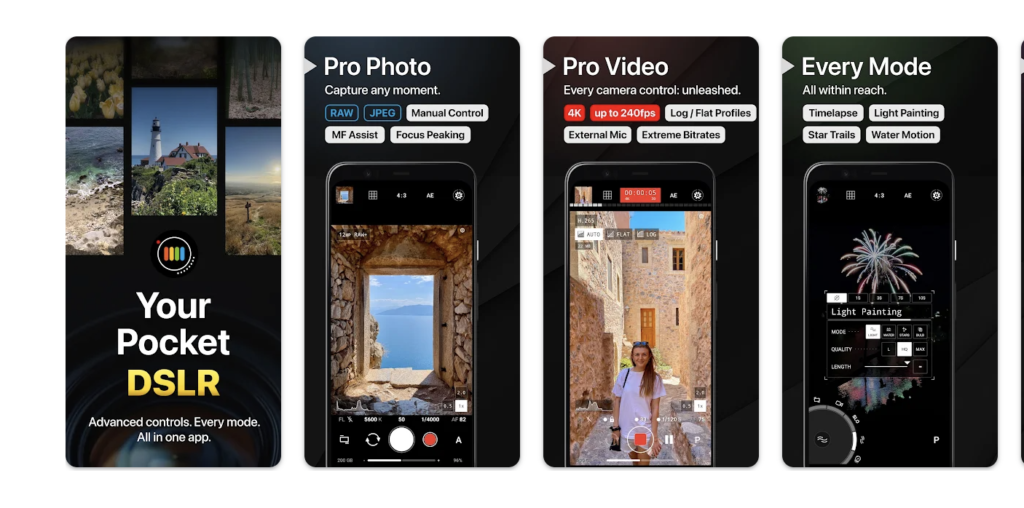
Manual focus deserves special attention because it has become something of a forgotten discipline within smartphone photography. Modern autofocus systems are undeniably impressive, but experienced street photographers have long understood that autofocus is not always the fastest solution. Long before sophisticated tracking algorithms existed, photographers working with Leica rangefinders or the Ricoh GR often relied upon zone focusing, establishing a focus distance in advance so that every subsequent frame could be made without waiting for the camera to decide where sharpness should fall. The technique remains remarkably effective today, particularly in crowded streets where people move unpredictably through the frame.
Halide’s implementation of manual focus is among the finest currently available on any mobile platform. Focus peaking clearly identifies areas of sharpness without overwhelming the display, allowing photographers to work with confidence even when photographing rapidly. After a surprisingly short period, the process becomes almost subconscious. Focus is established before the decisive moment arrives, leaving composition and timing free from technological interruption.
Equally impressive is Halide’s treatment of RAW capture. It is easy to underestimate how far smartphone sensors have evolved during the past decade. Early mobile RAW files often offered little practical advantage over JPEGs, but contemporary devices produce remarkably flexible files capable of withstanding extensive post-processing. Halide takes full advantage of those advances. Highlight recovery remains convincing, shadow detail survives difficult lighting conditions with impressive integrity, and colour information retains a subtlety that provides considerable freedom during editing.
This becomes particularly valuable when photographing cities after rain, at dusk or beneath mixed artificial lighting. Urban environments rarely present photographers with balanced illumination. Sodium street lamps, LED advertising screens, reflected shop windows and deep architectural shadows often coexist within the same frame. JPEG processing inevitably makes interpretive decisions on behalf of the photographer, whereas RAW capture preserves the opportunity to revisit those decisions later with greater care and sensitivity. Halide recognises that distinction and treats the smartphone less as a computational device than as a genuinely capable photographic instrument.
The application’s visual design reinforces this impression. Modern software often mistakes visual excitement for usability, filling displays with coloured icons, animated transitions and decorative effects that compete for attention with the world beyond the screen. Halide adopts a markedly quieter approach. Controls remain elegantly understated, typography is restrained and nothing appears included simply to demonstrate technological sophistication. After prolonged use, the interface recedes almost entirely from conscious awareness, leaving the photographer free to concentrate upon gesture, light and composition rather than software.
Its greatest strength may also explain why it is not universally suitable. Halide assumes that photographers wish to participate actively in the process of making an image. It offers assistance where appropriate, but it rarely attempts to conceal photographic decisions beneath automation. Photographers unfamiliar with exposure, focus or RAW workflows may therefore find themselves wondering why they should choose Halide instead of the phone’s native camera application, particularly when the latter produces immediately polished JPEGs with little effort.
That question is entirely reasonable, yet it perhaps misunderstands what Halide offers. It is not attempting to replace computational photography with nostalgia, nor is it designed solely for enthusiasts who enjoy adjusting technical settings for their own sake. Its purpose is to preserve creative authorship. The application allows photographers to decide how a photograph should look rather than accepting a sequence of algorithmic assumptions made before the shutter has even been released. In that respect, it occupies an increasingly important place within contemporary photography, reminding us that convenience and authorship need not always be synonymous.
For street photographers who regard the smartphone as a serious creative tool rather than simply a convenient camera, Halide remains one of the most accomplished applications available. It combines technical sophistication with remarkable clarity of design, offering extensive manual control without ever feeling burdened by it. More importantly, it succeeds in the one respect that ultimately matters most: after a short period of use, the software all but disappears, leaving the photographer alone with the endlessly unpredictable theatre of the street.
Blackmagic Camera: What Cinematographers Can Teach Street Photographers
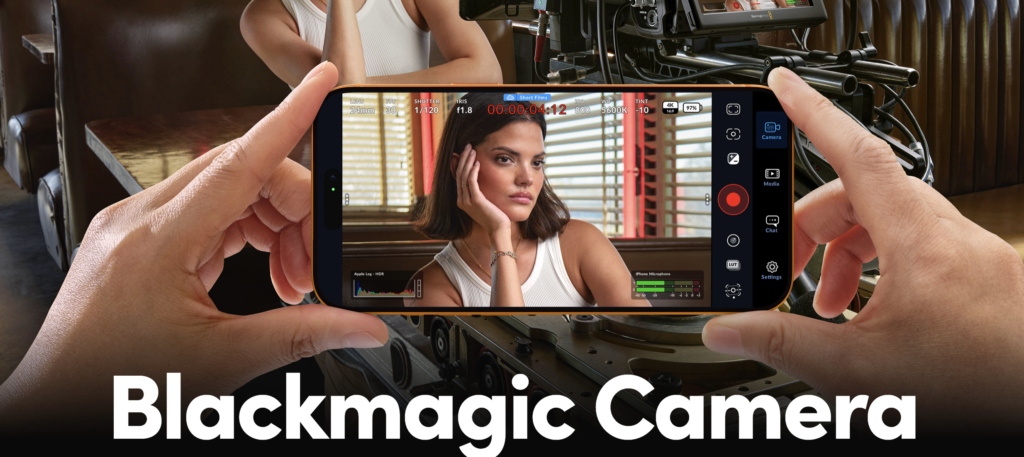
At first glance, Blackmagic Camera appears to be an unlikely recommendation for street photography. The application was developed primarily with filmmakers in mind, extending the philosophy of Blackmagic Design’s cinema cameras to the smartphone. Its interface borrows heavily from professional video production, its controls reflect the language of cinematography rather than still photography, and much of its publicity naturally concentrates on filmmakers. It would therefore be easy to conclude that street photographers have little reason to pay attention.
That would be a mistake. One of the more interesting developments in contemporary photography has been the gradual convergence of still and moving image practices. Documentary photographers increasingly work across both disciplines, producing photographs, short films and multimedia essays within the same project. As that boundary has softened, the qualities that make a camera useful for filmmaking—clarity of interface, reliable manual control and predictable exposure—have become equally valuable for photographers working in rapidly changing environments.
The Blackmagic Camera app exemplifies this shift. Although it was never designed specifically for street photography, it possesses a disciplined simplicity that many dedicated photography applications would do well to emulate. The interface is unapologetically functional. Nothing flashes unnecessarily across the display, no decorative graphics compete for attention and every control appears to exist because it serves a practical purpose rather than because it enhances a marketing brochure. The overall impression is one of quiet competence. The application assumes its users wish to make deliberate creative decisions and trusts them to do so.
That sense of trust is surprisingly refreshing. Much contemporary smartphone photography has been built upon the assumption that the photographer should intervene as little as possible, allowing artificial intelligence to determine exposure, colour, sharpening and tonal balance before the image is even recorded. The Blackmagic Camera app moves in precisely the opposite direction. It assumes that photography remains an interpretative act and that creative responsibility ultimately belongs to the person holding the camera rather than the software running behind it.
For street photographers, this philosophy has practical consequences. Walking through an unfamiliar city demands constant adaptation. Light changes as streets narrow, buildings reflect unexpected colours and weather alters the atmosphere almost from one moment to the next. Applications that conceal exposure decisions behind layers of automation can leave photographers feeling strangely detached from the image-making process, whereas Blackmagic Camera invites them to remain actively engaged. Adjustments become deliberate rather than accidental, and the relationship between changing light and photographic response becomes considerably more intuitive.
Exposure controls are exceptionally well organised. Rather than scattering adjustments across multiple screens, Blackmagic presents them with an economy that reflects its professional origins. After only a short period of use, altering exposure compensation or locking settings becomes almost instinctive. More importantly, these adjustments rarely require the photographer to stop observing the street. The interface has clearly been designed by people who understand that technical controls are only useful if they remain secondary to the act of seeing.
There is also a psychological quality to the application that deserves mention, although it is difficult to quantify. Blackmagic Camera encourages a measured pace of working. The interface lacks the visual exuberance characteristic of many consumer photography applications, replacing it instead with an understated professionalism that subtly changes the rhythm of photography itself. One becomes less inclined to shoot indiscriminately and more inclined to wait, observe and respond with greater intention. Whether this arises from the application’s design or simply from the expectations users bring to it is impossible to determine, yet the effect is noticeable nonetheless.
That said, the Blackmagic Camera app is not without limitations when viewed purely as a still photography tool. Its heritage remains firmly rooted in cinematography, and this occasionally becomes apparent in the organisation of certain controls. Photographers seeking dedicated still-photography features such as advanced focus peaking, specialised photographic shooting modes or extensive image management may discover that applications like Halide or ProCamera provide a workflow more closely aligned with their needs. Blackmagic Camera occasionally asks photographers to think like filmmakers, an approach that some will find intellectually stimulating while others may regard as unnecessarily indirect.
Its greatest audience is, therefore, likely to be photographers who already move comfortably between still and moving images or those whose documentary practice increasingly encompasses both. For them, Blackmagic Camera offers an unusually coherent environment in which visual storytelling becomes the central concern rather than the distinction between photographs and video. That broader perspective feels increasingly relevant at a time when many documentary projects no longer fit neatly within the traditional boundaries of a single medium.
More importantly, Blackmagic Camera reminds us of something easily forgotten amid the rapid evolution of smartphone photography. Sophisticated technology need not be visually noisy. Professional software can remain elegant without becoming simplistic, and powerful tools need not advertise their complexity at every opportunity. In resisting the temptation to overwhelm users with unnecessary embellishment, Blackmagic has produced an application whose greatest achievement lies not in what it adds to photography but in what it quietly removes. Freed from distraction, the photographer is left to concentrate on the infinitely more difficult task of recognising significance within the ordinary flow of everyday life.
Viewed in that light, the Blackmagic camera app proves to be far more than a filmmaker’s utility adapted for smartphones. It is a thoughtful, disciplined photographic tool that deserves serious consideration from street photographers who value clarity, intentionality and creative control over spectacle. It may not be the obvious choice, but some of the most rewarding cameras rarely are.
ProCamera: The Mature All-Rounder That Rarely Lets You Down
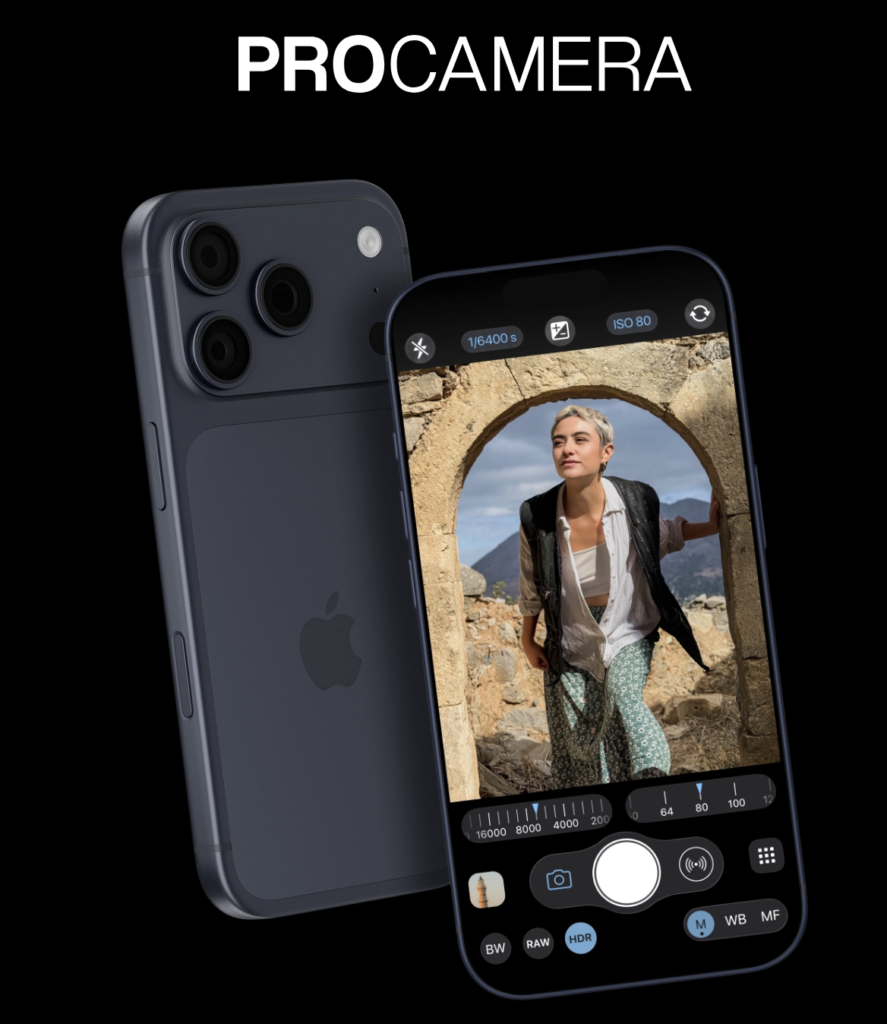
There is something reassuringly unfashionable about ProCamera. Unlike newer applications that arrive accompanied by promises of revolutionary artificial intelligence or cinematic innovation, ProCamera has spent years doing something considerably less glamorous: refining an already excellent photographic tool until it becomes almost invisible in everyday use. It has survived wave after wave of technological fashion not because it chases every new trend, but because it has consistently understood what photographers actually require when they step outside with a camera.
Longevity, in software, is not always a virtue. Some applications remain available long after innovation has passed them by, accumulating outdated interfaces and increasingly awkward workflows that betray their age. ProCamera has largely avoided that fate. Although it has evolved steadily over the years, its development has been characterised by careful refinement rather than wholesale reinvention. Existing users rarely feel abandoned by dramatic redesigns, while newcomers encounter an application whose confidence comes from maturity rather than novelty.
That maturity becomes apparent almost immediately when photographing in the street. The application launches quickly, responds predictably and presents its controls in a manner that feels logical rather than performative. Every adjustment appears to have been considered from the perspective of someone who genuinely expects to spend hours making photographs rather than simply demonstrating features during a five-minute product review.
This reliability should not be underestimated. Street photography depends upon repetition. Photographers often cover considerable distances during a single session, lifting the camera hundreds of times while waiting patiently for the occasional frame that successfully captures the relationship between people, place and time. Under those circumstances, even small frustrations become magnified. An awkward menu, an inconsistent exposure system or an unreliable focus mechanism gradually erodes confidence until attention shifts from observation towards managing the software itself. ProCamera rarely permits that to happen. It behaves with a consistency that encourages trust, and trust remains one of the most valuable qualities any camera can possess.
Manual controls have been integrated with considerable care. They remain immediately available without dominating the screen, allowing photographers to intervene whenever necessary while leaving automatic operation equally capable when circumstances demand speed above precision. This flexibility reflects the reality of contemporary street photography far more accurately than rigid philosophical positions about manual versus automatic shooting. Most experienced photographers move comfortably between the two approaches according to changing conditions, and ProCamera supports that fluidity without insisting upon one method over another.
RAW capture is predictably excellent, particularly for photographers who maintain an established post-processing workflow. Images retain generous dynamic range, highlights remain recoverable under demanding lighting conditions and colour information survives extensive adjustment without quickly deteriorating. Urban environments often contain a bewildering mixture of reflected daylight, artificial illumination and deep architectural shadow, and ProCamera preserves enough tonal information to allow thoughtful interpretation long after the photograph has been made.
The application’s approach to image processing also deserves recognition. Like several of the strongest applications discussed throughout this guide, ProCamera demonstrates admirable restraint. Rather than attempting to produce photographs that appear spectacular immediately after capture, it creates files that remain believable. Pavements continue to resemble pavements rather than polished stone; clouds retain their natural structure instead of dissolving into exaggerated drama, and skin maintains texture without becoming unpleasantly clinical. These distinctions may appear subtle in isolation, yet collectively they produce photographs that age considerably better than heavily processed alternatives.
Its greatest strength, however, lies not in any individual feature but in its balance. Leica LUX encourages a contemplative way of seeing. Halide appeals to photographers seeking uncompromising manual control. Blackmagic Camera borrows the disciplined language of professional cinematography. ProCamera occupies the ground between these positions with remarkable assurance. It neither romanticises analogue photography nor celebrates computational intervention. Instead, it quietly provides the tools required to respond intelligently to whatever the street presents.
That versatility inevitably comes with a minor compromise. Because ProCamera attempts to accommodate a broad range of photographic practices, it lacks the distinctive personality that characterises some of its competitors. Leica LUX possesses a recognisable visual philosophy. Halide has become synonymous with precision and craftsmanship. ProCamera is less immediately identifiable because it rarely imposes itself upon the photographer. Some users may interpret this neutrality as a lack of character, yet others will recognise it as one of the application’s greatest virtues. Good documentary photography has never depended upon software possessing a strong personality; if anything, the opposite is usually true.
Another consideration concerns value. ProCamera is a premium application, and, while its pricing remains entirely justifiable given the quality of its development, casual photographers who rely primarily upon automatic shooting may question whether the investment offers sufficient practical benefit over the native camera application already installed on their phone. The answer depends largely upon how photography fits within one’s life. Those who make only occasional snapshots may never exploit its strengths. Photographers who spend long afternoons wandering unfamiliar streets, however, are likely to appreciate the cumulative effect of an interface designed with unusual intelligence and restraint.
Perhaps that is ultimately the most appropriate description of ProCamera. It is an intelligent application. Not intelligent in the contemporary marketing sense of artificial intelligence or automated enhancement, but intelligent because its designers appear to have spent years observing how photographers actually work. Every decision reflects an understanding that software should reduce friction rather than introduce it, allowing the camera to become a transparent extension of the photographer’s attention.
Street photography has always rewarded patience over spectacle and consistency over novelty. ProCamera embodies those values quietly and without fanfare. It may never generate the excitement surrounding newer applications, yet excitement is rarely what serious photographers require from their tools. Reliability, subtlety and confidence prove considerably more valuable companions during a day spent walking the streets, waiting for ordinary life to reveal something unexpectedly extraordinary.


Joanne Carter
Joanne Carter BA (Hons), ARPS is a British photographer, photography journalist, editor and curator, and the founder and editorial director of TheAppWhisperer.com, an independent international photography publication established in 2009.She holds a First Class Honours degree in Photography and is an Associate of the Royal Photographic Society (ARPS).Her journalism, criticism and editorial work have appeared in The Times, The Sunday Times, The Guardian, Financial Times, BBC, Vogue Italia, LensCulture, Popular Photography and NikonPro, among other international publications.Through TheAppWhisperer, she brings together academic knowledge, professional photographic expertise and more than 17 years of specialist editorial experience to examine contemporary photography, mobile imaging, computational photography, photographic applications and emerging imaging technologies.