Aperture – Mac App – Updated
Aperture is designed for iPhoto users who want to get more out of their photos. It includes powerful tools for refining images, showcasing your work, and managing massive libraries on your Mac. Enhanced Faces and Places provide new ways to organize images. Nondestructive brushes with built-in edge detection make precision retouching of photographs intuitive and fast. Choose from dozens of built-in adjustment presets, or create your own to give your photos a custom look. Advanced slideshows support HD video and give you complete control over text, transitions, and timing. And stunning full-screen views let you use every inch of your Mac display to navigate and browse your entire library.
So What’s New in this latest update? Check that out below – this is a free update but if you haven’t already downloaded it you can do so here. It retails for $79.99/£50.00/Click here to download
What’s New
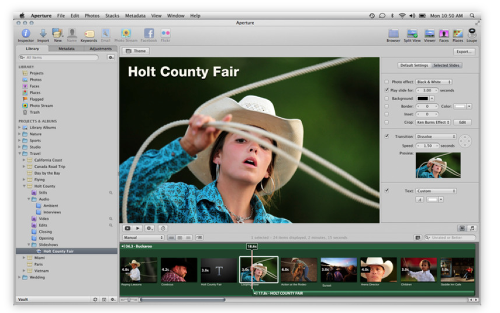
Aperture 3.2 supports compatibility with iCloud and iOS 5. This update also addresses minor stability, performance and compatibility issues, including:
• Resolves an issue that could cause the "Loading" indicator to reappear in the Viewer when cropping a photo
• Aperture now automatically relaunches into Full Screen mode if the application was in Full Screen mode when last quit
• Pinch-to-zoom gesture now automatically activates Zoom mode in the Viewer
• Left and right swipe gestures can now be used to navigate between photos in the Viewer
• Microsoft Outlook can now be chosen in Preferences as the application used by Aperture for emailing photos
• Fixes a problem that could cause Aperture, running on OS X Lion, to quit unexpectedly when using brushes to apply adjustments
• Loupe now correctly displays magnification levels between 50-100%.
• Fixes an issue that could cause Aperture, running on OS X Lion, to display the incorrect color profile on externally edited images
• Import window now includes an option to delete photos from iPhone and iPad after they have been imported into Aperture
• The Lift & Stamp tool now displays the correct cursor icons when being used in Split View and Viewer only modes
The update is recommended for all users of Aperture 3.

Joanne Carter
Joanne Carter BA (Hons), ARPS is a British photographer, photography journalist, editor and curator, and the founder and editorial director of TheAppWhisperer.com, an independent international photography publication established in 2009.She holds a First Class Honours degree in Photography and is an Associate of the Royal Photographic Society (ARPS).Her journalism, criticism and editorial work have appeared in The Times, The Sunday Times, The Guardian, Financial Times, BBC, Vogue Italia, LensCulture, Popular Photography and NikonPro, among other international publications.Through TheAppWhisperer, she brings together academic knowledge, professional photographic expertise and more than 17 years of specialist editorial experience to examine contemporary photography, mobile imaging, computational photography, photographic applications and emerging imaging technologies.
You May Also Like