Photogene² for iPhone – Updated
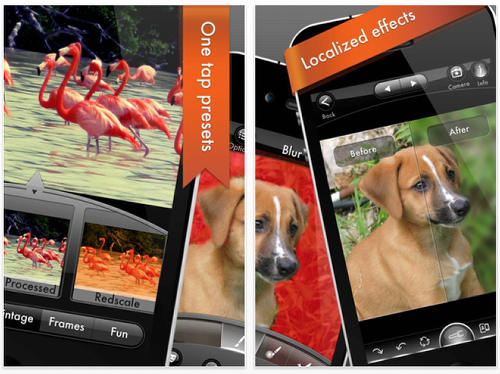
Photogene is an excellent tool for handling your iPhone photos. - It’s a full featured photo editor. - Powerful collage maker. - Supports uploading multiple photos.
This is a free update but if you haven’t already downloaded this app you can do so here. It retails for $0.99/£0.69/download
Main Features
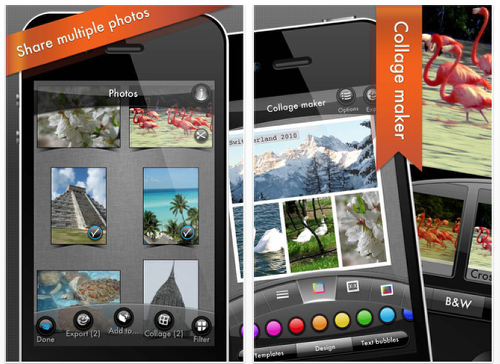
– Full featured photo editor: crop, straighten, color adjustments (including histogram and curves), sharpen and denoise, retouch tools (dodge/burn, heal, localized effects and more).
- Export several photos at once. Photogene supports a wide selection of export destinations, including Flickr, Dropbox, Facebook, Twitter, Picasa, FTP and e-mail.
– Full support for iPhone 4S native 8 MP resolution.
- Special effects: center focus, vignette, frames, reflection, text boxes and much more.
- Presets: large collection of predefined presets. Instantly give your photo a new look and then tweak it yourself.
- Collage maker: combine several photos into one piece of art using a variety of templates.
- Camera: use our built-in camera module to snap great photos and apply real-time effects.
- Metadata viewer: visual display of all the information stored in your photos. Including location on a map, date&time, file size, etc (IPTC editor included).
- Resize your photos as you export them. You can export edited photos at full resolution (same as the original).
- Compare edited photo vs the original at any time.
What’s New
A massive update. Lots of new features!
New: order directly from Photogene real photo products that will be delivered to you by mail. Service by tap2print.
Major new features:
- Device-to-device: transfer photos directly to another iPad/iPhone (requires Photogene to be installed on the other device).
- Clarity slider.
- Clone tool.
- Create your own presets! Long tap on a photo in the editor to save it as a preset.
More stuff:
- Add date-stamp to your exported photos.
- Copy edit operations from one photo and apply the same edits on another photo. Long tap on a photo in the editor to bring up the copy&paste menu.
- Can now upload directly to Evernote and Tumblr.
- Now it’s possible to preserve the original file names when uploading to Dropbox, FTP or mail (requires iOS 5).

Joanne Carter
Joanne Carter is a British photography journalist, editor, curator, and the founder of *TheAppWhisperer.com*, one of the world’s leading platforms dedicated to mobile photography and art. Since its launch in 2009, TheAppWhisperer has become an international hub for artists of all levels to discover, learn, exhibit, and engage with contemporary photographic practice.Built on principles of inclusivity, accessibility, and artistic excellence, Joanne has spent almost two decades championing mobile photography as a serious artistic medium. Through interviews, critical essays, exhibitions, competitions, and education, she has helped shape and document the evolution of mobile art on a global scale.Her work has taken her internationally, lecturing on photography and mobile art at institutions and events including the Museum of Art in Seoul, South Korea, alongside appearances in the UK and Europe. She has served as a juror for international photography and mobile art awards across Portugal, Canada, the United States, South Korea, Italy, and the UK.Joanne is also the founder of *TheAppWhispererPrintSales.com*, one of the first online galleries dedicated exclusively to collectible mobile art, connecting artists with collectors across Europe, the United States, and Asia.Before founding TheAppWhisperer, Joanne worked extensively in print journalism and photographic publishing, including roles at a paparazzi photo agency and as deputy editor of a leading photography magazine. Her freelance journalism, criticism, and commentary have been published widely in both the UK and the US, with bylines in *The Times*, *The Sunday Times*, *The Guardian*, *Popular Photography*, *NikonPro*, *DPReview*, *Which?*, *Vogue Italia*, *LensCulture*, the *BBC*, and more recently, the *Financial Times*, where her published letters on photography continue to contribute to wider conversations around the medium.Alongside her editorial and curatorial work, Joanne’s own photographic practice has been exhibited internationally across the UK, Europe, South Korea, and the United States. Her work increasingly explores themes of grief, loss, death, memory, and the body.Her current research interests centre on grief, death, and poverty, with forthcoming postgraduate study leading towards doctoral research in these areas.Joanne is currently developing new long-form writing and photographic projects and is available for commissions, editorial projects, speaking engagements, and collaborations.Contact: joannetheappwhisperer@gmail.com)