
Alayer (Photo App) Now Available For iPad
Loran Dyrmishi today announces Alayer 1.0 for iPad, an essential tool that will give anyone unprecedented control over the aesthetics of their photos. With Alayer, you can elevate your simple snapshots while enjoying the benefits of a streamlined photo editing workflow. Add an infinity of layers on your photos. Featuring more than 80 customizable textures, Alayer offers 15 different blending modes.With Alayer you can choose your Own Textures or other Images to Blend with your photo.
Alyaer for iPad retails for $0.99/£0.69 and you can download it here.
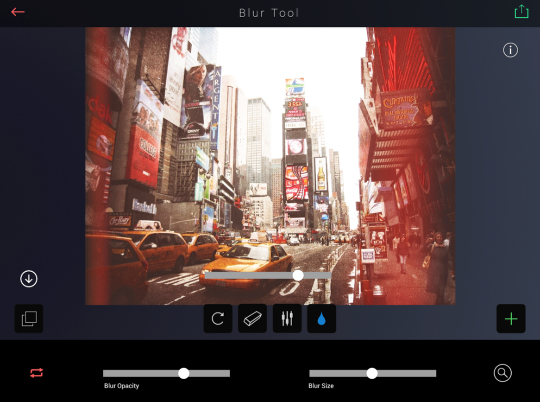
“Alayer really lets individuals unleash their inner artist,” said Loran. “We’ve included a roster of unique tools to help the users create the most beautiful photos possible right within the app. We can’t wait to see what amazing images our fans will produce.”
With Alayer you can choose your own textures or other images to blend with your photo. Now you can clone/duplicate the photo you are working with, as a new layer, making Alayer the best photo editing app for adding layers. Alayer includes more than 80+ textures created by photographers. Some of them include effects, light leak, lens flares, gradients and beautiful colorings. The app provides 15 different blending modes. Every new layer you add will create an infinity of beautiful and uniques images. All the textures are fully customizable.
“Don’t forget to use the Erase Tool for more control over the desire textures. Clean any part of the textures to better fit your images,” said Loran Dyrmishi, founder of Delix Software. “You can use the blur tool to blur out part of the texture. You can fade any part of the texture while retaining its color.”
This app comes with the love for photography. The possibilities with Alayer are unlimited. You have total control over your texture layers. Change the sharpness, unsharp, hue, saturation, exposure, contrast, brightness or the red, green and blue level of your texture layers. You can rotate, change the opacity, hide, move or delete any of the layers. Change the layers at any time. Drag the layers and see in real time the resulted photo. With a streamlined editing workflow you can change and modify any texture of any layers you have added before.
Video Demonstration The iPhone Version

Joanne Carter
Joanne Carter is a British photography journalist, editor, curator, and the founder of *TheAppWhisperer.com*, one of the world’s leading platforms dedicated to mobile photography and art. Since its launch in 2009, TheAppWhisperer has become an international hub for artists of all levels to discover, learn, exhibit, and engage with contemporary photographic practice.Built on principles of inclusivity, accessibility, and artistic excellence, Joanne has spent almost two decades championing mobile photography as a serious artistic medium. Through interviews, critical essays, exhibitions, competitions, and education, she has helped shape and document the evolution of mobile art on a global scale.Her work has taken her internationally, lecturing on photography and mobile art at institutions and events including the Museum of Art in Seoul, South Korea, alongside appearances in the UK and Europe. She has served as a juror for international photography and mobile art awards across Portugal, Canada, the United States, South Korea, Italy, and the UK.Joanne is also the founder of *TheAppWhispererPrintSales.com*, one of the first online galleries dedicated exclusively to collectible mobile art, connecting artists with collectors across Europe, the United States, and Asia.Before founding TheAppWhisperer, Joanne worked extensively in print journalism and photographic publishing, including roles at a paparazzi photo agency and as deputy editor of a leading photography magazine. Her freelance journalism, criticism, and commentary have been published widely in both the UK and the US, with bylines in *The Times*, *The Sunday Times*, *The Guardian*, *Popular Photography*, *NikonPro*, *DPReview*, *Which?*, *Vogue Italia*, *LensCulture*, the *BBC*, and more recently, the *Financial Times*, where her published letters on photography continue to contribute to wider conversations around the medium.Alongside her editorial and curatorial work, Joanne’s own photographic practice has been exhibited internationally across the UK, Europe, South Korea, and the United States. Her work increasingly explores themes of grief, loss, death, memory, and the body.Her current research interests centre on grief, death, and poverty, with forthcoming postgraduate study leading towards doctoral research in these areas.Joanne is currently developing new long-form writing and photographic projects and is available for commissions, editorial projects, speaking engagements, and collaborations.Contact: joannetheappwhisperer@gmail.com)

One Comment
woolane
Not universal ?