
Brand New iOS Photography App – Union – Photo Blending For Intuitive Editing & Powerful Surreal Imagery
The all-star Pixite LLC photo app suite gets an impressive boost this week with the launch of Union, a pioneering photo enhancement app designed for intuitive, high-level image stacking, editing and masking. A natural extension of Pixite’s established photo editing apps, Fragment and Tangent, Union lets users quickly and easily replace backgrounds and combine photos in unique and creative ways.
Union’s design appeals to professional photographers and hobbyists alike, featuring a clean, intuitive interface and the latest technologies in mobile graphic design.
Union is now available in the Apple App store – it retails for $1.99/£1.49 – you can download it here.
Quote
“It’s a brand new take on the entire masking procedure, changing the way you’ll think about layering, blending, and combining photos,” said one of Union’s creators, Ben Guerrette. “But it’s also easily understandable, ushering you through the steps without having to be super explicit.”
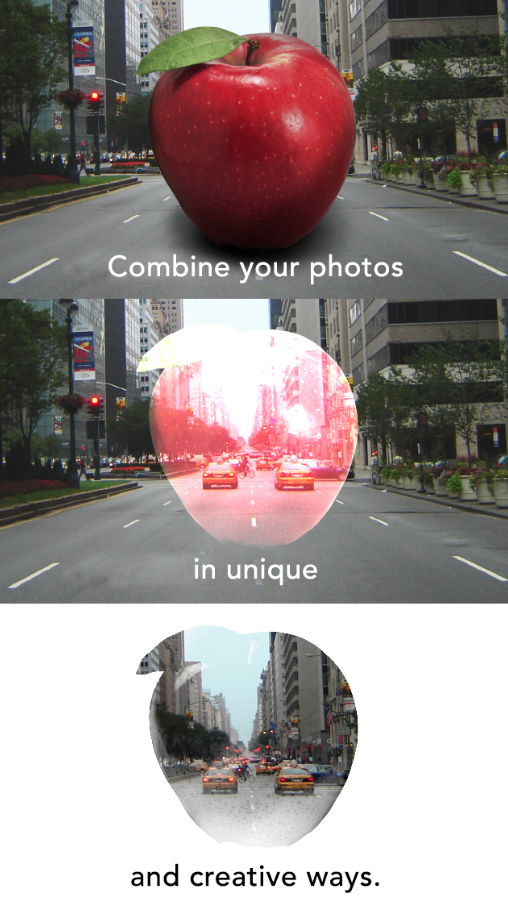
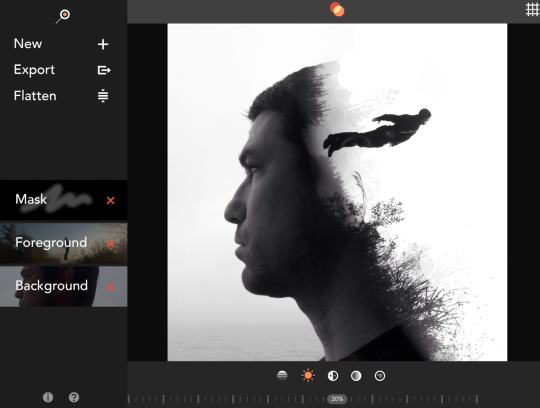
Union artists can create superimposed, silhouetted, and double-exposure edits from their iPhones or iPads by combining images for surreal and sometimes radically creative compositions, while retaining uncompromising professional quality results.
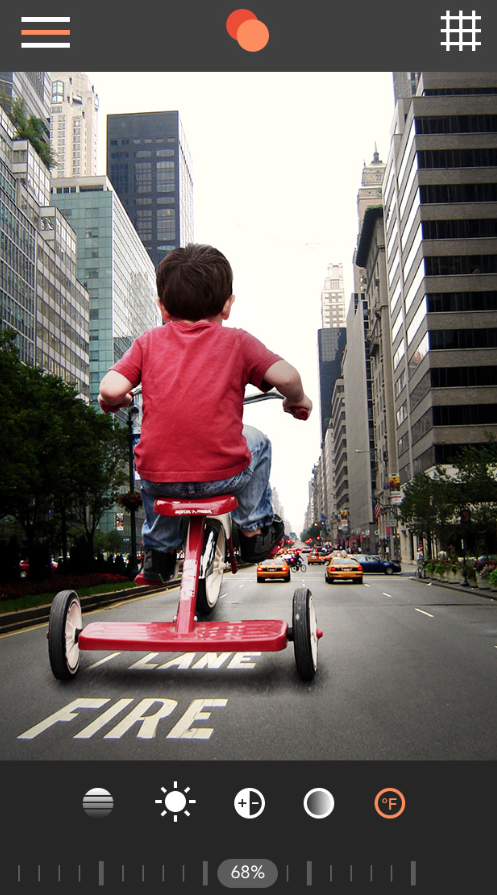
To begin, Union users load a background image, color fill, or transparent layer. Then, users load a foreground image or color fill that can be composited onto the background image. During either or both processes, users can make adjustments for brightness, contrast, color temperature, and saturation levels with a precision-focused slider.
In the final step, users add a mask layer that dictates the parts of the foreground to be erased to create the final blended image. Since the mask layer is non-destructive and separate from the foreground image, users don’t have to worry about permanently erasing or losing any parts of the foreground. Additionally, users can swap out the foreground and retain the mask that they have been working on.
Editing supports both broad and minute adjustments for foreground image position and size, creating tight, smooth blending for an organic finish. Highly precise tools erase unwanted image sections for seamless background and foreground integration.
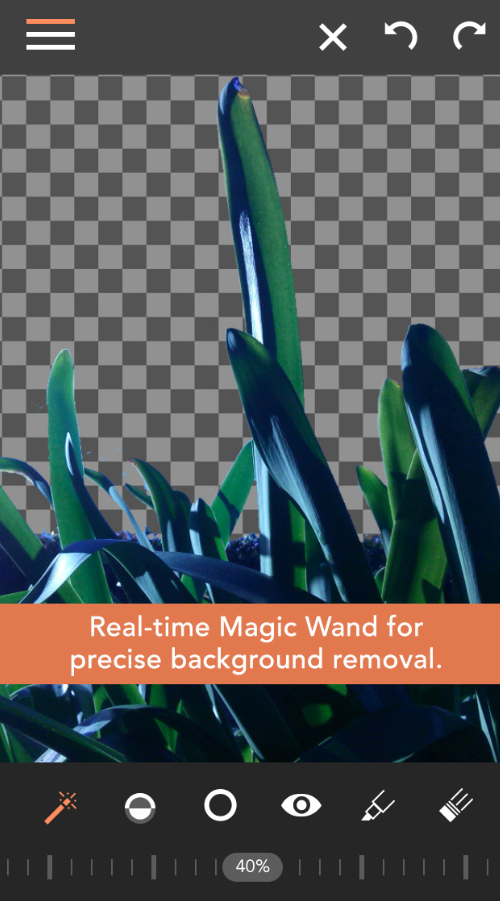
One of Union’s tools that has been optimized for mobile editing, the Magic Wand, is unique among those offered by other apps by allowing real-time adjustments, which drastically reduces time-consuming back-and-forth editing. Using Union’s Magic Wand, photo artists can complete both larger-scale sections and minute erasures with simple tap-delete functionality.
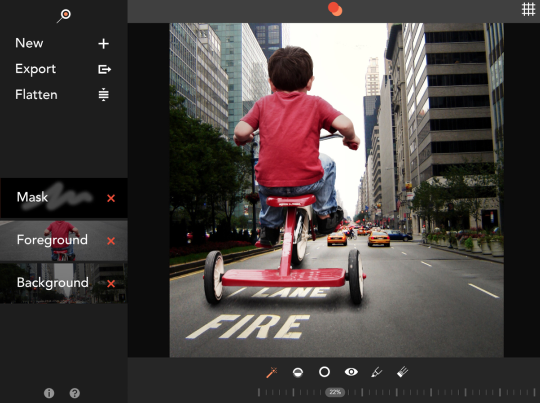
For up-close detailed work, the brush tool’s solid, gradient, and square brush options coupled with zoom-adjustable brush size give the users unmatched flexibility and precision. Used together with the Highlight tool, which clearly shows the masked areas using a semi- transparent red overlay, Union allows users to achieve pixel-perfect blending.
On top of its exceptional masking tools, Union brings a whole new level to blending by including shape and image loading for masks. Instead of starting from a blank mask layer, users can select from various geometric shapes or convert any photo in the Camera Roll into a high contrast black and white image to be used as a mask, offering opportunities for silhouetted compositions that weren’t previously possible.
Finished Union images can be saved in full-resolution format, exported, and shared on Instagram, Facebook, Twitter or via email.
Union can be used on its own or in tandem with other apps in the Pixite suite, including Tangent and Fragment. Both have already created big footprints in the iPhonography community–Tangent was named one of App Store Best of 2013 and Fragment topped the Photo & Video category charts–earning a loyal following while pushing the limits of mobile artistry.
To function more symbiotically with Union, both Pixite apps received fresh updates— making room for Tangent 1.6 and Fragment 1.3.
Overall, it’s a powerful vote for Union’s clean, uncluttered interface that gets out of the way so that users can focus on editing artistry and creative vision. Among Union’s enhancement options:
• Combining background and foreground images, then isolating a desired section
• Advanced real-time masking with specialized, high-precision erasure
• Both shape and image based masking with image adjustment, scaling and blending
tools
• Easily produced superimposed, silhouetted, and double-exposure effects for radically
surreal, spacious compositions
“It’s super easy for the hobbyist, but it has the deep tools a professional expects,” Guerrette said. “It covers both spectrums. There are both commercial and recreational possibilities.”
Union’s design features were created based on direct feedback from photo aficionados.
“Much of what we do is inspired by the community of artists on Instagram,” Guerrette said. “We’re constantly pulling inspiration from them. We look closely at what they do in order to create tools to make their job easier.”
Device Requirements
• iPhone or iPad with iOS 7.0 or later
• 19MB
Pricing and Availability
• Union is $1.99/£1.49 and available worldwide exclusively through the App Store in the Photo and Video category as a universal app.

Joanne Carter
Joanne Carter is a British photography journalist, editor, curator, and the founder of *TheAppWhisperer.com*, one of the world’s leading platforms dedicated to mobile photography and art. Since its launch in 2009, TheAppWhisperer has become an international hub for artists of all levels to discover, learn, exhibit, and engage with contemporary photographic practice.Built on principles of inclusivity, accessibility, and artistic excellence, Joanne has spent almost two decades championing mobile photography as a serious artistic medium. Through interviews, critical essays, exhibitions, competitions, and education, she has helped shape and document the evolution of mobile art on a global scale.Her work has taken her internationally, lecturing on photography and mobile art at institutions and events including the Museum of Art in Seoul, South Korea, alongside appearances in the UK and Europe. She has served as a juror for international photography and mobile art awards across Portugal, Canada, the United States, South Korea, Italy, and the UK.Joanne is also the founder of *TheAppWhispererPrintSales.com*, one of the first online galleries dedicated exclusively to collectible mobile art, connecting artists with collectors across Europe, the United States, and Asia.Before founding TheAppWhisperer, Joanne worked extensively in print journalism and photographic publishing, including roles at a paparazzi photo agency and as deputy editor of a leading photography magazine. Her freelance journalism, criticism, and commentary have been published widely in both the UK and the US, with bylines in *The Times*, *The Sunday Times*, *The Guardian*, *Popular Photography*, *NikonPro*, *DPReview*, *Which?*, *Vogue Italia*, *LensCulture*, the *BBC*, and more recently, the *Financial Times*, where her published letters on photography continue to contribute to wider conversations around the medium.Alongside her editorial and curatorial work, Joanne’s own photographic practice has been exhibited internationally across the UK, Europe, South Korea, and the United States. Her work increasingly explores themes of grief, loss, death, memory, and the body.Her current research interests centre on grief, death, and poverty, with forthcoming postgraduate study leading towards doctoral research in these areas.Joanne is currently developing new long-form writing and photographic projects and is available for commissions, editorial projects, speaking engagements, and collaborations.Contact: joannetheappwhisperer@gmail.com)
3 Comments
Gerry Coe
This looks interesting, think I could find a good use for it.
MlS
Thanks for keeping us all up to date with exciting new apps
Mikro
Just took this new app for a spin. So far I like the magic wand but that’s about it. Juxtaposer is far more capable. So if you already own Juxtaposer this app will not add to you’r creative arsenal.
Tips for the developer, add a brush size adjustment. Add a brush monitor so users can see more precisely when masking in tight areas. These are essential as precision separates the good from the great in digital art and compositing.