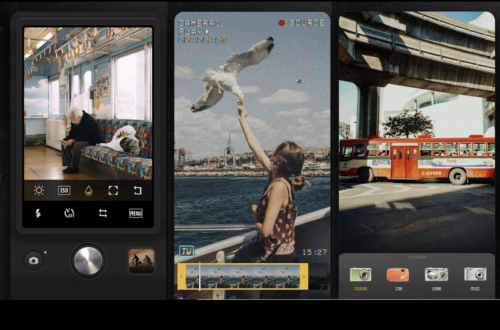
FEATURES
Daily App Digest – February 21, 2012
Latest apps and updates to hit the Apple App Store today… Name That Movie Prestige Entertainment Group LLC today is pleased to announce the release and worldwide availability of Name That Movie, their new comprehensive movie trivia game. In this quiz-based title, movie lovers will go through 5 different rounds, testing their knowledge of movies in all genres, master 7 ‘mini-games’ to make their way to the top of the Leaderboards, and achieve the ultimate Rank of "Hollywood Legend". Developers and movie-lovers Redwind Software have tailored Name That Movie to provide movie buffs with all kinds of movie trivia questions at just the right level of obscurity. In addition to…
iOS – Pinterest – Updated
In case you weren’t aware, Pinterest is a Virtual Pinboard. It lets you organize and share all the beautiful things you find in your life. People use pinboards to plan their weddings, decorate their homes, and organize their favorite recipes. Best of all, you can browse pinboards created by other people. Browsing pinboards is a fun way to discover new things and get inspiration from people who share your interests. And, it’s just been updated – this update includes optimization for iPhone 3G and iPhone 3GS so that makes even more users love this app. You can download Pinterest here.
iOS – SpellCraft School of Magic – Updated
SpellCraft has had a huge update now to 1.1 and brings with it new customization options, a money-growing magical plant, re-tuned difficult and various interface improvements. After closely monitoring play sessions in the last two months, the developers, Appy have taken note of where players have been having difficulty — where the game gets too hard, or a monster is too challenging. One way to address that was to rethink the Health sub-system. Rather than letting players get in over their head and then have to burn through their cash with healing potions, players can now brew healing spells ahead of time, and save the potion option for emergencies.…
iOS – Pokertini: Video Poker With a Twist – New
Smappsoft today announced the release of Pokertini: Video Poker With A Twist for the iPad, iPhone and iPod Touch. This new title, recently featured at MacWorld/iWorld, brings the classic casino favorite to a whole new level with a detailed and exciting strategic overlay. In Pokertini: Video Poker With A Twist, players simultaneously play three independent video poker hands, and arrange their simulated bets to maximize payoffs on favored hands. In addition, they use strategic twists to manipulate their cards to improve their hands and odds of winning. Along the way, they earn badges and unlock new twists, keeping the game challenging and exciting. Free/download Features – -Free download from the iTunes App Store – -Strategically arrange your bet across three…
Android – LoonaPix Effects – Updated
LoonaPix Effects for Android has recently been update, it’s a free photo manipulation app that lets users create funny photo effects by inserting a photo of choice into one of 200 fancy photo templates, such as currency, magazine covers, movie posters, paintings and paparazzi shots. The app is easy to learn and use and does not require design skills. Here’s what you do to create your first fancy picture. Step one is to choose a photo template to be used from the app’s collection. Step two is to select the image from the phone’s gallery and upload to LoonaPix Effects. Then the app embeds that photo to the selected template…
iPhoneography – Kinotopic – Updated With 12 New Filters
Kinotopic allows you to make still photographs in which a minor and repeated movement action occurs. This is an outstanding update bringing with it 12 new filters to make your kinos (otherwise known as cinemagraphs) look really great, there’s also the addition of smoother kinos with more frames per second on all devices (except iPod Touch). There’s been a bug fix for an error that occurred when tapping connect via email from Create Kino and there’s a fix to a processing crash when recording a video. This app is free and you can download it here.
iPhoneography – Image Blender – Updated
Image Blender is a great iPhoneography app allowing you to blend images together with blending modes including Multiply, Overlay, Screen and more. This leads in turn to allowing you to create your own personalized filters as well as allowing you to create double exposures with control. This update includes bug fixes and speed improvements as well as a single tap on preview for editing. This is a free update but if you haven’t already purchased this app you can do so here. It retails for $1.99/£1.49/download. Different Blend Modes Mask & Arrange
iPhoneography – King Camera – Volume Shutter Removed – At Apple’s Request
We have looked at King Camera many times, perhaps most notably on dpreview.com, you can read that review here. Well, the very friendly developers behind King Camera have just published an update to this popular app. This update, 2.5.2 now removes the volume shutter feature, as requested by Apple, although the developers are fighting hard to get this back. There’s also been a few other changes, there’s a new feature that allows for simultaneous multiple photo import and there’s also another new feature which allows you to share images in high resolution to Facebook, Twitter and Flickr. Not only that, a few bug fixes and additional stability fixes have also…
Kubota Lighting Notebook – 101 Lighting Styles and Setups for Digital Photographers by Kevin Kubota and Kubota Image Tools – Currently Free
The Lighting Notebook app is a companion to the bestselling printed book by Kevin Kubota, "Kevin Kubota’s Lighting Notebook: 101 Styles and Setups for Digital Photographers", published by Wiley. The book was given Amazon’s Top Book’s of 2011 award in the Arts & Photography category and PPA recognized it with a 2012 Hot One Award for Best Photography Book. This app is geared towards portrait photographers looking to learn and improve their location lighting skills, and will be highly educational to professional, serious amateur, or emerging photographers as well. The App is free, and includes 5 lighting scenarios. There is an in-App option to purchase the full version with all…
Daily App Digest – February 20, 2012
Latest apps and updates to hit the Apple App Store today… Chronosoft Pro FDBI has released Chronosoft Pro 1.3, its sports based timing application for iPhone and iPod touch. Chronosoft Pro is the only solution functioning on this kind of device which times and displays results with digital minute format. This is only one of the many advantages of this application in the professional world. Avoiding tedious manual inputs is certainly the greatest benefit of using Chronosoft Pro. Yes, you heard correctly: No manual input. Timing in the traditional way requires: * Timing in the workshop with a classic stopwatch, then writing the results on paper. This is the first…