
Why The Home Button Is Essential To Apple iPad 2 And iPhone 5
There’s so much talk of Apple removing the home button from the iPad 2 and iPhone 5, see our earlier report here
Many users though are unaware of what the Home button does, apart from the obvious and return you to the Home Screen. It also has some quite hidden features. Find out more below.
Double Click Trick
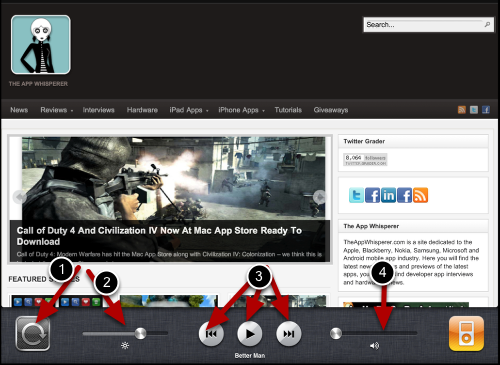
By double-clicking the home button on your iPad it takes you to the Adjustment screen for your iPad. From here, if you scroll back once you will then see a similar screen to the above.
From this position, you can click the first icon on the left to lock the screen orientation, so the screen doesn’t keep moving around when you rotate the iPad.
The second icon allows you to adjust the brightness of the screen. This is a much easier way of adjusting the brightness than coming out of the app you are in and going to the Settings menu, then Brightness and Wallpaper and adjusting it there.
As a point of note though if you are reading a book from the iBooks app you can further adjust the brightness of the iPad within that. From the iBook menu it is possible to adjust the brightness to a very minimal level, allowing you to read a book without disturbing others around you.
Thirdly, the double click trick allows the user to play music/podcasts from the iPod facility, and forward or reverse to the next track.
Fourthly, the volume of the iPod can be adjusted and this also doubles up as a volume adjuster for other apps that you are currently using.
Triple Click Trick
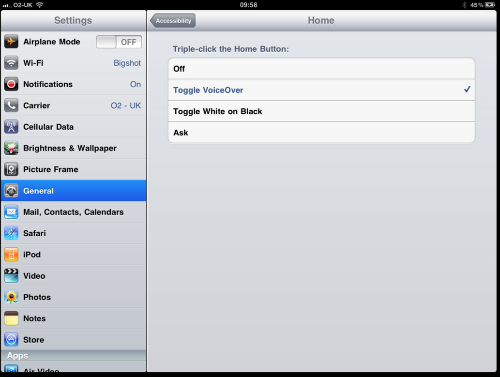
Double clicking the Home button is just one trick but did you know that by triple clicking it you can specify specific settings for other users of the same iPad. Triple clicking the Home button allows access to the Accessibility Options. From there you Turn VoiceOver On, Turn Zoom On, Turn White on Black On.
The trick is that the Triple Click allows the Accessibility Options to return to default. So if you have a user in the house that prefers to view the iPad with Black On, any of the other functions, by clicking the home screen three times allows for automatically to reset it again.
This is a fantastic option for users that share an iPad, particularly with someone with disabilities.
With both the double click and the triple click tricks the user is accessing the Settings menu of the iPad but without physically having to exit the app they are in and then adjusting the Setting, then returning to the app.
Could we really manage without the Home Button on the iPad 2 and iPhone 5?

Joanne Carter
Joanne Carter BA (Hons), ARPS is a British photographer, photography journalist, editor and curator, and the founder and editorial director of TheAppWhisperer.com, an independent international photography publication established in 2009.She holds a First Class Honours degree in Photography and is an Associate of the Royal Photographic Society (ARPS).Her journalism, criticism and editorial work have appeared in The Times, The Sunday Times, The Guardian, Financial Times, BBC, Vogue Italia, LensCulture, Popular Photography and NikonPro, among other international publications.Through TheAppWhisperer, she brings together academic knowledge, professional photographic expertise and more than 17 years of specialist editorial experience to examine contemporary photography, mobile imaging, computational photography, photographic applications and emerging imaging technologies.



One Comment
Rob
Looks like a new iPad 2 case shows a place for the home button:
http://www.appleinsider.com/articles/11/01/18/exclusive_chinese_supplier_floating_ipad_2_case_with_possible_sd_card_and_mini_displayport.html
So we probably have at least another year until the home button goes away (if ever). Apple probably wants to see if people pick up on gestures (or at least train us to use gestures) before they go and remove the home button. If you wish you iPad, iPhone, or iPod touch didn’t have a home button because your kids press it all the time, get a BubCap.com home button cover!