Best Free Android Photography Apps (No Subscription)in 2026
The apps that still give you control — without locking you in
There is a quiet shift happening in mobile photography. As more apps move toward subscriptions and bundled features, a smaller group continues to offer something different: control without commitment.
The best free Android photography apps in 2026 are not limited versions of paid tools. In many cases, they are complete, focused applications that allow you to shoot and edit without interruption.
If you are building a serious Android photography workflow, these free tools still hold up.
Snapseed – Best Free Photo Editing App for Android

Snapseed remains one of the best free photo editing apps on Android. What sets it apart is not just the range of tools, but the way they are presented. Everything is deliberate, and nothing feels excessive.
Selective adjustments, healing tools and tonal controls allow for precise editing without forcing you into presets or automated looks. It is one of the few apps that still feels like it expects you to make decisions rather than accept suggestions.
Download Snapseed:
https://play.google.com/store/apps/details?id=com.niksoftware.snapseed
Open Camera – Best Free Camera App for Manual Controls

Open Camera is one of the most powerful free camera apps on Android, particularly for those who want full manual control. It offers features typically reserved for paid apps, including manual ISO, shutter speed, focus control and RAW capture.
The interface is functional rather than polished, but that is part of its appeal. It prioritises control over design, giving you access to the tools you actually need when shooting.
Download Open Camera:
https://play.google.com/store/apps/details?id=net.sourceforge.opencamera
Adobe Lightroom (Free Version) – Best for RAW Editing

The free version of Adobe Lightroom remains one of the strongest editing tools available on Android. While the subscription unlocks additional features, the core editing tools remain free.
Colour grading, exposure adjustments, and RAW editing tools enable a refined workflow, particularly when working with higher-quality files.
Download Lightroom Mobile:
https://play.google.com/store/apps/details?id=com.adobe.lrmobile
VSCO (Free Tier) – Best for Film-Style Editing

VSCO’s free tier is more limited than it once was, but it still offers something distinct. The presets available without subscription are restrained, and the editing tools encourage a more subtle approach.
It is less about correction and more about interpretation. The results tend to feel cohesive rather than over-processed.
Download VSCO:
https://play.google.com/store/apps/details?id=com.vsco.cam
Google Photos – Best Free AI Photo Editing App

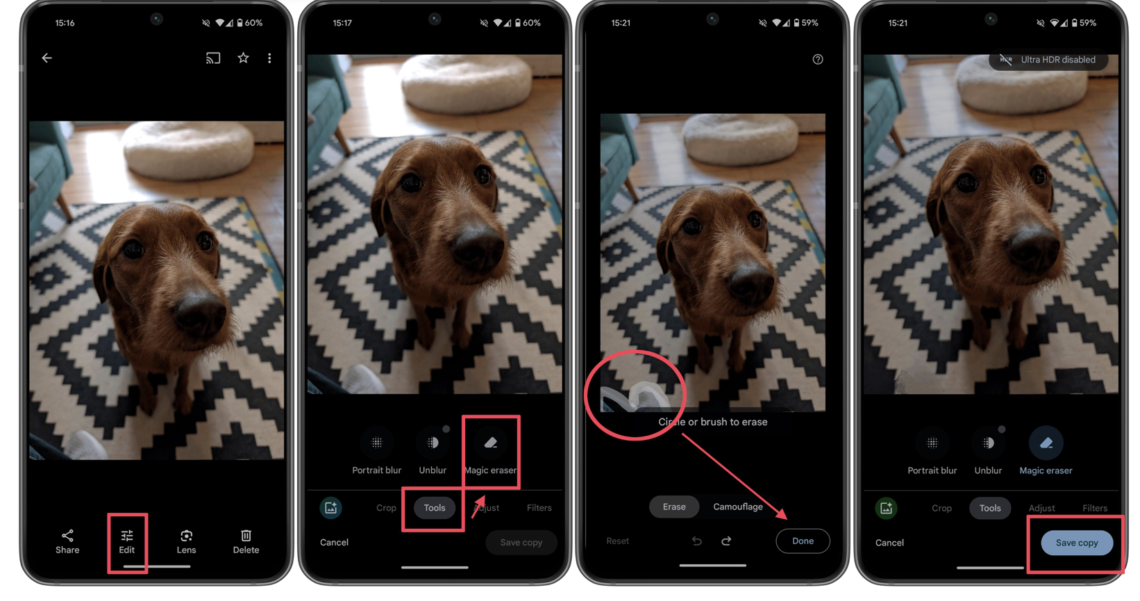
Google Photos is one of the best free AI photo editing apps on Android. Features such as Magic Eraser, auto-enhancement and intelligent suggestions allow for quick adjustments without needing a separate editor.
It is not built for precision work, but it is extremely effective for speed and everyday editing.
Download Google Photos:
https://play.google.com/store/apps/details?id=com.google.android.apps.photos
What These Free Android Photography Apps Offer
What connects these apps is not just that they are free. It is that they avoid locking you into a system.
There are no aggressive paywalls, no constant prompts to upgrade, and no pressure to edit in a particular style. You are free to build your own workflow, moving between apps as needed.
Building a Free Android Photography Workflow
A simple Android photography workflow using free apps might look like this:
- Capture: Open Camera
- Edit: Snapseed or Lightroom
- Style: VSCO
- Quick edits: Google Photos
Each app does its job without trying to replace the others.
Final Thoughts
Free apps are often treated as entry points, something to move beyond. But in 2026, some of the most reliable tools are still the ones that ask the least from you.
They give you control, remain consistent, and allow you to focus on the image rather than the software.
You may also be interested in our other best guides to mobile photography
Best AI Photo Editing Apps in 2026
Best Android Photography Apps – 2026 Edition
Best Manual Camera Apps for Android (2026) – DSLR Control on Your Phone
Best Mobile Photography Apps (2026 Edition)
Best long-exposure eApps for iPhone 2026 edition
Best Camera Apps to Reduce iPhone Processing (2026 Edition)
The Best Camera & Editing Apps for Android – Tested and Updated – 2026 Edition
• Best Mobile Photography Apps (2026 Edition)
• Best Camera Apps to Reduce iPhone Processing (2026 Edition)
• Best Mobile Filmmaking Apps (2026 Edition)
• Best Black and White Photography Apps for iPhone (2026 Edition)
• Best Portfolio Apps and Websites for Photographers (2026 Edition)
• Blackmagic Camera Settings Guide
• Best way to use Blackmagic’s camera remote control (2026)
• Snapseed vs Lightroom Mobile
• Best iPhone Camera Apps for Photographers
• 10 Apps Secretly Draining Your Phone’s Battery – 2026 Edition
• Best Way To Create More Dynamic Travel Photos with Lightroom on Mobile
___________________________________________
Please support us
TheAppWhisperer has always had a dual mission: to promote the most talented mobile artists of the day and to support ambitious, interested viewers worldwide. Over the years, TheAppWhisperer has gained readers worldwide and created new spaces for that exchange.
All this work thrives with the support of our community. Your support helps protect our independence, and we can keep delivering open, global promotion of mobile artists. Every contribution, however big or small, is valuable for our future.

Joanne Carter
Joanne Carter is a British photographer, photography journalist, editor and curator and the founder and editorial director of TheAppWhisperer.com, an independent international photography publication established in 2009.Her journalism, criticism and commentary have appeared in The Times, The Sunday Times, The Guardian, Financial Times, BBC, Vogue Italia, LensCulture, Popular Photography, Android Magazine, NikonPro, DPReview, Which Digital Camera and Which Camera. She has lectured internationally on photography and mobile art, served as a juror for international photography awards, and exhibited her own photographic work across the UK, Europe, South Korea and the United States.Alongside her editorial work, Joanne's photographic and postgraduate research explores death, grief, memory, representation and social inequality through contemporary photography, participatory practice and visual research methods, with the longer-term aim of developing this work through doctoral research.Through TheAppWhisperer, she continues to publish independent photography journalism spanning contemporary photographic practice, mobile imaging, photographic apps, computational photography and emerging imaging technologies.Joanne is available for editorial commissions, photography projects, judging, curatorial work, speaking engagements, consultancy and selected collaborations.