10 Photography Apps That Solve Problems You Didn’t Know Your Phone Could Solve
From Predicting the Perfect Photograph to Replacing Paperwork, These Clever Apps Turn Your Smartphone Into a Serious Photographic Toolkit
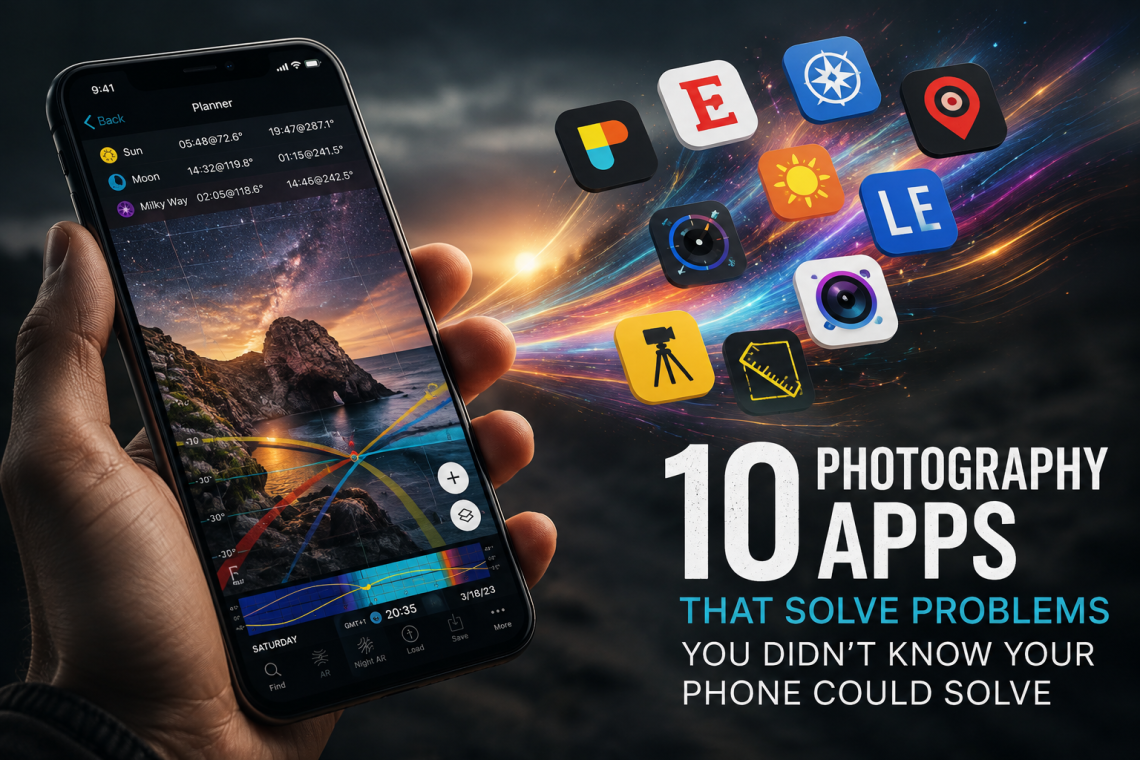
There are photography apps that edit photographs, photography apps that take photographs and photography apps that tell us when the sun is going to set. We know those. But buried deeper in the App Store is another, considerably more interesting category: applications designed to solve the oddly specific problems photographers encounter before, during and after making a photograph.
These are the apps that can tell you whether a particular lens will give you the composition you want before you even take the camera out of its bag. They can work out how long to expose through a ten-stop neutral-density filter, predict when the weather and light at a location will finally come together, calculate exactly where acceptable sharpness begins and ends, turn a model release into a signed PDF before you leave the shoot, or create a permanent visual database of locations you may not return to for months.
None of this sounds as glamorous as the latest AI filter, but that is precisely what makes these applications interesting. A smartphone is packed with cameras, GPS, accelerometers, processing power, connectivity and an extraordinarily accurate clock. Used imaginatively, all of that technology can solve photographic problems that have remarkably little to do with smartphone photography itself.
Here are ten applications that demonstrate just how useful the phone in your pocket can become.
1. Cadrage — See Through a Camera and Lens You Don’t Have With You

Location scouting usually presents photographers with an irritating problem. You find a potentially interesting location, but the camera and lenses you intend to use for the finished photograph are somewhere else. Looking through the phone camera gives you an impression of the scene, but it does not necessarily tell you what your chosen camera and lens combination will actually see.
Cadrage turns the iPhone into a professional director’s viewfinder. Select a camera, sensor or film format and lens, and the app provides a framing preview based on that combination. Its database contains thousands of cameras and lenses, while custom frame lines and aspect ratios allow photographers to visualise compositions for less conventional requirements. Photographs and video previews can be saved, and locations can be developed into organised projects and PDF shot lists.
Although director’s viewfinders are traditionally associated with cinematography, the principle is enormously useful for still photographers. An architectural photographer can determine whether a particular focal length will encompass a building before returning with equipment. A portrait photographer can scout backgrounds. A landscape photographer carrying several heavy lenses can investigate a composition without repeatedly changing them. For medium-format photographers, in particular, the ability to walk around a location with nothing more than a phone and preview the framing of a much larger camera can be remarkably liberating.
The problem it solves: Knowing which camera and lens combination you will need before unpacking — or even bringing — the equipment.
2. Photo Scout by Cascable — Let Your Phone Wait for the Photograph

Photographers have become accustomed to checking weather forecasts, sunrise times, cloud cover and other conditions before travelling to a location. Photo Scout reverses that relationship. Instead of repeatedly asking whether conditions are right, you tell the application what you are waiting for and allow it to watch the location for you.
A saved photographic scene can contain requirements relating to weather, cloud cover, temperature, wind, time of day and other conditions. Photo Scout continuously evaluates those requirements and can send a notification when the opportunity you described is approaching. It can also assess conditions at unfamiliar locations and offer photographic suggestions, making it particularly useful when travelling.
This sounds like a relatively small change, but conceptually it is rather clever. Photographers normally organise themselves around forecasts. Here, the forecast is being organised around the photograph. You might identify a coastal location that only works with broken cloud, low wind and evening light, save those requirements and get on with something else until the phone tells you that the combination is finally approaching.
For photographers working on long-term landscape projects, this could transform location planning. The smartphone stops being something you constantly consult and becomes something that quietly waits on your behalf.
The problem it solves: Repeatedly checking whether the conditions for a photograph you have planned are finally going to happen.
3. SetMyCamera — Work Backwards From the Photograph You Want

Most depth-of-field calculators work in the same direction: enter the camera, focal length, aperture and focus distance, and they tell you what should appear acceptably sharp. SetMyCamera includes that conventional calculation, but one of its more interesting tools reverses the process.
Tell it where you want acceptable focus to begin and end, and it can help determine the photographic settings required to achieve it. That is a much more intuitive way of thinking when the photograph already exists in your head. Instead of asking, “What depth of field will f/8 give me?”, the question becomes, “I need everything from this foreground rock to that tree to be sharp — how do I achieve it?”
The application goes considerably further. It includes field-of-view visualisation, angle-of-view calculations, exposure and neutral-density calculations, flash configuration, shutter-speed recommendations, print-resolution calculations, support for accessories including bellows, extension tubes and teleconverters, and an extensive camera database. It can even help calculate the effect of some of the physical additions photographers attach between lens and camera.
It is the sort of application that initially looks like a calculator and gradually reveals itself as a compact technical reference library.
The problem it solves: Translating the photograph you have planned into the camera, lens, focus and exposure settings required to make it.
4. Easy Release — Put the Model Release Inside the Camera Bag You Never Forget

There are few pieces of photographic equipment less exciting than a model-release form, which may explain why it is so easy to arrive at a shoot without one. Unfortunately, remembering that somebody should have signed a release after everybody has gone home is considerably less amusing.
Easy Release replaces the paper form with a release created and signed directly on an iPhone, iPad or Android device. Model and property information can be entered on location, signatures captured on screen and a photograph of the person or property attached to the document. The completed release can then be generated as a PDF and saved or distributed digitally.
The application includes multiple release translations and is accepted by major stock agencies including Getty Images, iStock, Shutterstock, Alamy and others. For photographers working internationally, that combination of portability and multilingual documentation is particularly useful.
This is an excellent example of the smartphone solving a photographic problem without touching the photograph itself. Nobody is going to buy a phone because it can replace a clipboard, but on the day you need a legally useful release and the clipboard is sitting at home, it may feel like one of its best features.
The problem it solves: Creating, signing, storing and retrieving model and property releases without carrying paperwork.
5. Long Exposure Calculator — Stop Counting Stops in the Dark
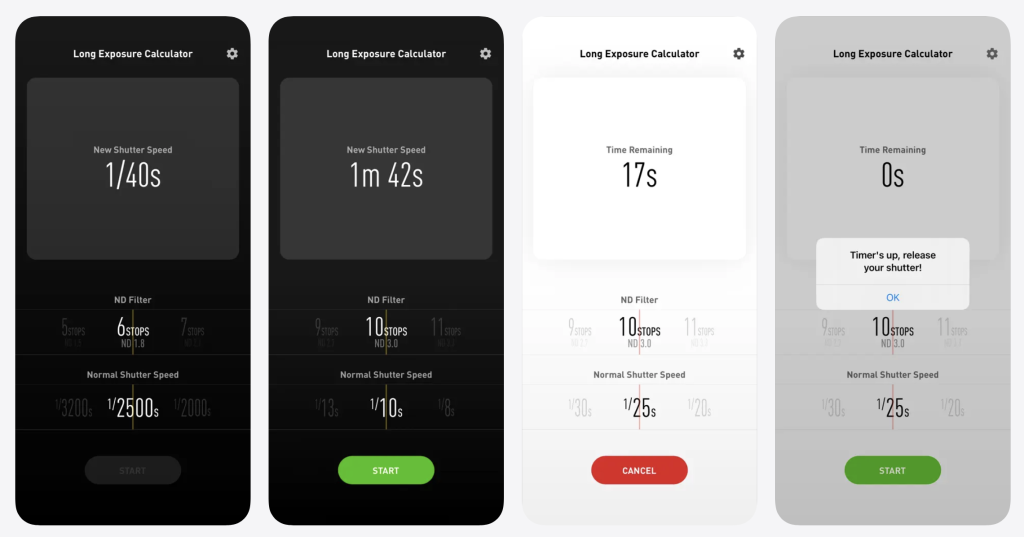
Neutral-density filters create one of photography’s more peculiar practical problems. You meter the scene without the filter, attach a piece of dark glass that may reduce the light by six, ten or even fifteen stops, and suddenly a perfectly manageable shutter speed becomes an exposure measured in seconds or minutes.
The arithmetic is straightforward until you are standing beside a tripod in fading light trying to remember whether a ten-stop filter turns 1/30 second into 30 seconds or something considerably longer. Long Exposure Calculator does the arithmetic instead. Enter the unfiltered exposure and the strength of the ND filter and the application calculates the corrected exposure time.
The real benefit is not that photographers are incapable of calculating exposure shifts. It is that photographic conditions change while we are calculating them. During sunrise or sunset, light levels can move surprisingly quickly, and eliminating unnecessary mental arithmetic means more attention can remain on the photograph.
For architectural, landscape, seascape and fine-art photographers using strong neutral-density filters to remove people, smooth water or alter the appearance of clouds, this is one of those tiny utilities that earns its place on a phone precisely because it does one thing quickly.
The problem it solves: Calculating multi-stop ND-filter exposures without mental arithmetic, charts or guesswork.
6. ShotSpot – Never Forget a Photography Location Again

You know the situation: you pass a location and immediately think, I need to come back here with a camera. A few weeks later, you can remember the place but not exactly where it was.
ShotSpot turns your iPhone into a simple photographic location notebook. Drop a pin with a tap, or take a photograph and the app can associate it with that location automatically. Locations can then be supplemented with photographs, notes, tags and categories and organised into folders, gradually building your own private map of places worth returning to.
It is a deceptively useful idea because location scouting doesn’t always happen when you’re deliberately scouting. Interesting backgrounds, buildings, viewpoints and fragments of landscape are often discovered while doing something completely unrelated. ShotSpot gives those discoveries somewhere to live until you’re ready to photograph them properly.
The problem it solves: “Where exactly was that place I saw three months ago?”
7. SunOnTrack — See the Shadow Before It Exists

Knowing where the sun will be is useful. Knowing what its position will actually do to the shadows within a location can be considerably more useful.
SunOnTrack allows users to examine the sun’s path and position for locations around the world, but its particularly interesting feature for photographers is shadow prediction. The application can visualise the direction and length of shadows and demonstrate how they change according to time of day and season, both on maps and through augmented reality.
For architectural photography, this can answer questions that a simple sunrise-and-sunset table cannot. When will the front of a building emerge from shadow? How far will the shadow of the building opposite extend across the street? Will a particular structure cast a useful geometric shadow at 4pm, and how different will it look three months later?
Street photographers can use the same information to anticipate pools of light and shadow before arriving, while portrait photographers can assess whether a planned outdoor location is likely to provide the light they need. The phone is effectively allowing you to inspect a future version of the location.
The problem it solves: Predicting not merely where the sun will be, but where the shadows will fall.
8. myLightMeter PRO — Turn a Phone Into a Meter for a Camera Made Decades Ago

There is something wonderfully incongruous about placing a modern iPhone beside a camera manufactured half a century ago and allowing one to solve a problem for the other. Many beautiful mechanical cameras have no functioning light meter at all; others contain meters that have become unreliable with age. The camera itself may remain perfectly capable of making photographs.
myLightMeter PRO turns the phone into a reflected or incident exposure meter with control over aperture, shutter speed, ISO and exposure compensation. It supports unusually broad exposure ranges, including very low-light situations, and can average multiple measurements where a scene requires more considered metering. It also includes point metering, lens memory and hyperfocal-distance tools.
For incident metering, the developer notes that a diffuser is required over the phone’s front camera, but even as a reflected meter, the application demonstrates an intriguing relationship between photographic generations. The most sophisticated electronic device in the photographer’s pocket can extend the practical life of a completely mechanical camera rather than replacing it.
That is one of my favourite uses of mobile photographic technology: new technology supporting old technology without demanding that the older process disappear.
The problem it solves: Providing an exposure meter for vintage, mechanical and meterless cameras without carrying a separate handheld meter.
9. Photo Measures — Put the Dimensions Into the Photograph

This is not marketed primarily as a photography application, which is exactly why it belongs in this collection. Photo Measures allows dimensions, arrows, angles and notes to be placed directly onto a photograph, turning an ordinary reference image into a visual measurement record.
For studio and commercial photographers, that can be surprisingly useful. Photograph the dimensions of a shooting space while location scouting. Record the width of a wall intended for an exhibition print. Note the distance available for a backdrop, the dimensions of a product, the size of a window or the amount of space around a piece of furniture before returning with lighting equipment.
Photographers frequently make reference photographs that are not intended to become photographs in the artistic sense at all. They exist to remember how a location was arranged, where equipment could stand or how large something was. Adding measurements directly to those images makes them considerably more useful than a collection of unexplained phone snapshots several weeks later.
It is a reminder that some of the best apps for photographers are not labelled “photography” anywhere near prominently enough.
The problem it solves: Remembering physical dimensions from a location scout, studio setup, exhibition space or commercial shoot.
10. PhotoPills — Ask “Can This Photograph Exist?” Before You Travel There

PhotoPills is better known than some of the specialist applications in this collection, but it earns its place because of the extraordinary question it can answer: if you can imagine a photograph involving the Sun, Moon or Milky Way, can the geometry of the real world actually make it possible?
The application combines maps, astronomical information and augmented reality to show where the Sun, Moon, Milky Way and other celestial features will appear from a particular position at a particular time. That means a photographer can work backwards from an imagined composition. If you want a full moon rising beside a church tower, the application can help determine where you need to stand and when the alignment will occur. If you want the Milky Way positioned above a landscape feature, you can investigate the possibility before travelling to the location in darkness.
It also includes depth-of-field, field-of-view, long-exposure, time-lapse, star-trail and hyperfocal tools, but its real power is planning. The photograph can begin long before the camera leaves the bag.
This changes the relationship between luck and preparation. Extraordinary natural alignments still feel magical when they happen, but increasingly the photographer can know that they are going to happen — and be standing in precisely the right place when they do.
The problem it solves: Determining whether an imagined Sun, Moon or Milky Way photograph is physically possible — and exactly where and when to make it.
Your Phone Is More Than a Camera
What connects these applications is that relatively few of them are primarily concerned with taking a photograph on the phone. Instead, they exploit everything else a smartphone has become: a GPS receiver, compass, light sensor, calculator, database, augmented-reality viewer, weather terminal, notebook, communications device and portable computer.
That is an important distinction in the continuing discussion around mobile photography. We often measure the photographic significance of smartphones according to camera specifications: sensor size, megapixels, lenses, computational processing and image quality. Yet for many photographers, the phone has quietly become just as important when it is not being used as the camera at all.
It can scout for a medium-format camera, meter for a Leica manufactured before the smartphone existed, predict the shadow that will cross a building next month, calculate an exposure behind a piece of ten-stop glass, remember a location discovered three years earlier and produce the paperwork required after photographing somebody there.
Those may not be the features that sell phones, but they can make them extraordinarily useful photographic tools.
TheAppWhisperer’s Picks
If I were choosing purely on the basis of solving problems in unexpectedly clever ways, Photo Scout is perhaps my favourite. There is something rather wonderful about telling the phone the photograph you are waiting for and allowing it to watch the conditions until the opportunity arrives. Cadrage is an equally compelling example of the smartphone becoming a companion to a completely different camera system, while MapAPic is the application whose value potentially grows for years as a photographer builds an increasingly personal archive of locations.
SetMyCamera deserves particular mention for the sheer range of photographic mathematics it manages to put into a usable form, while Easy Release wins on sheer practicality. It may be considerably less exciting than predicting the Milky Way, but discovering that every signed release from a shoot is safely stored is the sort of excitement professional photographers learn to appreciate.
The Bigger Picture
Perhaps the most interesting thing about these applications is that none of them promises to make a photographer creative. They solve problems, provide information and remove uncertainty, but they do not decide what is worth photographing.
That feels increasingly refreshing. At a time when photographic software is often marketed according to how much of the creative process it can automate, these apps take a different position. They assume that the photographer already has an idea and ask a much more useful question: what information do you need in order to make it happen?
Sometimes the answer is where the Moon will rise. Sometimes it is which lens to pack, how long to expose, where the shadows will fall or whether somebody signed the release form.
And sometimes the cleverest photography app is not the one that makes the photograph at all. It is the one that removes the problem standing between the photographer and the photograph they already know they want to make.
You May Also Like
- Best Mobile Photography Apps (2026 Edition) — A broader guide to the essential capture, editing and creative photography apps available now.
- Best Photography Workflow Apps for Creators on the Move (2026) — Apps for organising the entire mobile photography workflow, from shooting through to publishing.
- Best AI Photo Editing Apps in 2026 — The AI-powered editing tools worth using and where they actually add something to the photographic process.
- Best Camera Apps Without AI Processing — For photographers who want greater control and less computational intervention.
- Best Camera Apps to Reduce iPhone Processing (2026) — Alternatives to Apple’s increasingly processed native-camera look.
- Best Long Exposure Apps for iPhone (2026) — Dedicated apps for light trails, moving water, night photography and extended exposures.
- Best Film Camera Apps for iPhone and Android in 2026 — Apps bringing analogue aesthetics and slower photographic processes to smartphones.
- Best Apps to Remove Objects from Photos in 2026 — Tools for removing unwanted people, wires, signs and other distractions.
Support TheAppWhisperer
If you’ve found this article useful and would like to support independent photography journalism, please consider making a small donation to TheAppWhisperer.
Since 2009, TheAppWhisperer has published thousands of interviews, reviews, opportunities, and essays dedicated to photography and mobile art, remaining free to read for everyone. Every contribution helps support the time, research, and editorial work that goes into producing and preserving this archive.
Your support helps keep thoughtful photography writing alive.

Joanne Carter
Joanne Carter BA (Hons), ARPS is a British photographer, photography journalist, editor and curator, and the founder and editorial director of TheAppWhisperer.com, an independent international photography publication established in 2009.She holds a First Class Honours degree in Photography and is an Associate of the Royal Photographic Society (ARPS).Her journalism, criticism and editorial work have appeared in The Times, The Sunday Times, The Guardian, Financial Times, BBC, Vogue Italia, LensCulture, Popular Photography and NikonPro, among other international publications.Through TheAppWhisperer, she brings together academic knowledge, professional photographic expertise and more than 17 years of specialist editorial experience to examine contemporary photography, mobile imaging, computational photography, photographic applications and emerging imaging technologies.