The Best Film Photography Apps for 2026: Essential Tools for Analogue Photographers
Hidden Gems, Specialist Tools and Brilliant Independent Apps for Photographers
There was a time when discovering a new photography app felt genuinely exciting. The App Store was less predictable; developers experimented freely, and photographers could stumble across a tiny piece of software that changed the way they exposed, composed, processed or simply thought about photographs. As mobile photography matured, however, the landscape became dominated by increasingly familiar names. Lightroom, Photoshop, Snapseed and the major camera applications occupy enormous amounts of attention, while a quieter ecosystem of independent developers continues building tools for photographers with very particular needs.
Some of those applications are far more interesting than their relatively modest visibility suggests. This is not another list of the biggest photography apps of 2026. I wanted instead to look beyond the obvious choices and find applications that solve specific photographic problems, encourage different ways of seeing or simply demonstrate the kind of imagination that originally made the mobile photography ecosystem so compelling. Some recreate aspects of analogue practice; others help photographers meter light, visualise lenses, record exposures or work with RAW files. Several have been created by very small development teams, sometimes by photographers building the application they wanted for themselves.
That distinction matters. Photography software does not always need another enormous AI feature set. Sometimes the most useful app on your phone is the one that performs one highly specialised task exceptionally well.
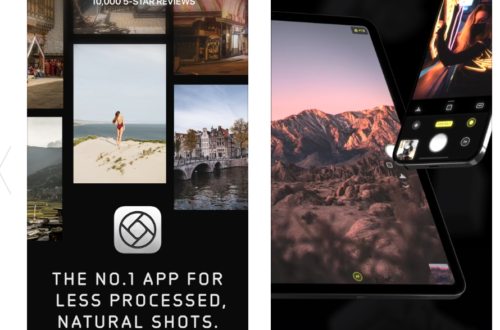
LUMA Camera & Presets — RAW Photography Without Giving Up Control
The computational camera has become one of the defining photographic technologies of our time. Press the shutter on a modern smartphone, and the resulting photograph may be assembled from multiple exposures, subjected to local tonal adjustments, sharpened, denoised and interpreted by software before we ever see it. The results can be technically extraordinary, but there remains a significant group of photographers who would rather make more of those decisions themselves.
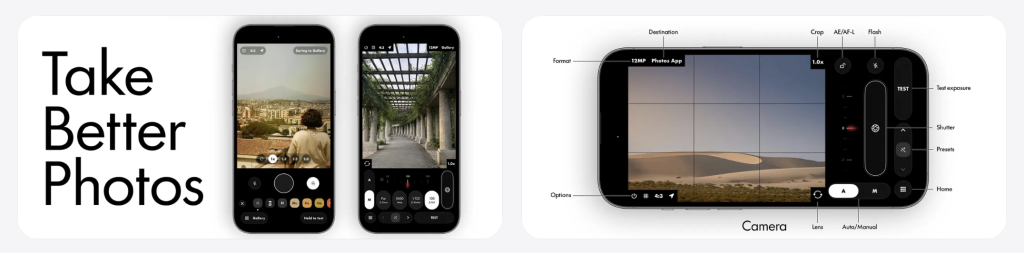
LUMA is interesting precisely because it approaches the iPhone from that direction. Developed by Rafal Kopiec, it is built around a RAW-first workflow and provides both automatic and manual exposure control. Its processing pipeline is EDR-aware and is designed to retain the extended tonal information contained in RAW files rather than immediately forcing everything towards a conventional finished smartphone image. Presets operate within that RAW pipeline rather than simply being overlaid as filters, while the Lab provides non-destructive controls for exposure, highlights, shadows, tone curves, colour grading, grain, halation and other characteristics. The original RAW file remains untouched.
What makes LUMA worth examining is not simply another collection of manual controls. It represents a different philosophy of smartphone photography: the iPhone as a photographic instrument rather than an automated image-producing appliance. The distinction may sound small, but for photographers accustomed to making deliberate decisions about exposure and processing, it is fundamental.
Best for: Photographers who want to wrest some creative authority back from the computational camera.
Film Photography Viewfinder — A Digital Companion for Very Analogue Cameras

Some of the most interesting photography apps exist because smartphones and traditional cameras can complement one another rather than compete. Film Photography Viewfinder is a particularly good example. It is designed for analogue photographers working with formats ranging from 35mm and medium format through large format, pinhole and wet-plate photography. Instead of replacing the camera, the phone becomes a tool for preparing the photograph.
The digital viewfinder allows photographers to visualise focal lengths before unpacking equipment, including support for custom focal lengths, lens image circles and movements such as rise, fall and shift. There is also a spot meter, multiple-reading averaging, an extensive aperture range and unusually specialist exposure tools. Reciprocity failure and bellows extension can be compensated for within the meter, while very low ISO settings and apertures extending to f/1024 make the application relevant to practices that most mainstream photography apps simply ignore.
That is exactly why I like applications of this kind. Nobody designing software purely for mass-market appeal would begin by asking what a wet-plate or 8×10 photographer might need from an iPhone. Yet those apparently niche requirements can produce extraordinarily useful tools. The app is also currently free, without advertising, subscriptions or locked features; its in-app purchases are optional donations to the developer.
Best for: Analogue, large-format, medium-format, pinhole and alternative-process photographers.
Light Meter & Logbook — Giving Film Photographs Their Missing Metadata
Light Meter & Logbook — App Store | Google Play

One of digital photography’s quiet luxuries is metadata. Aperture, shutter speed, ISO, focal length and often location are recorded automatically. Shoot film and much of that information disappears unless you make the effort to preserve it yourself.
Light Meter & Logbook, developed by Vadim Turko, brings those two related activities together. The phone becomes a reflected-light meter, while the accompanying logbook allows photographers to record the circumstances in which individual photographs were made. Its tools extend considerably beyond basic exposure calculation: spot metering, a histogram, ND-filter support, long-exposure timing, reciprocity correction, push/pull support, equipment profiles, pinhole settings and a library of film stocks are included. The Android version also supports incident metering using a device’s built-in light sensor, where available.
For photographers returning to negatives months or years later, that record can become surprisingly valuable. Instead of wondering which lens was used, how a particular exposure was calculated or why one frame looks markedly different from another, the information can remain attached to the photographic process. In that sense, the application is doing something more interesting than imitating a traditional light meter: it is giving analogue photography some of the organisational advantages we have come to expect from digital capture.
Best for: Film photographers who want both accurate exposure tools and a record of how their photographs were made.
Silverlog — The Analogue Photographer’s Digital Notebook

Silverlog deserves considerably more attention than its name might initially suggest. Developed by Simon Westgate, it has evolved into something approaching an operating system for analogue photography. Rolls can be logged frame by frame, including camera, lens, aperture, shutter speed, ISO and notes; development sessions can be recorded with chemistry, temperature, time and agitation information; darkroom printing sessions can be documented; equipment and film inventories can be maintained; and photographs can be organised into projects.
There is a light meter too, alongside depth-of-field tools, reciprocity information, filter factors, push/pull references, the Zone System and film-stock information. Silverlog can even analyse expenditure, including development, scanning and printing costs, while its inventory system can record purchase prices and equipment depreciation. Data can be exported as PDF or CSV, and the application is designed to remain functional offline.
The apparent contradiction is rather wonderful: using an extraordinarily capable pocket computer to support a photographic process involving film, chemistry, enlargers and handwritten traditions. But analogue photography has never required photographers to reject useful technology. Silverlog simply puts the digital device to work around the photograph rather than asking it to make the photograph.
Best for: Serious film photographers who want one place to manage shooting, film, development, darkroom work and equipment.
RNI Aero — Infrared Colour Without the Discontinued Film

RNI Aero is one of the more visually distinctive apps here. Its purpose is specific: recreating the extraordinary appearance associated with Kodak Aerochrome, the discontinued colour infrared film originally developed for aerial and surveillance applications. Vegetation rendered in brilliant reds and pinks gave Aerochrome an unmistakable visual character, and its disappearance left photographers with increasingly scarce and expensive remaining film stock.
RNI, the London-based company behind the application, developed Aero’s filters from real infrared film with the explicit aim of recreating and preserving something of that aesthetic digitally. There is an interesting photographic question embedded within that idea. Film simulation is often dismissed as nostalgia, yet once the physical material itself disappears, software can also become a means of preserving aspects of a photographic visual language. It cannot reproduce the material experience of loading and exposing Aerochrome, of course, but it can allow photographers to explore the strange inversion of colour that made infrared photography so compelling.
Used indiscriminately it could easily become an effect. Used thoughtfully, however, it offers something much more interesting: another way of destabilising our expectations of how landscape, vegetation and the natural world should appear.
Best for: Experimental photographers, colourists and anyone fascinated by infrared and false-colour photography.
Why Small Photography Apps Still Matter
The larger story here is not really about any individual application. It is about what happens when software is developed around photographic practice rather than simply around the largest possible audience. A large company has obvious advantages: resources, engineering teams, integration and the ability to develop extraordinarily sophisticated computational tools. But small developers can work at the edges. They can build an exposure calculator for somebody extending a large-format bellows. They can worry about reciprocity failure. They can design an application around recording darkroom chemistry or preserving the peculiar colour language of a discontinued infrared film. These are not necessarily features capable of attracting hundreds of millions of users, and that is precisely what makes them valuable.
Photography itself has always depended upon specialist knowledge. The history of the medium is full of photographers adapting processes, modifying equipment, keeping exposure notebooks, testing emulsions and inventing ways around technical limitations. The smartphone has not eliminated that tradition. In some respects, these applications are its contemporary continuation.
There is another reason to seek them out. App-store discovery tends to reward scale, familiarity and existing popularity. The result is that photographers searching broadly for “photo editor” or “camera” can encounter the same handful of applications repeatedly, while genuinely inventive specialist software remains almost invisible. Independent photography journalism has a role to play here. Finding those tools, testing them and placing them within a wider photographic context is far more useful than producing another list containing the same ten applications everybody already knows.
TheAppWhisperer’s Picks
If I were choosing from this group according to photographic purpose, Film Photography Viewfinder would be my specialist pick. There is something refreshingly uncompromising about an application that takes large-format movements, bellows extension, reciprocity failure and wet-plate photography seriously. Silverlog is the strongest choice for photographers deeply invested in analogue workflow, particularly those developing and printing their own work, while Light Meter & Logbook is perhaps the easiest recommendation for somebody who simply wants to begin recording exposures alongside a dependable mobile meter.
For smartphone photographers, LUMA is the one I would investigate first because its RAW-first philosophy addresses a question that becomes more significant with every generation of computational cameras: how much of the photograph do we want the device to decide for us? RNI Aero, meanwhile, wins the prize for the app most likely to send somebody down an entirely new photographic rabbit hole.
The Bigger Picture
The most exciting photography app is not necessarily the one with the longest feature list, the largest development team or the most aggressive use of artificial intelligence. Sometimes it is a tiny application that understands one particular part of photography extraordinarily well. That is worth remembering in 2026. As photographic software becomes increasingly automated, there is something encouraging about discovering applications that still assume the photographer wants to think. They help us calculate, visualise, record, experiment and prepare, but the photographic decision remains ours.
Perhaps that is the common thread running through the best apps in this collection. They do not promise to make us better photographers at the press of a button. They simply give us more interesting tools with which to work.

Joanne Carter
Joanne Carter BA (Hons), ARPS is a British photographer, photography journalist, editor and curator, and the founder and editorial director of TheAppWhisperer.com, an independent international photography publication established in 2009.She holds a First Class Honours degree in Photography and is an Associate of the Royal Photographic Society (ARPS).Her journalism, criticism and editorial work have appeared in The Times, The Sunday Times, The Guardian, Financial Times, BBC, Vogue Italia, LensCulture, Popular Photography and NikonPro, among other international publications.Through TheAppWhisperer, she brings together academic knowledge, professional photographic expertise and more than 17 years of specialist editorial experience to examine contemporary photography, mobile imaging, computational photography, photographic applications and emerging imaging technologies.