Best Android RAW Camera Apps for Serious Mobile Photography in 2026
Smartphone photography has evolved dramatically over the past few years, but one of the most important developments for serious photographers has been the rise of RAW capture on Android devices. While computational photography continues to dominate the mainstream market, RAW photography offers something entirely different — control, flexibility, tonal depth, and a far more photographic workflow.
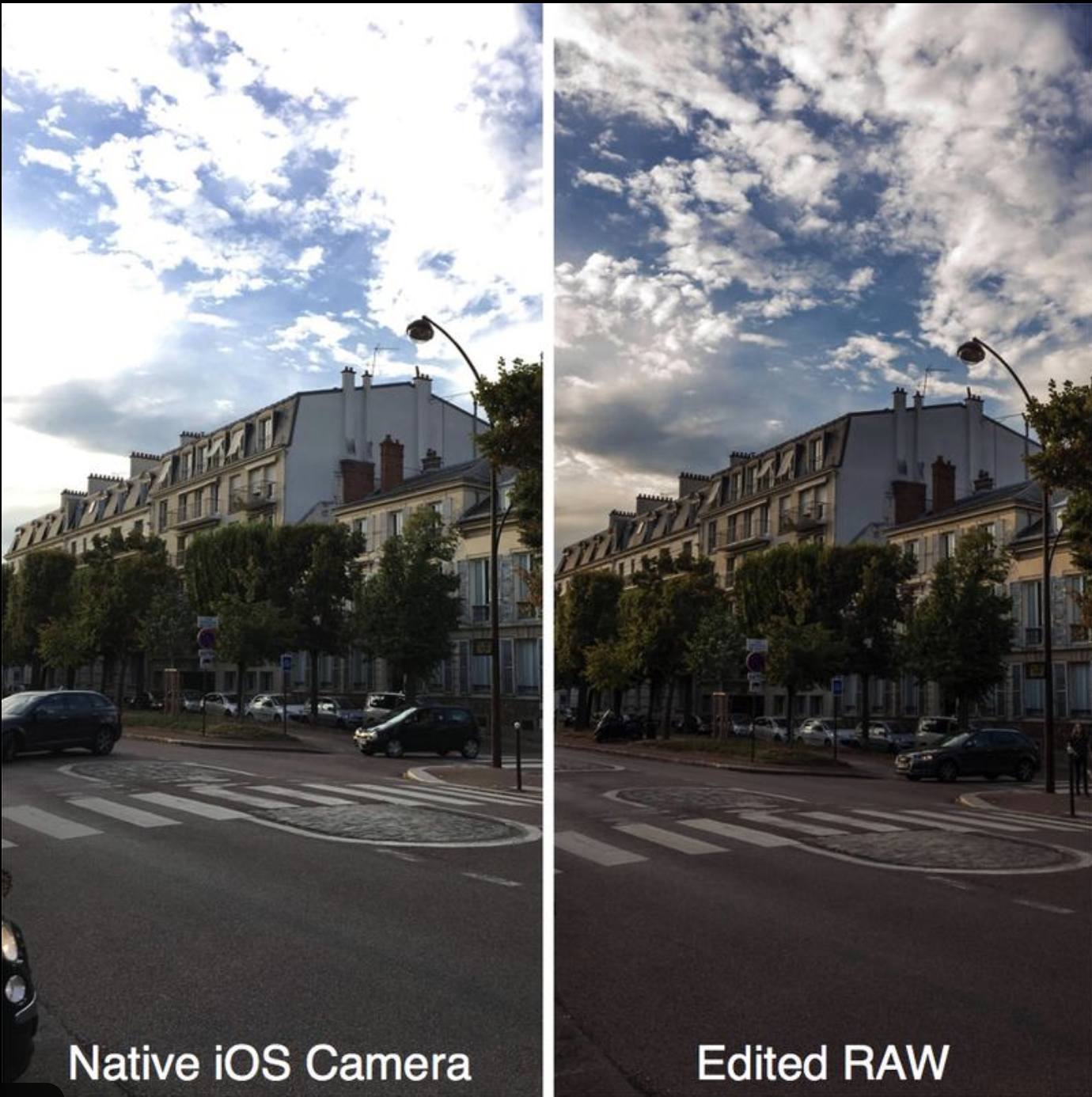
For photographers who want greater creative freedom, shooting RAW on Android can completely transform the image-making process. Rather than allowing aggressive AI processing, sharpening, noise reduction, and colour enhancement to dictate the final image, RAW files preserve substantially more image data directly from the sensor itself.
That extra information becomes invaluable during editing.
Highlights can often be recovered more successfully, shadows retain greater detail, white balance adjustments become cleaner, and colour grading feels far more natural. RAW files also preserve texture and atmosphere in ways that heavily processed JPEGs frequently destroy.
The difference is particularly noticeable in:
- Low-light photography
- Street photography
- Black and white editing
- Landscape work
- Documentary-style shooting
- Fine art photography
As Android camera hardware becomes increasingly sophisticated, particularly on devices like the Samsung Galaxy S26 Ultra and Google Pixel series, developers have responded with camera apps capable of delivering genuinely professional-level control.
Here are the best Android RAW camera apps available in 2026.
1. MotionCam Pro — The RAW Powerhouse
MotionCam Pro has become one of the most talked-about Android photography apps amongst serious mobile photographers, and for good reason.
Unlike many traditional camera apps, MotionCam bypasses much of Android’s standard image pipeline entirely. The result is remarkably clean RAW output with impressive dynamic range and far more natural rendering.
One of MotionCam’s greatest strengths is its ability to capture:
- True RAW stills
- RAW video
- Computational RAW workflows
- High dynamic range scenes
- Excellent low-light detail
Images often feel closer to dedicated camera output than standard smartphone photography. Texture, shadow transitions, and highlight roll-off appear considerably more organic than heavily processed JPEG capture.
For photographers frustrated by over-sharpened smartphone aesthetics, MotionCam can feel revelatory.
Download MotionCam Pro:
https://play.google.com/store/apps/details?id=com.motioncam
Related reading:
https://theappwhisperer.com/category/android-photography/
2. ProShot — DSLR-Style Manual Control
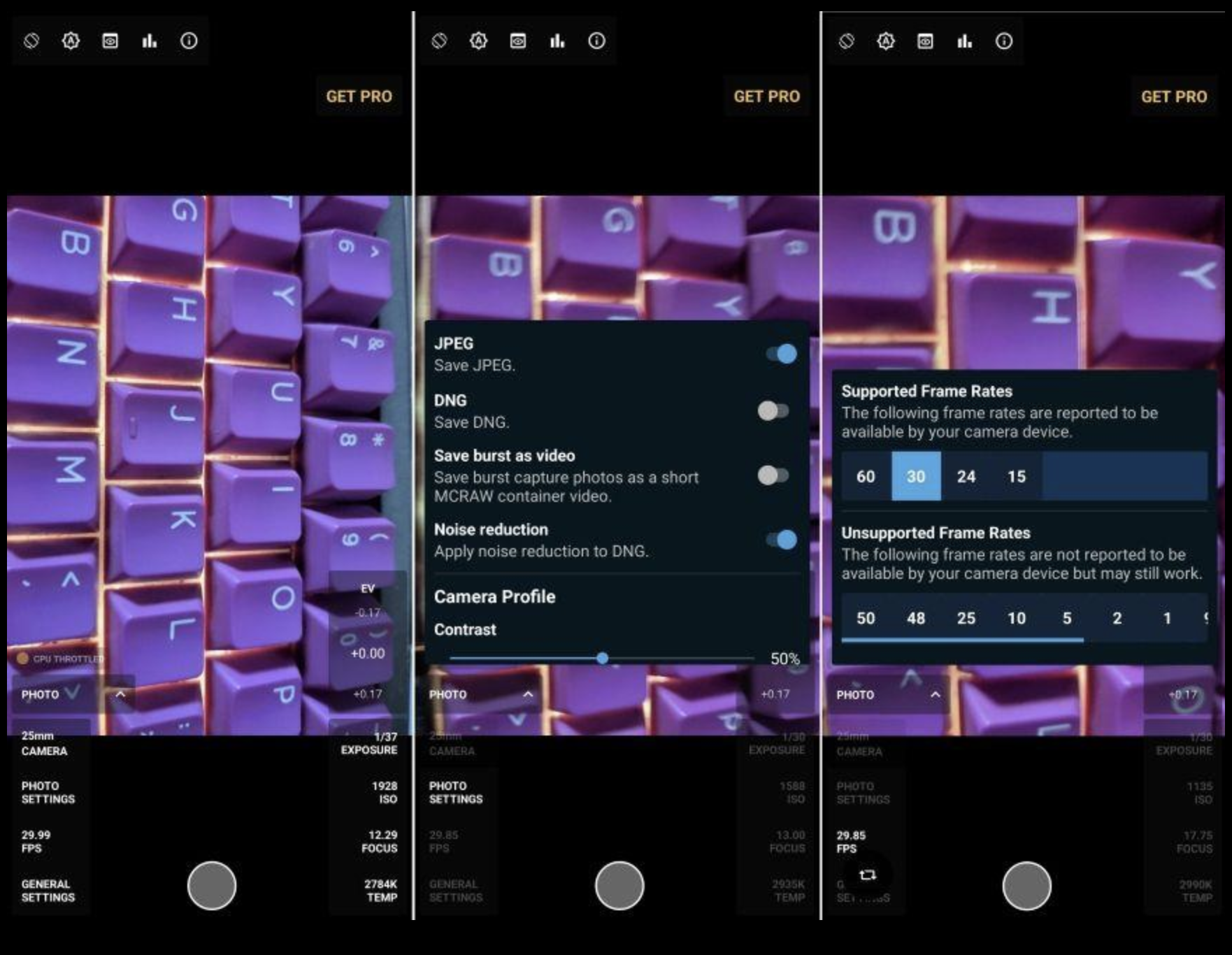
ProShot has long been respected for delivering one of the most complete manual shooting experiences on Android.
The interface feels closer to a traditional DSLR than a smartphone app, making it particularly appealing for photographers transitioning from dedicated cameras.
Key RAW features include:
- Full manual exposure
- RAW DNG capture
- Manual focus
- Long exposure modes
- Adjustable bitrate controls
- Histogram and focus peaking
What makes ProShot especially compelling is its balance between professional control and usability. The app avoids unnecessary visual clutter while still providing access to advanced photographic tools.
For street photography and documentary work, ProShot remains one of Android’s most dependable manual camera apps.
Download ProShot:
https://play.google.com/store/apps/details?id=com.riseupgames.proshot2
Read more:
https://theappwhisperer.com/?s=proshot
3. Open Camera — The Best Free RAW Camera App
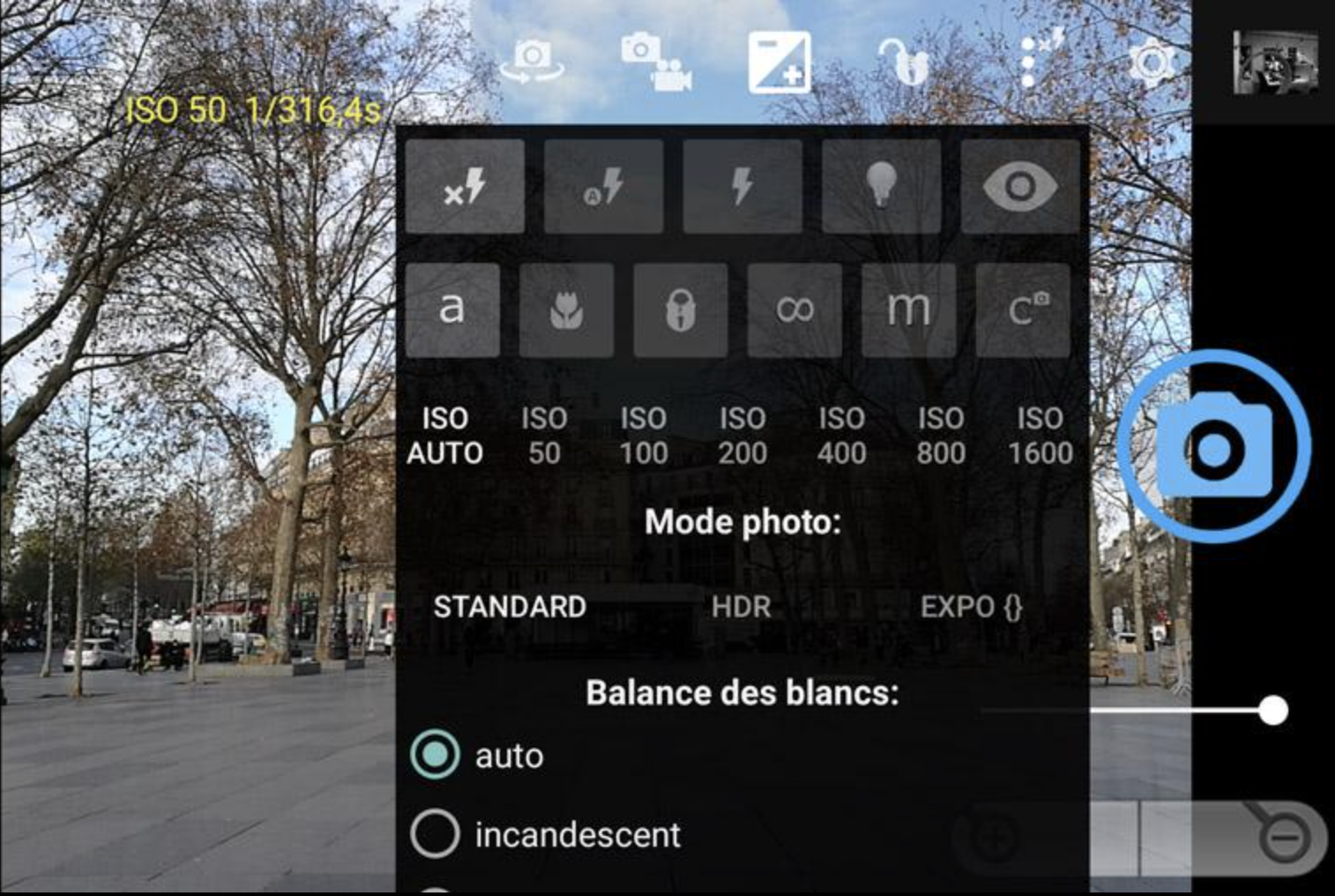
Open Camera remains one of the most important photography apps on Android, largely because it proves that powerful photographic tools do not necessarily require expensive subscriptions or aggressive monetisation.
Despite being free, Open Camera includes:
- RAW DNG support
- Manual exposure controls
- Focus bracketing
- External microphone support
- Noise reduction controls
- Auto-stabilisation
The interface is admittedly less refined than some premium competitors, but the app’s flexibility and reliability continue to make it enormously popular amongst Android photographers.
For photographers exploring RAW capture for the first time, Open Camera is arguably the ideal starting point.
Download Open Camera:
https://play.google.com/store/apps/details?id=net.sourceforge.opencamera
Related reading:
https://theappwhisperer.com/category/mobile-photography/
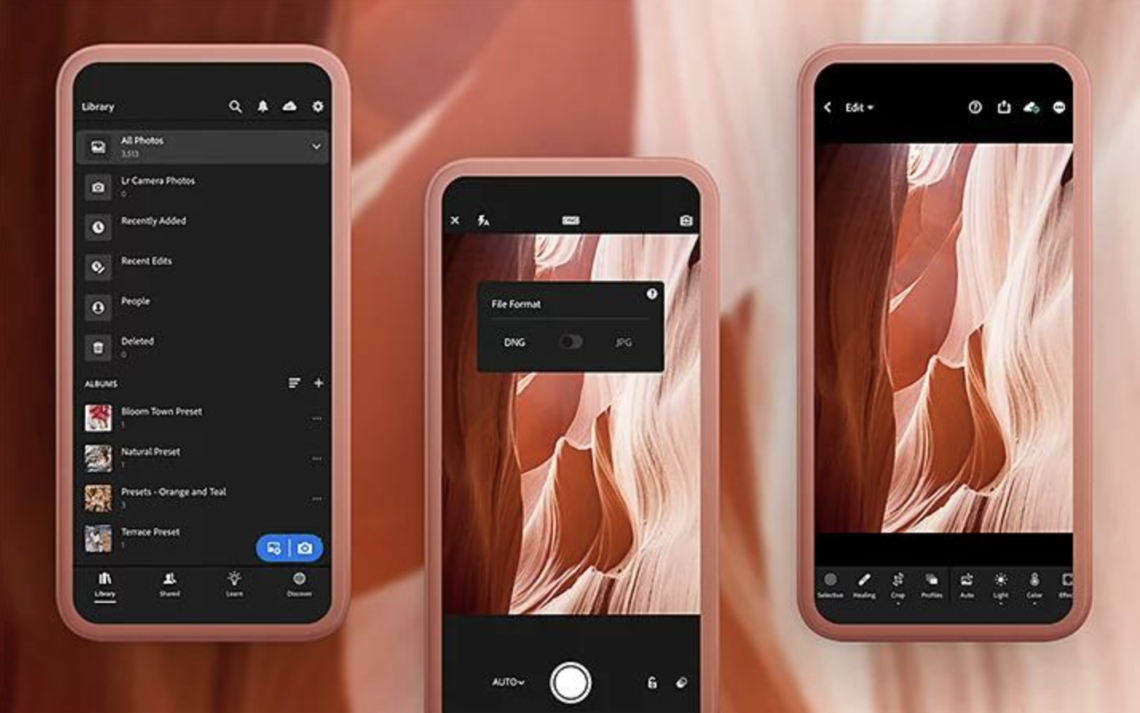
4. Lightroom Mobile — RAW Capture Meets Professional Editing
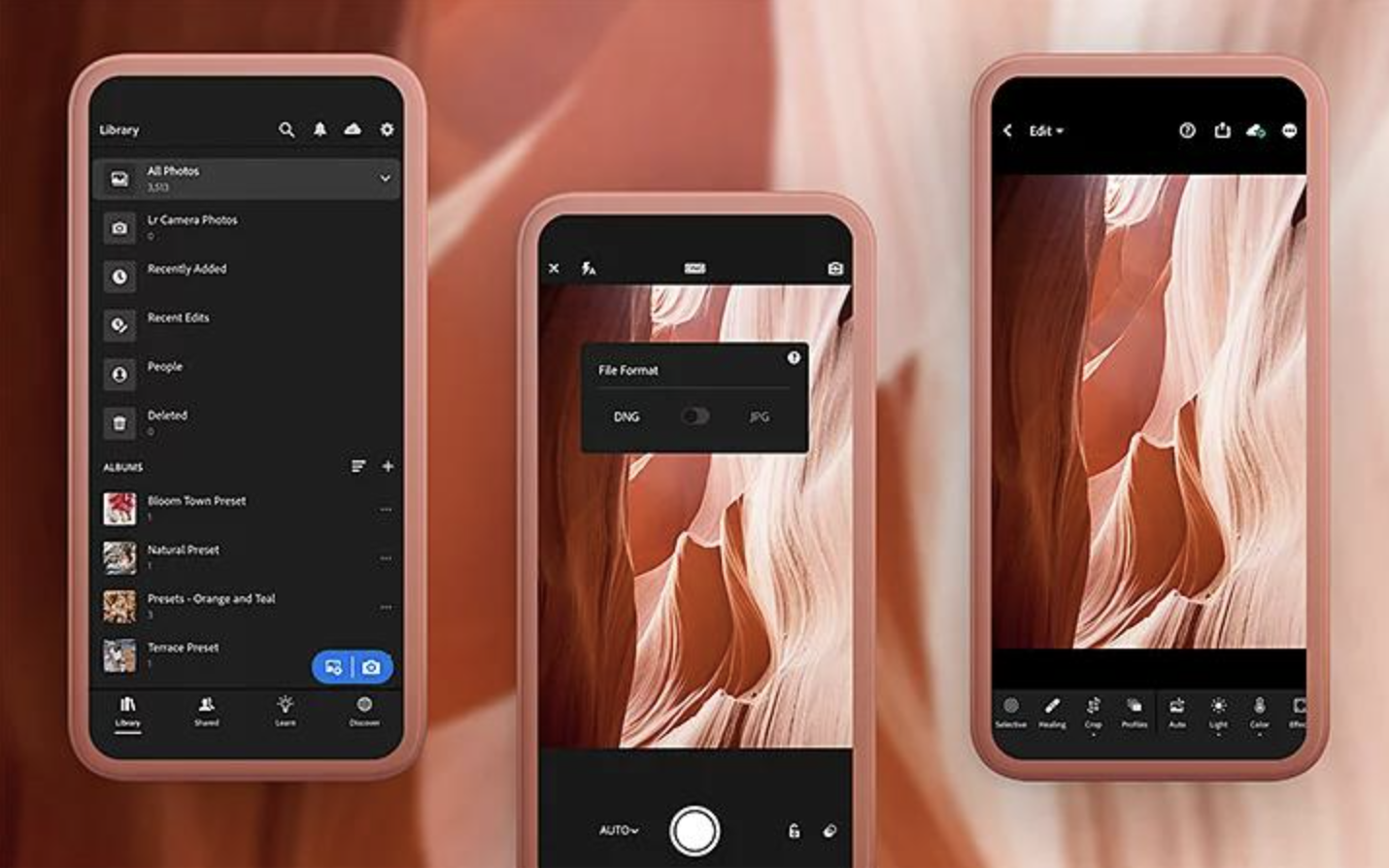
Adobe Lightroom remains one of the strongest all-in-one solutions for Android RAW photography because it combines capture and editing within a single ecosystem.
The in-app camera offers:
- RAW DNG capture
- Manual shooting controls
- Exposure compensation
- Professional colour grading
- Cloud synchronisation
- AI masking tools
For photographers already working within Adobe workflows, Lightroom Mobile creates an efficient end-to-end editing pipeline directly on Android devices.
Its RAW editing capabilities remain among the best available on mobile.
Download Lightroom Mobile:
https://play.google.com/store/apps/details?id=com.adobe.lrmobile
Read our Lightroom coverage:
https://theappwhisperer.com/?s=lightroom
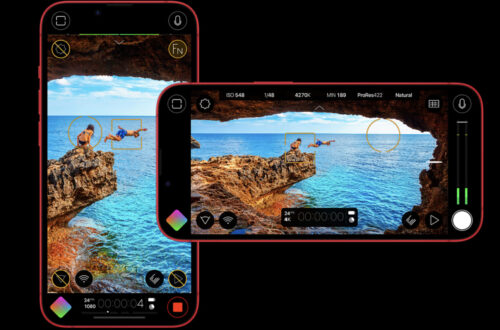
5. Blackmagic Camera — Professional Imaging Comes to Android
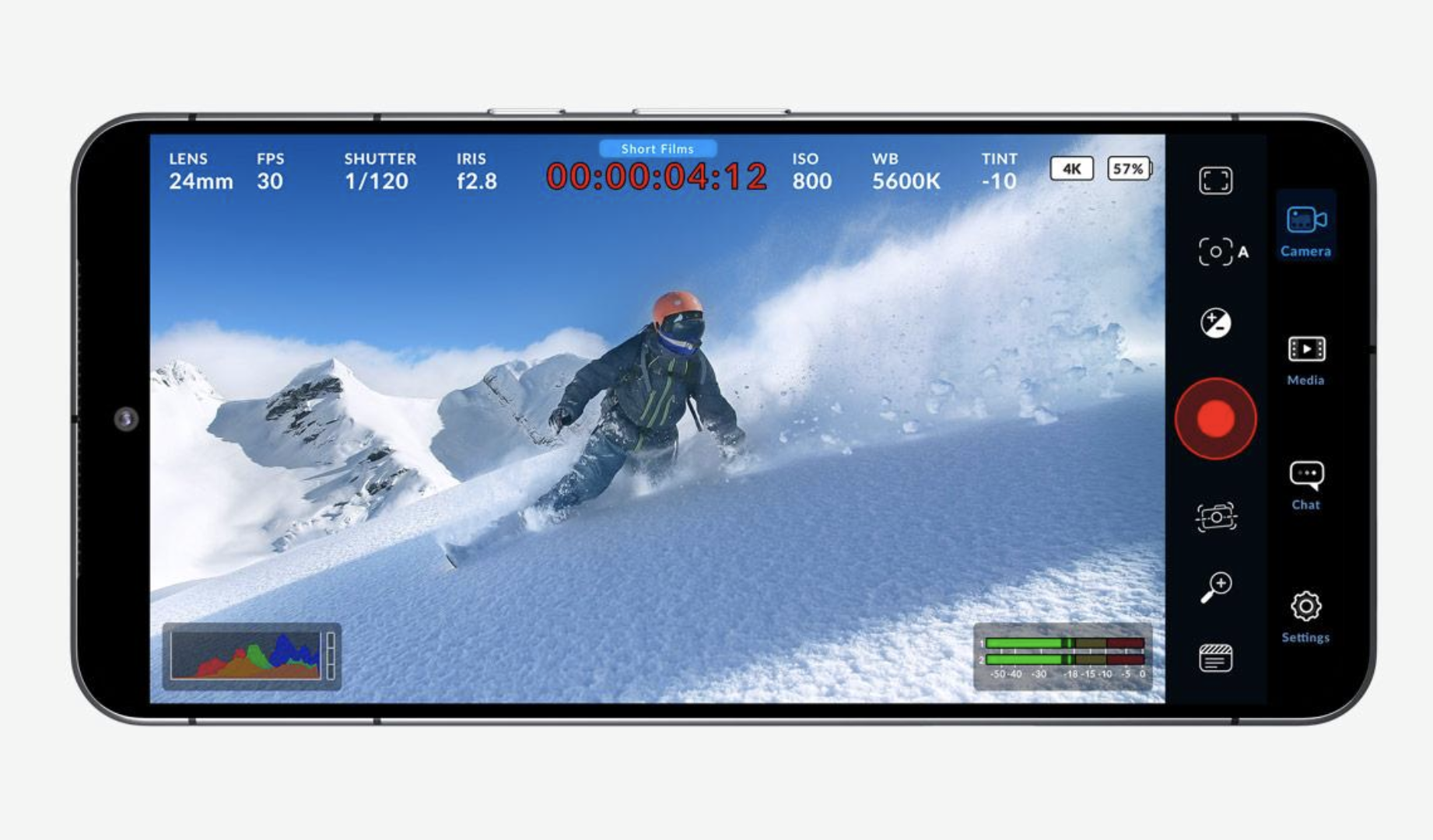
Blackmagic Camera has rapidly become one of the most important professional imaging apps available for mobile creators.
Although primarily associated with filmmaking, Blackmagic Camera offers extraordinary manual imaging control that many still photographers now appreciate as well.
Recent Android-compatible updates introduced:
- Advanced codec support
- Professional monitoring tools
- LUT workflows
- Open Gate recording
- High-bitrate capture
- Cinematic exposure controls
For hybrid creators moving between stills and motion work, Blackmagic Camera offers one of the most sophisticated professional imaging experiences currently available on Android.
Download Blackmagic Camera:
https://play.google.com/store/apps/details?id=com.blackmagicdesign.android.blackmagiccam
Related reading:
https://theappwhisperer.com/?s=blackmagic+camera
Why RAW Photography Still Matters
As smartphone photography becomes increasingly AI-driven, RAW capture remains one of the few ways photographers can preserve a more authentic relationship with the image.
JPEG photography is designed for speed and convenience. RAW photography is designed for interpretation.
That distinction matters.
RAW files retain ambiguity, atmosphere, texture, and tonal subtlety in ways heavily processed smartphone images often erase. Rather than accepting the phone manufacturer’s interpretation of a scene, RAW photography allows photographers to shape the final image themselves.
In many ways, shooting RAW on Android feels closer to traditional photographic practice:
- observing carefully
- exposing intentionally
- editing thoughtfully
- embracing imperfection
And that remains deeply valuable.
Related Articles on TheAppWhisperer
Best AI Photo Editing Apps in 2026:
https://theappwhisperer.com/2026/04/best-ai-photo-editing-apps-in-2026/
Best Leica-Style Camera Apps for Mobile Photography:
https://theappwhisperer.com/
Best Film Camera Apps for Mobile Photography:
https://theappwhisperer.com/
Blackmagic Camera Tutorials:
https://theappwhisperer.com/?s=blackmagic+camera
Android Photography Coverage:
https://theappwhisperer.com/category/android-photography/
You may also enjoy our curated guides exploring the tools, techniques and creative approaches shaping contemporary mobile photography and digital art.
Popular starting points include:
Best Leica Style Camera Apps for Mobile Photography in 2026
Best AI Headshot & Portrait Apps for iPhone & Android in 2026
Best Film Camera Apps for iPhone and Android in 2026
Best Apps for Colourising Black and White Photos (2026)
Best AI Video Generator Apps for iPhone & Android in 2026
Best Apps to Remove Objects from Photos in 2026 – Clean Up Your Images Effortlessly
Best Free Android Photography Apps (No Subscription) in 2026
Best AI Photo Editing Apps in 2026
Best Android Photography Apps – 2026 Edition
Best Manual Camera Apps for Android (2026) – DSLR Control on Your Phone
Best Mobile Photography Apps (2026 Edition)
Best long-exposure eApps for iPhone 2026 edition
Best Camera Apps to Reduce iPhone Processing (2026)
• Best Camera Apps to Reduce iPhone Processing (2026 Edition)
• Best Mobile Filmmaking Apps (2026 Edition)
Best Way To Create More Dynamic Travel Photos with Lightroom on Mobile
• Best Black and White Photography Apps for iPhone (2026 Edition)
• Best Portfolio Apps and Websites for Photographers (2026 Edition)
• Blackmagic Camera Settings Guide
• Best way to use Blackmagic’s camera remote control (2026)
• Snapseed vs Lightroom Mobile
• Best iPhone Camera Apps for Photographers
• 10 Apps Secretly Draining Your Phone’s Battery – 2026 Edition
Please support us
The AppWhisperer has always had a dual mission: to promote the most talented mobile artists of the day and to support ambitious, interested viewers worldwide. As the years pass, TheAppWhisperer has gained readers and viewers and has found new venues for that exchange.
All this work thrives with the support of our community. Your support helps us maintain our independence, allowing us to continue delivering open, global promotion of mobile artists. Every contribution, however big or small, is valuable for our future.

Joanne Carter
Joanne Carter is a British photographer, photography journalist, editor and curator and the founder and editorial director of TheAppWhisperer.com, an independent international photography publication established in 2009.Her journalism, criticism and commentary have appeared in The Times, The Sunday Times, The Guardian, Financial Times, BBC, Vogue Italia, LensCulture, Popular Photography, Android Magazine, NikonPro, DPReview, Which Digital Camera and Which Camera. She has lectured internationally on photography and mobile art, served as a juror for international photography awards, and exhibited her own photographic work across the UK, Europe, South Korea and the United States.Alongside her editorial work, Joanne's photographic and postgraduate research explores death, grief, memory, representation and social inequality through contemporary photography, participatory practice and visual research methods, with the longer-term aim of developing this work through doctoral research.Through TheAppWhisperer, she continues to publish independent photography journalism spanning contemporary photographic practice, mobile imaging, photographic apps, computational photography and emerging imaging technologies.Joanne is available for editorial commissions, photography projects, judging, curatorial work, speaking engagements, consultancy and selected collaborations.