10 iPhone Camera Apps for Distinctive Photo Styles in 2026
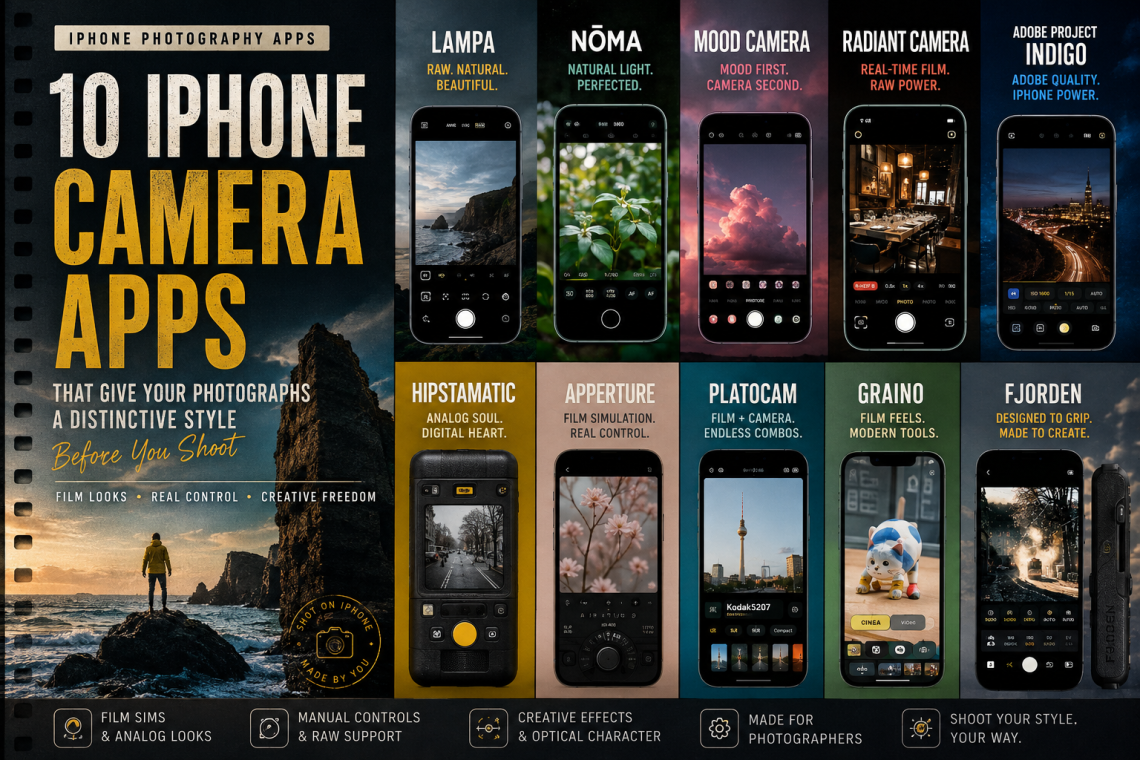
Discover ten iPhone camera apps taking a different approach to mobile photography in 2026, from film recipes and optical imperfections to natural rendering, distinctive colour and computational restraint. From film recipes and optical imperfections to natural rendering and computational restraint, these camera apps ask you to decide what a photograph should feel like before you press the shutter.
I have become increasingly interested in where, exactly, the aesthetic decisions in smartphone photography are being made. For years, the direction of travel seemed obvious. We photographed first and decided later. Capture the technically flexible image, open it in another application, scroll through presets, alter the colour, recover the highlights, open the shadows, add grain, and eventually decide what sort of photograph it was going to become.
There is nothing inherently wrong with that. Post-production has always belonged to photography, whether it happened beneath an enlarger, inside Photoshop or on the screen of an iPhone. But something interesting is happening in camera apps now. A growing number of developers are moving those decisions back towards the beginning of the photographic process. They are asking us to choose a colour response, a rendering style, an imperfect lens, a particular relationship with dynamic range or even a different way of physically operating the camera before we make the photograph.
I think that matters, because the way I expect a camera to render the world inevitably changes the way I look at it. Give me a monochrome viewfinder and colour temporarily becomes irrelevant. Give me a camera that refuses to rescue every highlight and I become more conscious of exposure. Give me a particular film response for an afternoon and I start recognising photographs that belong to it. Give me a camera with imperfections and suddenly, technical perfection stops being the only measure of success.
The ten apps here approach that idea from very different directions. Some are explicitly influenced by film. Some construct their own processing pipelines. Some retain RAW information underneath the finished aesthetic. One uses enormous amounts of computation precisely to produce a photograph that can feel less conventionally computational. Another concentrates on putting physical camera operation back into the iPhone experience.
What connects them is not nostalgia. It is a much more interesting photographic question: what happens when we decide what the photograph should look or feel like before, rather than after, we press the shutter?
1. Lampa — A Digital Camera That Doesn’t Want Everything to Look Digital
Download Lampa — Digital & Film Camera on the App Store

Lampa immediately caught my attention because it is not simply placing a nostalgic treatment over the standard iPhone photograph. It uses its own image-capture engine, taking RAW data and immediately processing it through its profiles. The stated aim is a more natural image without the aggressively sharpened, heavily HDR-rendered character that has become associated with some smartphone photography.
The profiles draw on both 35mm film and compact digital cameras, which is itself revealing. We have reached the point where the early digital-camera aesthetic has become a photographic reference in much the same way that particular films have been for decades. Lampa can produce still photographs and video, with video options extending to 4K/60fps on supported hardware, and it allows profile and exposure adjustments after capture. RAW files can also be exported for photographers who want greater flexibility elsewhere.
What interests me most, though, is the starting point. Lampa is trying to change the underlying character of the photograph rather than simply decorate the conventional smartphone result. Its emphasis on softer detail, natural skin tones, light depth and restrained processing places the argument at the capture stage.
Why I find it interesting: Lampa treats photographic style as part of image formation rather than something pasted over the photograph afterwards.
2. Nōma — Choose the Recipe, Then Make the Photograph
Download Nōma on the App Store

Nōma takes a wonderfully direct approach to the same question. The basic proposition is to choose a film-inspired recipe, see that visual language as you photograph and then make the picture. That may sound deceptively simple, but I think the order of those actions is important.
When I select the aesthetic before photographing, I am no longer auditioning different identities for an image I have already made. I begin looking for subjects, light and colour that belong to the visual language I have chosen. The treatment becomes part of the seeing.
This is one of the things analogue photography imposed naturally. Loading a particular film meant accepting, at least to some extent, its colour response, contrast and sensitivity for the photographs that followed. Digital photography gave us extraordinary freedom to postpone those choices. Nōma deliberately brings some of that decision-making forward again while retaining the immediacy of the iPhone.
Why I find it interesting: Nōma makes style part of seeing rather than something selected once seeing has finished.
3. mood.camera — Bringing Uncertainty Back to Smartphone Photography
Download mood.camera on the App Store

mood.camera remains one of the more conceptually interesting camera apps for me because what it removes is almost as significant as what it adds. Its custom image-processing pipeline produces photographs with film grain, halation and carefully considered colour, but there is no conventional live filter preview and no editing suite inside the application.
That changes the psychology of photographing. Smartphone cameras have made feedback almost instantaneous: photograph, inspect, adjust, repeat. mood.camera deliberately introduces a little distance between the decision and the result. You photograph without continually cycling through possible treatments and without immediately turning the capture experience into an editing session.
I particularly like that the developer does not position this simply as an exercise in nostalgia. The more interesting objective is bringing character and serendipity back into a photographic process that has become extraordinarily good at eliminating both uncertainty and technical imperfection.
There is also control beneath that apparent simplicity. On compatible devices, photographers can customise dynamic range, while the broader approach allows the aesthetic response to be established before the photograph rather than endlessly reconsidered afterwards.
Why I find it interesting: mood.camera is experimenting not merely with the appearance of film photography, but with something of its psychology.
4. Radiant Camera — Commit to the Look Without Losing the RAW
Download Radiant Camera — Film Camera on the App Store

Radiant Camera is one of the more technically ambitious apps in this selection because it tries to solve a contradiction that sits at the heart of style-led digital photography. Creative commitment can be useful, but photographers are understandably reluctant to throw away the flexibility of the original file.
Radiant supports ProRAW and Bayer RAW capture on compatible hardware while displaying its film emulation in real time. Grain, halation, chromatic aberration, bloom, vignette and colour treatment can become part of the viewfinder experience, but its R-Negative workflow retains the original RAW information so the photograph can be revisited later.
There is considerable depth beyond that. Manual ISO, shutter speed and white balance controls sit alongside colour and tonal adjustments, custom 3D LUT and HALD import, shareable recipes and lo-fi modes drawing on VHS, CCD and older digital-camera aesthetics. The same processing philosophy extends into video, with current support including 4K and 60fps where the hardware allows it.
This creates an intriguing compromise. I can photograph as though I have committed to a particular visual language while knowing that the underlying digital negative still exists. The style influences the act of photographing without necessarily becoming an irreversible technical decision.
Why I find it interesting: Radiant asks whether creative commitment and digital flexibility really have to be opposites.
5. Project Indigo — Using More Computation to Make a Less Computational-Looking Photograph
Download Project Indigo on the App Store
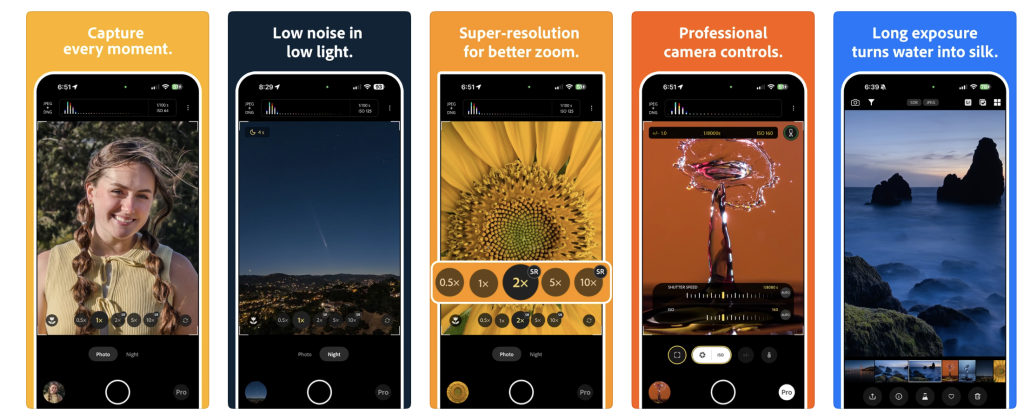
Adobe’s Project Indigo belongs in this collection for almost the opposite reason to several of the other apps. It does not reject computational photography. It embraces it, but attempts to give the photographer a different relationship with the computation taking place.
Indigo uses multi-frame computational capture to create high-quality photographs with reduced noise and substantial dynamic range, while providing photographic controls that allow the user to influence how the image is made. Its continuing development has added features including multi-image super-resolution, Night mode, long-exposure functionality, Pro controls, focus tools and increasingly sophisticated handling of different iPhone camera systems.
I find the underlying contradiction fascinating. We have become accustomed to describing a photograph as either computational or natural, as though those things necessarily occupy opposite ends of a line. Indigo suggests something more complicated. Perhaps sophisticated computation can be used precisely to create a photograph that feels less like the conventional computational smartphone image.
That is a much richer discussion than simply dividing camera applications into AI and no-AI camps. Computation itself is not necessarily the problem. The question is whether the photographer understands it, can influence it and actually wants the aesthetic decisions it makes.
Why I find it interesting: Project Indigo treats computation as a photographic material that can be shaped rather than an invisible correction system that simply has to be accepted.
6. Hipstamatic — The Original Idea Makes More Sense Than Ever
Download Hipstamatic Analog Camera on the App Store
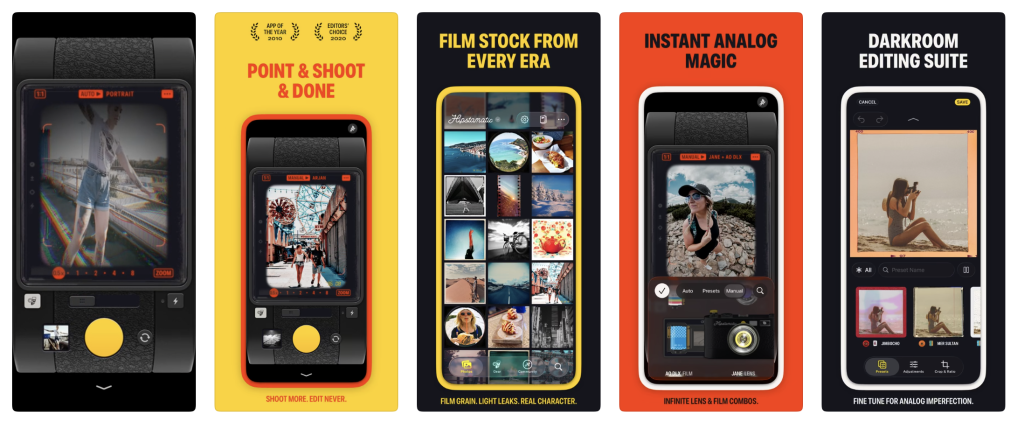
It would be impossible for me to write about this particular direction in mobile photography without Hipstamatic. It has been exploring the idea since 2009, long before the current enthusiasm for making the iPhone photograph feel less like an iPhone photograph.
The contemporary proposition is wonderfully uncompromising: choose a lens, choose a film and photograph. The current app offers more than 200 lenses and more than 200 films, producing over a thousand possible analogue combinations across different camera aesthetics.
What is important is not simply the quantity of combinations. Hipstamatic’s central idea is that the photographic materials are chosen before the shutter. The resulting limitations can become a vocabulary. Choose one combination and use it for an afternoon and you begin to recognise the kind of light, colour, subject and composition that works within it.
That principle feels remarkably relevant in 2026. We now have extraordinary tools capable of making almost any image look like almost anything afterwards. Hipstamatic reminds us that deliberately narrowing the possibilities can sometimes produce a more coherent way of seeing.
Why I find it interesting: Hipstamatic demonstrates that a limitation can become a photographic language rather than merely a restriction.
7. Apperture — A Camera That Is Prepared to Let You Get It Wrong
View Apperture: Film Simulation on the App Store

Apperture interests me because it approaches film simulation from a more photographic and educational direction. Instead of merely giving the user a collection of fashionable film colours, it attempts to recreate some of the relationships between exposure, film and consequence.
Its feature set includes more than 30 film-stock simulations, manual exposure controls, long exposures, reciprocity-failure tools, colour-filter simulation and facilities for recording film equipment and rolls. What makes that interesting is the possibility of seeing what exposure decisions actually do rather than having the software silently rescue them.
Modern smartphone cameras are extraordinarily good at preventing technical failure. Shadows are recovered, highlights controlled, several exposures combined and noise reduced before we necessarily realise anything difficult happened. That is immensely useful, but it can also conceal the photographic relationship between the decision and the result.
Learning photography sometimes requires making a poor exposure and understanding why it is poor. An application prepared to let that relationship remain visible therefore has a very different educational value from one whose principal ambition is ensuring that every frame looks technically acceptable.
Why I find it interesting: Apperture treats photographic mistakes as information rather than defects that software must automatically remove.
8. PlatoCam — Simulating the Camera, Not Just the Film
Download PlatoCam on the App Store

PlatoCam is one of my favourite discoveries in this group because it recognises something that gets lost in a great deal of film simulation: film was only one part of the photographic system. Cameras and lenses had characteristics, too.
The app currently simulates several kinds of camera, including SLR, compact, LOMO, toy, fisheye and four-lens cameras, which can be combined with more than twenty film styles. More interestingly, it attempts to reproduce optical characteristics including fall-off, chromatic aberration and distortion. Grain and vignetting can respond to factors including brightness and focal length rather than behaving as completely static overlays.
There is double exposure too, including the ability to combine captured or imported images, alongside manual focus fine-tuning, spot and highlight-priority metering, timers, light leaks, white-balance and temperature adjustments, frames and timestamps.
This is much more interesting to me than simply making an iPhone photograph look old. A toy camera, fisheye or imperfect compact does not merely produce a different colour palette; its physical characteristics influence what photographers expect from it and consequently what they decide to photograph.
Why I find it interesting: PlatoCam treats imperfection as part of the imagined photographic apparatus rather than an effect pasted onto a finished image.
9. Graino — A Contemporary Version of the Digital Negative
Download Graino on the App Store
Graino occupies an interesting position between analogue-inspired commitment and digital insurance. Its film-oriented approach places the look into the capture experience, allowing colour and texture to influence what the photographer sees while making the image rather than only becoming decisions in a later editing session.
The attraction of this kind of system is not simply getting a photograph that looks as though it was made on film. What matters is that a particular visual response is present while I am deciding what belongs inside the frame. Once again, the aesthetic begins feeding backwards into the act of seeing.
At the same time, the possibility of retaining underlying image information means this need not become an absolute commitment. That creates a particularly contemporary photographic compromise: behave as though the visual decision matters at capture, but retain some of the reversibility that makes digital photography so powerful.
I think there is value in that. The existence of a digital negative does not mean we have to postpone every aesthetic decision until later.
Why I find it interesting: Graino explores whether photographers can gain something from committing visually at capture without completely surrendering digital flexibility.
10. Fjorden Camera — Style Can Begin With the Way You Hold the Camera
Download Fjorden Camera on the App Store

Fjorden is deliberately the outlier here because photographic style does not have to mean film grain, halation, faded colour or a simulated stock. Sometimes the appearance of our photographs changes because a camera changes the way we work.
Fjorden Camera provides manual exposure control, exposure compensation, ISO and shutter-speed adjustment, preset and fully manual white balance, assisted and manual focus, focus peaking, face detection, composition tools and RAW, ProRAW, JPEG and HEIF capture where supported. It can be used as an iPhone camera app in its own right, but it is also the companion to the Fjorden Grip, which introduces tactile controls and a two-stage shutter button.
I think that physical relationship is worth considering. Put a shutter button beneath the photographer’s finger, provide immediate controls for photographic parameters and encourage the phone to be handled more like a conventional camera, and the change is not merely ergonomic. It may alter timing, attention and the way the photographer responds to the scene.
We sometimes talk about photographic style as though it lives entirely inside colour science or post-production. It doesn’t. Style develops through repeated ways of seeing and working, and the design of the camera has always played a part in that.
Why I find it interesting: Fjorden reminds us that photographic style can begin with behaviour — with the way a camera encourages us to look, hold, react and shoot.
TheAppWhisperer’s Picks
There isn’t a single winner here because these apps are trying to solve quite different photographic problems. If I wanted to escape some of the conventional smartphone rendering while keeping the experience straightforward, Lampa would be high on my list. mood.camera remains particularly compelling because it changes not only the finished image but the psychology of making it.
Radiant Camera is perhaps the most technically interesting proposition for photographers who want the aesthetic decision to happen at capture without surrendering the security of RAW. Project Indigo fascinates me for almost the opposite reason: it demonstrates that computational photography itself does not necessarily have to produce an obviously computational aesthetic.
Of the newer discoveries, PlatoCam is the app I particularly want to spend more time with. The attempt to simulate aspects of the camera and lens rather than simply fashionable film colour is a much richer idea. Apperture interests me for similar reasons because it is prepared to expose the relationship between photographic choices and their consequences rather than hiding every mistake.
And then there is Hipstamatic. More than fifteen years after it helped define creative iPhone photography, its central proposition suddenly seems remarkably contemporary again: choose your photographic materials first and allow those choices to influence what you see.
The Bigger Question: When Should We Decide What a Photograph Looks Like?
Photography has never been a neutral recording process. Film stocks had different colour responses. Developers altered contrast. Papers affected tone. Lenses rendered scenes differently. Cameras imposed physical and optical limitations. Photographers chose these things because the materials were part of how the photograph would eventually look.
Digital photography separated many of those decisions from capture. The sensor could record enormous amounts of information and software allowed interpretation to be postponed. Smartphone photography extended that possibility again while simultaneously introducing another phenomenon: increasingly sophisticated processing decisions being made automatically before we even see the file.
What I find compelling about this generation of camera apps is that developers are beginning to question both tendencies. Some ask us to choose a look before we photograph. Some deliberately restrain conventional smartphone processing. Others use considerable computation to create something that feels less computational. Some preserve a RAW file beneath an aesthetic decision, while others deliberately reintroduce optical imperfection, uncertainty or even the possibility of getting something wrong.
None of this makes a photograph more authentic simply because it resembles film. Choosing a recipe before pressing the shutter does not automatically make somebody a more thoughtful photographer either. The important question is whether that decision changes the act of looking.
For me, that is where these apps become interesting. The best camera software does not merely give me another way to process the photograph I have already made. It has the potential to make me notice a different photograph in the first place.
The photograph does not begin when we edit it. It does not even begin when we press the shutter. It begins when we decide what we are looking for.
Continue Your Mobile Photography Journey
If you found this guide helpful, you may also enjoy these in-depth resources from The App Whisperer. Together, they explore every stage of the modern mobile photography workflow—from choosing the best camera app to editing, organising and sharing your images.
- Best Film Camera Apps for iPhone and Android (2026) – Discover the finest analogue-inspired camera apps, complete with authentic film simulations, vintage colour palettes and classic photographic aesthetics.
- Best Camera Apps for Street Photography (2026) – Explore the camera apps trusted by street photographers for fast shooting, discreet operation and complete manual control.
- Best Camera Apps Without AI Processing – Looking for a more traditional photographic experience? This guide highlights camera apps that prioritise photographer control over computational photography.
- Best Photography Workflow Apps for Professionals – Build an efficient end-to-end workflow, from capture and editing to organisation, backup and publishing.
- Best Apps for Culling Photos in 2026 – Save valuable editing time by identifying your strongest images quickly and efficiently.
- Best AI Photo Editing Apps (2026) – Compare the latest AI-powered editing tools for removing distractions, improving portraits and accelerating your post-processing workflow.
- Blackmagic Camera App Settings Explained (2026) – A complete guide to getting the very best results from one of the most powerful mobile filmmaking apps available.
- Best Video Settings for Blackmagic Camera App – Learn the optimal recording settings for cinematic footage on your smartphone.
- Best Way to Use Blackmagic Camera Remote Control – Discover how to control multiple cameras remotely and streamline professional video production.
- Best Leica-Style Camera Apps for Mobile Photography – Explore camera apps inspired by Leica’s distinctive colour science, shooting philosophy and minimalist interface.
- Best Android RAW Camera Apps for Serious Mobile Photography – Compare the leading RAW capture apps for photographers who demand the highest possible image quality.
- Best Photography Portfolio Apps for Professionals (2026) – Showcase your work beautifully with portfolio apps designed for photographers, artists and visual storytellers.
Whether you’re just beginning your mobile photography journey or refining an established professional workflow, these guides will help you get more from your smartphone camera and continue developing your photographic practice.
Support TheAppWhisperer
If you’ve found this article useful and would like to support independent photography journalism, please consider making a small donation to TheAppWhisperer.
Since 2009, TheAppWhisperer has published thousands of interviews, reviews, opportunities, and essays dedicated to photography and mobile art, remaining free to read for everyone. Every contribution helps support the time, research, and editorial work that goes into producing and preserving this archive.
Your support helps keep thoughtful photography writing alive.

Joanne Carter
Joanne Carter BA (Hons), ARPS is a British photographer, photography journalist, editor and curator, and the founder and editorial director of TheAppWhisperer.com, an independent international photography publication established in 2009.She holds a First Class Honours degree in Photography and is an Associate of the Royal Photographic Society (ARPS).Her journalism, criticism and editorial work have appeared in The Times, The Sunday Times, The Guardian, Financial Times, BBC, Vogue Italia, LensCulture, Popular Photography and NikonPro, among other international publications.Through TheAppWhisperer, she brings together academic knowledge, professional photographic expertise and more than 17 years of specialist editorial experience to examine contemporary photography, mobile imaging, computational photography, photographic applications and emerging imaging technologies.