Blackmagic Camera v3.3: Apple Watch Remote Control Explained (2026 Guide)
Blackmagic Camera v3.3 for iPhone: Apple Watch Remote Control Explained (Full Tutorial)
Blackmagic Camera v3.3 for iPhone introduces one of the most requested features for mobile filmmakers: Apple Watch remote control and monitoring. What could easily have been treated as a minor update instead changes how you work, particularly if you are shooting alone.
This latest version extends the camera beyond the phone itself. It allows you to step away from the device while still maintaining a clear sense of framing, focus and audio. For anyone used to moving back and forth between camera and subject, that shift is immediate.
If you are building out a complete mobile workflow, it’s also worth exploring broader resources such as Best Mobile Photography Apps 2026 and Best iPhone Camera Apps 2026, both of which directly relate to how apps like this are now being used in practice.
In this guide, we take a closer look at how Apple Watch control works with Blackmagic Camera v3.3, how to set it up, and what it actually adds in practice.
Getting Started with Apple Watch Remote Monitoring
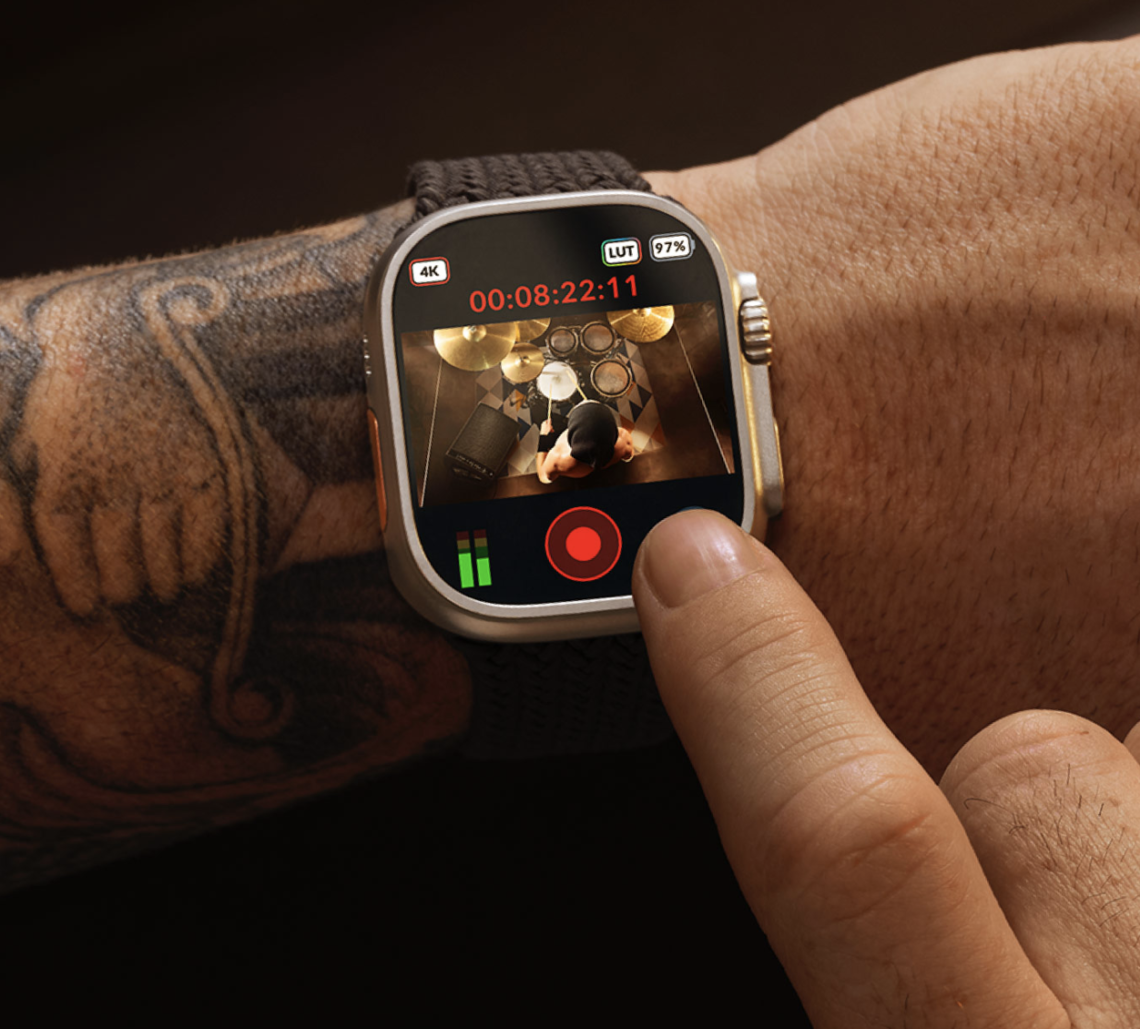
Setting up Apple Watch remote monitoring in Blackmagic Camera v3.3 is straightforward. Once the app is updated on your iPhone, opening the companion app on your Apple Watch connects almost instantly.
You are presented with a live preview of your frame directly on your wrist. There is a slight delay, but it is minimal and does not interfere with monitoring. It is responsive enough to rely on when you are away from the camera, which is ultimately what matters.
A particularly useful addition is the real-time audio level meter. When working alone, audio is often the hardest to check. Being able to monitor levels from a distance adds a layer of confidence that is usually missing in solo setups.
Apple Watch Interface and Controls
The interface feels familiar from the outset. Rather than redesigning the experience, Blackmagic has simplified it. You can swipe to hide or reveal the on-screen controls, allowing you to focus purely on framing when needed.
Starting and stopping recording is immediate. A single tap is all it takes, with no delay or complication. This simplicity is important. The farther you are from the camera, the more essential it becomes that the controls behave exactly as expected.
Switching Lenses Using the Digital Crown
One of the most effective features in Blackmagic Camera v3.3 is lens control via the Apple Watch Digital Crown. Rotating the crown cycles through the available focal lengths on your iPhone. When you stop, the selected lens is applied instantly.
This approach avoids menus entirely. It feels natural and precise, offering a physical interaction that mirrors the change in focal length. It is a small detail, but one that makes the experience feel considered rather than experimental.
Manual Camera Controls from Your Wrist
Blackmagic has gone beyond basic remote functionality. The Apple Watch app provides access to a range of manual camera controls that would normally require direct interaction with the phone.
You can adjust or lock focus, exposure and white balance, depending on how much control you want to retain. Stabilisation can be toggled on or off, and more advanced shooting modes such as timelapse or off-speed recording are also available.
Live streaming is supported as well, provided it has already been configured on the iPhone. This means you can begin broadcasting without returning to the device itself.
There is also support for preview LUTs. While subtle, this is an important addition. Being able to see a representation of your intended look, even on a small screen, helps maintain consistency across your workflow.
ProRes RAW and Electronic Stabilisation
ProRes was also mentioned in our article ProRes ‘Almost’ RAW vs 12-Bit DCG RAW Video Shootout! (iPhone 17 Pro vs Pixel 10 Pro)
Beyond Apple Watch integration, Blackmagic Camera v3.3 introduces electronic stabilisation for ProRes RAW. This is a significant update, particularly for handheld shooting.
Longer focal lengths tend to exaggerate small movements, making footage harder to stabilise in post. The addition of in-camera electronic stabilisation reduces that issue, making handheld footage more usable straight away.
It does not remove movement entirely, but it refines it enough to make a noticeable difference in real-world shooting conditions. If you are editing this kind of footage afterwards, tools from Best Video Editing Apps for iPhone can help refine the final output further.
What This Update Means for Solo Filmmakers
The biggest impact of Blackmagic Camera v3.3 is not a single feature, but what it removes. The constant need to return to the camera.
When filming alone, there is always a gap between what you think the camera is capturing and what it is actually recording. This update reduces that gap. It allows you to remain in position while still having visibility and control.
The Apple Watch becomes an extension of the camera rather than a separate device. It restores a sense of connection that is otherwise lost the moment you step away. For a wider look at how this fits into the ecosystem, see Best Apps for Filmmaking 2026.
Final Thoughts
Blackmagic Camera v3.3 is not just an incremental update. It changes the way mobile filmmaking can be approached, particularly for those working independently.
The addition of Apple Watch remote control and monitoring is handled with restraint. It does not overwhelm or overcomplicate. Instead, it focuses on what is necessary: visibility, control and reliability.
For something that could have felt experimental, it is surprisingly complete.
Quick FAQ: Blackmagic Camera Apple Watch Features
Can you control Blackmagic Camera from an Apple Watch?
Yes, Blackmagic Camera v3.3 allows full remote control from an Apple Watch, including recording, lens switching and monitoring.
Can you switch lenses using the Apple Watch?
Yes, the Digital Crown lets you cycle through and select lenses directly from your wrist.
Does Blackmagic Camera show audio levels on Apple Watch?
Yes, the Apple Watch app includes a real-time audio level meter for remote monitoring.
Can you use LUTs with Apple Watch monitoring?
Yes, preview LUTs can be enabled, allowing you to see your intended look while monitoring remotely.
Please support us
The AppWhisperer has always had a dual mission: to promote the most talented mobile artists of the day and to support ambitious, interested viewers worldwide. As the years pass, TheAppWhisperer has gained readers and viewers and has found new venues for that exchange.
All this work thrives with the support of our community. Your support helps us maintain our independence, allowing us to continue delivering open, global promotion of mobile artists. Every contribution, however big or small, is valuable for our future.

Joanne Carter
Joanne Carter is a British photographer, photography journalist, editor and curator and the founder and editorial director of TheAppWhisperer.com, an independent international photography publication established in 2009.Her journalism, criticism and commentary have appeared in The Times, The Sunday Times, The Guardian, Financial Times, BBC, Vogue Italia, LensCulture, Popular Photography, Android Magazine, NikonPro, DPReview, Which Digital Camera and Which Camera. She has lectured internationally on photography and mobile art, served as a juror for international photography awards, and exhibited her own photographic work across the UK, Europe, South Korea and the United States.Alongside her editorial work, Joanne's photographic and postgraduate research explores death, grief, memory, representation and social inequality through contemporary photography, participatory practice and visual research methods, with the longer-term aim of developing this work through doctoral research.Through TheAppWhisperer, she continues to publish independent photography journalism spanning contemporary photographic practice, mobile imaging, photographic apps, computational photography and emerging imaging technologies.Joanne is available for editorial commissions, photography projects, judging, curatorial work, speaking engagements, consultancy and selected collaborations.