Hand Tint – Mac App – Huge Price Drop
Hand Tint is the premier app for hand tinting and coloring photography and is the most powerful colorizing application on the desktop. Hand Tint is a professional application with powerful features, great workflow, and gorgeous results.
Hand tinting adds soft, otherworldly colors to a photo, and can also lend an antique feel to even the most modern subjects. Brush on color to add a life-like blush to the cheeks of a child, or draw attention to a single element, like a flower or a sunset sky. Hand painting will take a photograph to a higher realm. The key is simplicity…light tinting of color will lend a nostalgic quality to the photography, scrapbook or craft project.
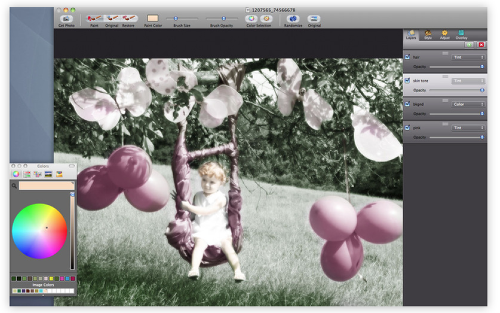
Hand Tint will start the process by converting the photo to black and white, vintage, or luminosity. After this simple and quick step, painting can be used to tint areas back onto the photograph and bring color back into the aged photo. Easy to use but built with a professional workflow, layers provide a way to split up color categories and allow you to turn them off or on for a variety of looks. Use "Color Selection" to isolate specific areas in the photo to brush them on quickly and accurately. Finish the hand-tinted photo with the "Restore" brush and wash away any mistakes that occurred during the coloring process.
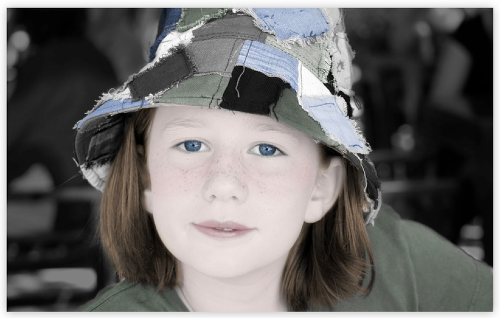
Hand Tint has some of the most powerful image editing features specifically geared towards hand tinting and colorizing photos. Add multiple layers that support opacity, visibility, and multiple custom compositing modes developed specifically to match the hand tinting process. Compositing modes include ‘Color’ for painting on colors while retaining the details and shadow and highlights in an image. ‘Tone’ adds color tones to the image as if painted under the image. ‘Tint’ is a lighter version of ‘Tone’ that can be used to add just the slightest amount of color to areas on the image. ‘Soft Paint’ is used to paint on soft color. Semi colored and semi tinted, ‘Soft Paint’ is great on the checks of a child, adding soft glows to portraits or extra color to hair. ‘Paint’ is directly color. Very useful when using the ‘Original’ brush as it composites color directly back onto the photo. All compositing modes, visibility, layer ordering, and opacity can be adjusted before the paint, during, or after the paint is applied. The gives great power and control over the hand tinting process.

Joanne Carter
Joanne Carter BA (Hons), ARPS is a British photographer, photography journalist, editor and curator, and the founder and editorial director of TheAppWhisperer.com, an independent international photography publication established in 2009.She holds a First Class Honours degree in Photography and is an Associate of the Royal Photographic Society (ARPS).Her journalism, criticism and editorial work have appeared in The Times, The Sunday Times, The Guardian, Financial Times, BBC, Vogue Italia, LensCulture, Popular Photography and NikonPro, among other international publications.Through TheAppWhisperer, she brings together academic knowledge, professional photographic expertise and more than 17 years of specialist editorial experience to examine contemporary photography, mobile imaging, computational photography, photographic applications and emerging imaging technologies.
You May Also Like