
iOS – 645 Pro – Updated
The next update to 645 PRO—Release 1.11—is awaiting App Store review, and should be available for download in a few days. The developers have published details on what we can expect in this new update, take a look below to see what they say…
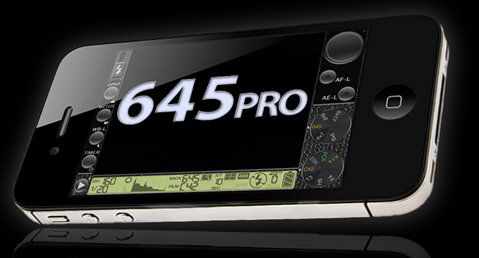
"Firstly, we continue to work on increasing the efficiency and performance of 645 PRO, and the new update will include a few incremental improvements in those twin, related areas.
Next, we’e added options specifically targeted at those who want high-fidelity unprocessed images in an iOS workflow. To explain:
The core of 645 PRO-using photographers (with whom we tested 645 PRO prior to release, and who make up much of its post-launch user-base) wanted such unprocessed images for use in a “desktop”—including laptop—workflow using Photoshop, Aperture or Lightroom. That’s why we went with the option of saving “developed RAW”—dRAW TIFFs to 645 PRO’s own Documents folder for later transfer to the “mother ship” computer via iTunes File Sharing.
However, we’ve reached (and been delighted to reach) a broader audience than that, some of whom want the option of saving dRAW TIFFs (or their closest JPEG equivalent) to the Camera Roll for immediate processing using an iOS image-editing app such as Snapseed or PhotoForge. So we’ve given them two ways of doing just that.
The first is very simple. Double-tap on the Mode Selector:
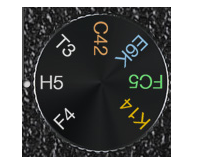
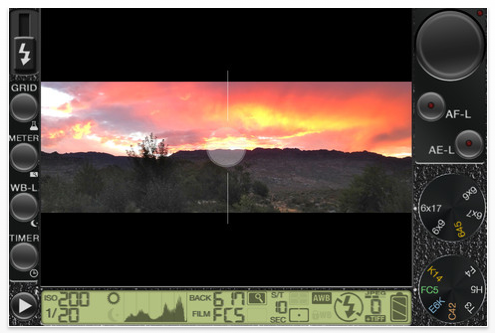
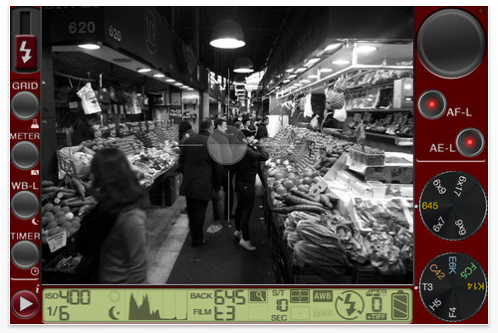
This will disable all in-app processing, which includes the enhancements offered by the Film Modes together with the crops that the Backs deliver (and, by extension, Live Preview, as there is no processing to be previewed). You therefore have the option to save the unmodified image data as either HI-quality or MAX-quality JPEGs (the former being ideal for everyday use, the latter—with no visible compression artefacts, but large files—being for when maximum image fidelity is required). You can still save dRAW TIFFs too, if you also want the best possible image fidelity for a desktop-based workflow. Double-tapping the same location returns 645 PRO to standard operation, of course…
The second option can be accessed via the main Settings.app, which is typically on the first screen of iPhone’s Springboard:
Scroll down until you see the 645 PRO entry in the list of installed apps with configurable settings:
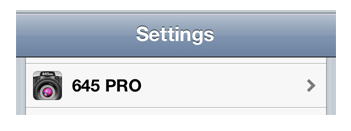
Select that, and you now have some new options, one of which is to save TIFFs to your Camera Roll (instead of to the default location in 645 PRO’s Documents folder). That means you can feed your dRAW TIFFs straight int one of those (relatively few) apps that can natively handle TIFF files. Also, you can use the built-in Photos app to delete the files on your device, should you want to do so. This option applies whether or not you are choosing to bypass the Film Modes and Backs, as described above.
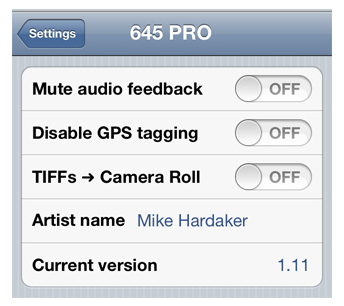
The other options available here are worth a few words, too. Our testing has shown that 645 PRO’s audio feedback (the clicks from buttons, the beeps to let you know an action has completed) provides a major usability boost. However, some people don’t like it; now they have the option to turn it off.
Next there are people who don’t want to geo-tag their images with location data, but do want to be able to share and review their images within 645 PRO (which requires, due to Apple’s rules, access to Location Services, as the ability to view and use images on the Camera Roll gives access to any GPS data that may be embedded in them). They can now disable the addition of the GPS data to the images they take with 645 PRO, while leaving Location Services enabled for viewing and sharing.
Finally, you have the option to enter your own name (or that of your photography business), which will then be embedded in the images’ EXIF data as the Artist or Creator".
The full list of updates and fixes in 645 PRO Release 1.11 follows:
➢ Double-tapping the Mode Selector disables the Film Modes and Backs for “unprocessed” JPEG output (and re-enables them)
➢ Smoother operation for Back Selector and Mode Selector knobs
➢ Option to save dRAW TIFFs to Camera Roll rather than Documents folder (via Settings.app)
➢ Option to mute audio feedback (via Settings.app)
➢ Option to add Artist Name to EXIF data (via Settings.app)
➢ Option to disable GPS tagging of images (via Settings.app), although Location Services must still be enabled to view images, as imposed by Apple
➢ Fixed quirks in “upside down” landscape mode
➢ Fixed “black screen” for users trying to review/share images with Location Services restricted (but not disabled…)
➢ Fixed Flickr sharing bug where title was not being posted
➢ Fixed intermittent issue where zoom level was incorrectly sent to image capture
➢ Revised sharing buttons
➢ Updated User Manual

Joanne Carter
Joanne Carter is a British photography journalist, editor, curator, and the founder of *TheAppWhisperer.com*, one of the world’s leading platforms dedicated to mobile photography and art. Since its launch in 2009, TheAppWhisperer has become an international hub for artists of all levels to discover, learn, exhibit, and engage with contemporary photographic practice.Built on principles of inclusivity, accessibility, and artistic excellence, Joanne has spent almost two decades championing mobile photography as a serious artistic medium. Through interviews, critical essays, exhibitions, competitions, and education, she has helped shape and document the evolution of mobile art on a global scale.Her work has taken her internationally, lecturing on photography and mobile art at institutions and events including the Museum of Art in Seoul, South Korea, alongside appearances in the UK and Europe. She has served as a juror for international photography and mobile art awards across Portugal, Canada, the United States, South Korea, Italy, and the UK.Joanne is also the founder of *TheAppWhispererPrintSales.com*, one of the first online galleries dedicated exclusively to collectible mobile art, connecting artists with collectors across Europe, the United States, and Asia.Before founding TheAppWhisperer, Joanne worked extensively in print journalism and photographic publishing, including roles at a paparazzi photo agency and as deputy editor of a leading photography magazine. Her freelance journalism, criticism, and commentary have been published widely in both the UK and the US, with bylines in *The Times*, *The Sunday Times*, *The Guardian*, *Popular Photography*, *NikonPro*, *DPReview*, *Which?*, *Vogue Italia*, *LensCulture*, the *BBC*, and more recently, the *Financial Times*, where her published letters on photography continue to contribute to wider conversations around the medium.Alongside her editorial and curatorial work, Joanne’s own photographic practice has been exhibited internationally across the UK, Europe, South Korea, and the United States. Her work increasingly explores themes of grief, loss, death, memory, and the body.Her current research interests centre on grief, death, and poverty, with forthcoming postgraduate study leading towards doctoral research in these areas.Joanne is currently developing new long-form writing and photographic projects and is available for commissions, editorial projects, speaking engagements, and collaborations.Contact: joannetheappwhisperer@gmail.com)


One Comment
David
Now this app is starting to get real interesting. I’ve not been overly impressed with it to date…finding it a bit hard to work it’s “control panel”…sounds like this update might take care of that…and the enhancements sound wonderful!