Mobile Photography – A Picture’s Worth with Rob DePaolo
‘A Picture’s Worth‘… is where we ask mobile photographers that have created powerful mobile photography/art to explain the processes they took. This includes their initial thoughts as to what they wanted to create, why they wanted to create it, how they created it, including all apps used and what they wanted to convey. We also ask these incredible artists to explain their emotions and how the image projects those feelings. We have published a few A Picture’s Worth articles recently, if you have missed those – please go here.
In this A Picture’s Worth today we asked Rob DePaolo to tell us more about his image ‘Doing Nothing, Going Nowhere’. DePaolo has detailed his thoughts below, we think you’ll find this invaluable…
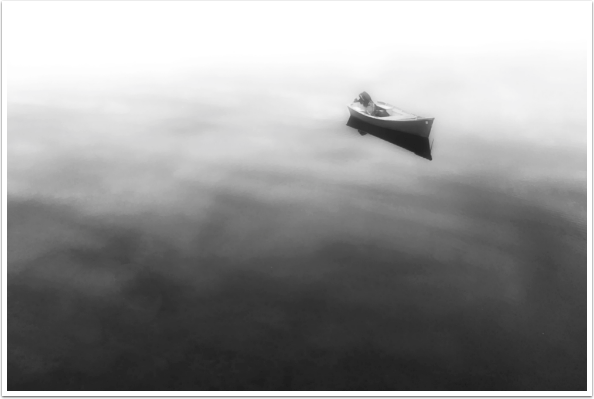
‘Doing Nothing…Going Nowhere…’ – ©Rob DePaolo
“My image, “Doing Nothing… Going Nowhere…” is a good example of my typical black and white editing workflow, but with a twist.
While I do occasionally work in color, my preferred medium is black and white photography.
For the vast majority of my black and white work, I prefer a very straightforward editing workflow that, in many ways, mirrors my editing technique for DSLR photos using Adobe Lightroom. For mobile black and white photos, I typically do all of my editing in Filterstorm Neue, which is a fairly straightforward, yet powerful editing app for iPhone. This app features many of the classic editing controls found in higher-end desktop software, yet optimized for mobile devices. It offers little in the way of effect “filters” or other gimmicks and simply serves as a powerful image editor.
I began my workflow on this image as I usually do—in color. I made basic luminance levels and contrast adjustments and even lowered the saturation down a bit (typically around 80%). Only then to I convert the image to black and white. By converting to black and white in Filterstorm Neue, I am able to adjust the brightness levels of red, green and blue as part of the conversion process, which saves time and steps later on. On a related note, I have found that starting with a “better” color photo typically yields a better black and white image as it provides me with a better range of tones to work with in the conversion process.
I then cropped the image a bit to better focus the image and remove the background boats as well as the partial shoreline that was visible as well. For this particular image, I also used the clone tool in Filterstorm Neue to extend the water out slightly along the top edge where the bottoms of other boats were still just barely visible (I didn’t want to crop the image any tighter). This is about the extent to which I do any real photo-manipulation in my typical workflow. I also dabble in more composite work, but that involves an entirely different approach.
After achieving a solid black and white version of this image, I still felt that it wasn’t quite capturing the mood that I felt when I first laid eyes on the scene. While the original scene was not a foggy one, that is the feeling that I had when I took the photo. Therefore, I imported the new black and white image into Handy Photo and applied the Fog effect at full strength. The image was now approaching what I saw in my mind. However, I have found that I actually prefer the Fog effect in Handy Photo if I combine it with the Glow effect at a moderate setting as I did here. Following this, I then exported the image back to my Camera Roll.
On a side note, I shoot all my mobile photos as TIFFs using either ProCamera 8 or PureShot as they both support higher-quality TIFF files. I am a bit obsessive when it comes to image quality/size, and I try to keep my images in TIFF format throughout the entire editing process if possible. Luckily, many of my favorite apps including Filterstorm Neue and Handy Photo not only support the importing of TIFF files, but are also capable of exporting images as full-res TIFFs. The files are much larger than JPGs, (especially with Handy Photo as it doesn’t add the lossless compression that Filterstorm Neue does) but I’ll do anything to preserve image quality. Part of the reason for this is that I approach all images as if I will eventually print them for display, and to that end, I want to maximize the quality of the final image so that I can make the prints as large as possible.
Following the addition of the Fog and Glow effects in Handy Photo, I brought the image back into Filterstorm Neue to make some final tweaks to the contrast and luminance levels as well as add a subtle vignette to the image. I am a big fan of vignettes both subtle and strong and use them in almost all of my images. I really like how they help to draw the viewer’s eye into the image.
While my black and white workflow is fairly predictable with occasional deviations as in this example, my goal is always to simply render a photo that best mirrors the image that was in my mind at the time of capture (whether preconceived or not). Sometimes that’s easy and sometimes it’s not, but I love the feeling I get when the final image really does live up to my expectations. I always start with this process, but I am not chained to it either. I enjoy experimenting with new apps and techniques, although I will admit that 80-90% of the apps end up being deleted from my phone as I find them too gimmicky or redundant.
I truly believe that experimentation is crucial to growing as an artist regardless of one’s medium. Discovering a new app and/or technique is often the catalyst for my work taking on a new and exciting direction. I can’t wait to see what’s next…

Joanne Carter
Joanne Carter is a British photographer, photography journalist, editor and curator and the founder and editorial director of TheAppWhisperer.com, an independent international photography publication established in 2009.Her journalism, criticism and commentary have appeared in The Times, The Sunday Times, The Guardian, Financial Times, BBC, Vogue Italia, LensCulture, Popular Photography, Android Magazine, NikonPro, DPReview, Which Digital Camera and Which Camera. She has lectured internationally on photography and mobile art, served as a juror for international photography awards, and exhibited her own photographic work across the UK, Europe, South Korea and the United States.Alongside her editorial work, Joanne's photographic and postgraduate research explores death, grief, memory, representation and social inequality through contemporary photography, participatory practice and visual research methods, with the longer-term aim of developing this work through doctoral research.Through TheAppWhisperer, she continues to publish independent photography journalism spanning contemporary photographic practice, mobile imaging, photographic apps, computational photography and emerging imaging technologies.Joanne is available for editorial commissions, photography projects, judging, curatorial work, speaking engagements, consultancy and selected collaborations.