Apple Launches Dedicated Accessibilty Website and we are Excited!
Apple premiered their Keynote yesterday with a video highlighting their brand new Accessibility website. I was immensely touched by this, not only because I have a disability myself but I have dear friends and family, as many of us do, with disabilities and anything that technology can do to help us all feel and be more involved within this world, is a truly wonderful thing.
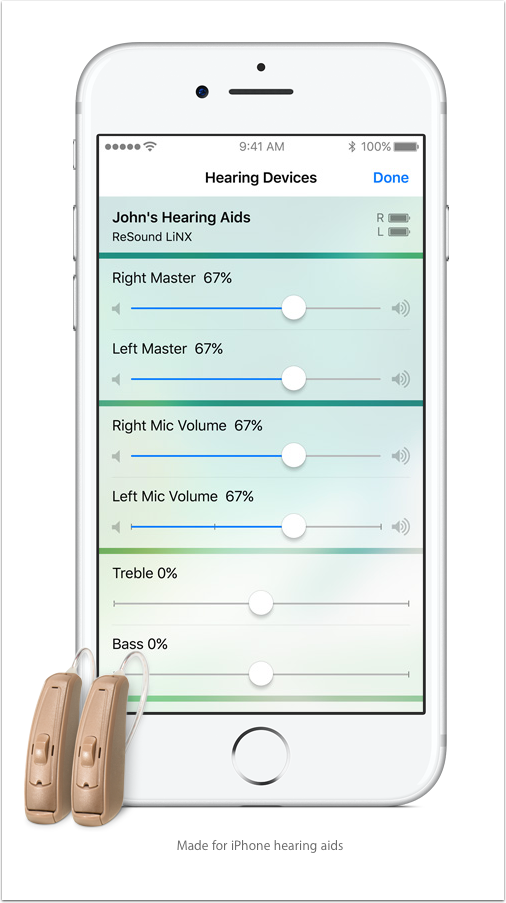
This morning, I have spent some time with my audiologist, I have moderate to profound hearing loss and wear hearing aids full time. These are a life line but they do present problems for me, in certain situations. When using the telephone, I receive a lot of feedback. Unfortunately the digital hearing aids, that I do have (my dear husband purchased these for me two years ago – prior to that it was difficult from birth, although I am an expert at lip-reading), are not ‘Made for iPhone’ and I really hoped they might be. This feature would allow me to manage audio levels from my iPhone and help me when using the telephone, or recording podcasts for example in my work. Both of these are incredibly trying for me to manage. I do have a remote control with various settings and I can reduce background noises in loud places but if I were and I am not in a position to and if you are and you need them, then I would strongly recommend looking for ‘Made for iPhone’ hearing aids. The features are incredible, it is even possible to check the battery status for each aid, these always seem to go at the most inconvenient of times.
I will post some of the features below, the new Accessibility website is truly wonderful. We have a Photo and Accessibility section within TheAppWhisperer and we have a wonderful writer, Luis Perez. He is an Apple Distinguished Educator whose work focuses on accessibility and inclusive design. He received his doctorate in special education from the University of South Florida in 2013 and is the author of Mobile Learning for All from Corwin Press. His work has appeared in THE Journal, The Loop Magazine, and the New York Times Bits Blog. You can read more about Luis here.
Of course, the audiology section is only one part of Apple’s Accessibility website and we will be looking at each section in turn. There really is so much help, for example with autism (I further studied Autism in Children at University), as well as Switch Control, Workout videos and more!
How to Set Up ‘Made for iPhone’ Hearing Aids with your iOS Device
If you do have ‘made for iPhone’ hearing aids, here is how you Pair and Connect them:
To pair your hearing aid, follow these steps:
- Open your hearing aid’s battery doors.
- On your device, tap Settings > General > Accessibility > Hearing Aids.
- If Bluetooth is off, turn it on under Devices.
- Close your hearing aid’s battery doors. Your device will search for your hearing aid.
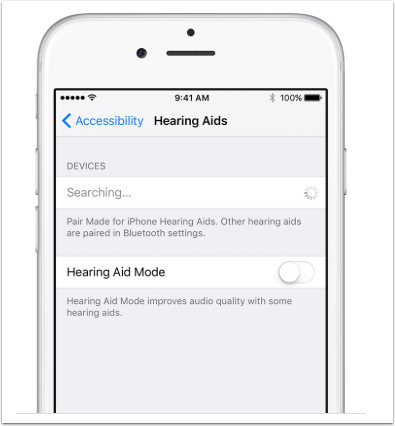
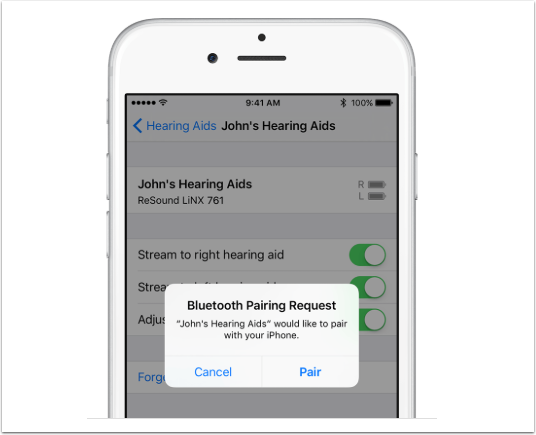
5. Under Devices, tap the name of your hearing aid.
6. Tap Pair when you see the pairing request on the screen. If you have two hearing aids, you’ll get two requests. Pairing could take up to a minute. You can put on your hearing aid, but don’t try to listen to audio from your device yet.
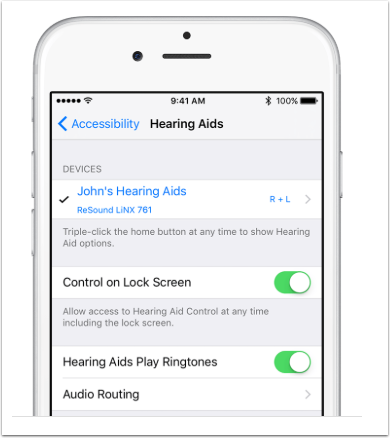
When your hearing aid pairs, you’ll see it under Devices with a check mark. Control on Lock Screen will be on. Leave it on to control your hearing aid from the Lock screen (using the Accessibility Shortcut) and from Control Center.
Pair with more than one device
When you pair your hearing aids with more than one iOS device, the connection for your hearing aids switches from one device to the other when you use audio. The connection also switches when you receive a call on your iPhone. If you make changes to your hearing aid settings on one device, they’re sent to your other iOS devices.
To pair with another iOS device, follow these steps:
- Make sure all devices are connected to the same Wi-Fi network and signed in to iCloud with the same Apple ID.
- Follow the steps for how to pair your hearing aid.
Connect when you turn on your hearing aid
When you turn off your hearing aid, it disconnects from your iOS device. When you turn on your hearing aid, open and close the battery doors on your hearing aid to connect again.
Control your hearing aid
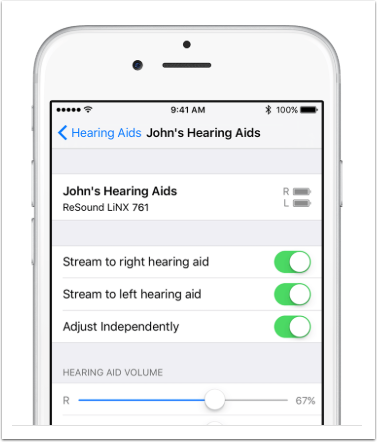
You can use your iOS device to see your hearing aid’s battery life, adjust the volume, and turn on Live Listen. To control your hearing aid, use Settings or the Accessibility Shortcut.
Tap Settings > General > Accessibility > Hearing Aids. Then tap your hearing aid’s name.
Here’s what you can do in Settings:
- View battery life
- Adjust volume levels for either or both hearing aids
- Choose an audio preset
- Turn on Live Listen
- Unpair your hearing aid

Joanne Carter
Joanne Carter BA (Hons), ARPS is a British photographer, photography journalist, editor and curator, and the founder and editorial director of TheAppWhisperer.com, an independent international photography publication established in 2009.She holds a First Class Honours degree in Photography and is an Associate of the Royal Photographic Society (ARPS).Her journalism, criticism and editorial work have appeared in The Times, The Sunday Times, The Guardian, Financial Times, BBC, Vogue Italia, LensCulture, Popular Photography and NikonPro, among other international publications.Through TheAppWhisperer, she brings together academic knowledge, professional photographic expertise and more than 17 years of specialist editorial experience to examine contemporary photography, mobile imaging, computational photography, photographic applications and emerging imaging technologies.