• News
  • INTERVIEWS
    • Vogue
    • LensCulture Articles
    • IntImate Interview
    • Reviews
    • High-Brow Interviews
    • TrueView Interviews
    • App Developer Interviews
    • A Day In The Life Of …
    • ‘Impossible’ Project Interviews
    • A Picture’s Worth…
    • Olloclip Interviews
    • Brought To Light
    • Extension Of The I
    • Artists’ Corner
    • Building Mobile Bridges with Instagram
    • Photo App Lounge
    • Spotlight
    • Photographs and text
    • Spotlight
    • Alternative Mobile Photography Processing
    • Pro Columns
  • TUTORIALS
    • App Art School
    • Creative Tutorials
      • Video Tutorials
      • Technical Tutorials
      • Hardware Tutorials
      • Viral SmartPhone Photography & Video Techniques
  • FEATURES
    • Tip Of The Day
    • Tickle Your Fancy
    • Saturday Poetry
    • Giveaways
    • Video Reviews
    • Drone
    • Apps
      • Amazon Appstore
      • Samsung Apps
      • Android Apps
      • BlackBerry Apps
      • 645 PRO
      • PhotoToaster
      • Windows Apps
      • Analog Camera
      • Color Lake
      • Etchings
      • Photo & Video
      • Image Blender
      • PhotoStation
      • MyPadLive
      • ProCamera
      • ProCam
      • Wood Camera
      • Photo Tool Apps
      • Apple Watch
      • iBooks Photo Books
      • Hardware
      • Photographic TED Talks
      • Mob-Entrepreneurs
      • Instagram Mobile Photographers To Follow Now
      • Indiegogo & Kickstarter Campaigns
      • Mobile Photography Courses
      • RUMORS
      • Photography & Art Magazines
      • Photography Books
      • SECTIONS
    • Exhibitions
    • Creative Grants and Residencies
    • Podcasts
    • Pic of the Day
    • Whisperings…
    • Mini Mobile Portfolio Reviews (MMPR)
    • Events
    • Venues
    • SHOWCASES
    • COLUMNS
      • COLUMNISTS
      • Draw the Line – Mobile Art as an Expression
      • StreetWise
      • Streets Ahead
      • Portrait of an Artist
      • APPart
      • Appstrax
      • Mobile Movies
      • Artistic Anarchy – Mobile Collusions
      • Ask Misho
      • Fly On The Wall
      • iFoto Fairchild
      • iObsess
      • Koci
      • iSights
      • Mobile Macro Photography
      • Photo Education & Accessibility
      • ItalianBrother
      • Mobile Photo Essays
      • Kuster
      • PictureBook
      • Portrayal
      • The Guetta Fringe
      • parallel II perspectives
      • The New Renaissance
      • Is There An App For That?
      • Vision & Voice
      • Tiny Shutter
      • The Picture Project
      • The App Nerds Workshop
      • StreetVIEW
      • Spare Moments
      • Shooting Star
  • About
    • Contact Us
      • Twitter
      • Instagram
      • YouTube
      • Support Us
  • GALLERY
  • News
  • INTERVIEWS
    • Vogue
    • LensCulture Articles
    • IntImate Interview
    • Reviews
    • High-Brow Interviews
    • TrueView Interviews
    • App Developer Interviews
    • A Day In The Life Of …
    • ‘Impossible’ Project Interviews
    • A Picture’s Worth…
    • Olloclip Interviews
    • Brought To Light
    • Extension Of The I
    • Artists’ Corner
    • Building Mobile Bridges with Instagram
    • Photo App Lounge
    • Spotlight
    • Photographs and text
    • Spotlight
    • Alternative Mobile Photography Processing
    • Pro Columns
  • TUTORIALS
    • App Art School
    • Creative Tutorials
      • Video Tutorials
      • Technical Tutorials
      • Hardware Tutorials
      • Viral SmartPhone Photography & Video Techniques
  • FEATURES
    • Tip Of The Day
    • Tickle Your Fancy
    • Saturday Poetry
    • Giveaways
    • Video Reviews
    • Drone
    • Apps
      • Amazon Appstore
      • Samsung Apps
      • Android Apps
      • BlackBerry Apps
      • 645 PRO
      • PhotoToaster
      • Windows Apps
      • Analog Camera
      • Color Lake
      • Etchings
      • Photo & Video
      • Image Blender
      • PhotoStation
      • MyPadLive
      • ProCamera
      • ProCam
      • Wood Camera
      • Photo Tool Apps
      • Apple Watch
      • iBooks Photo Books
      • Hardware
      • Photographic TED Talks
      • Mob-Entrepreneurs
      • Instagram Mobile Photographers To Follow Now
      • Indiegogo & Kickstarter Campaigns
      • Mobile Photography Courses
      • RUMORS
      • Photography & Art Magazines
      • Photography Books
      • SECTIONS
    • Exhibitions
    • Creative Grants and Residencies
    • Podcasts
    • Pic of the Day
    • Whisperings…
    • Mini Mobile Portfolio Reviews (MMPR)
    • Events
    • Venues
    • SHOWCASES
    • COLUMNS
      • COLUMNISTS
      • Draw the Line – Mobile Art as an Expression
      • StreetWise
      • Streets Ahead
      • Portrait of an Artist
      • APPart
      • Appstrax
      • Mobile Movies
      • Artistic Anarchy – Mobile Collusions
      • Ask Misho
      • Fly On The Wall
      • iFoto Fairchild
      • iObsess
      • Koci
      • iSights
      • Mobile Macro Photography
      • Photo Education & Accessibility
      • ItalianBrother
      • Mobile Photo Essays
      • Kuster
      • PictureBook
      • Portrayal
      • The Guetta Fringe
      • parallel II perspectives
      • The New Renaissance
      • Is There An App For That?
      • Vision & Voice
      • Tiny Shutter
      • The Picture Project
      • The App Nerds Workshop
      • StreetVIEW
      • Spare Moments
      • Shooting Star
  • About
    • Contact Us
      • Twitter
      • Instagram
      • YouTube
      • Support Us
  • GALLERY
  • appart
    App Art School,  APPart,  Creative Tutorials,  News,  Technical Tutorials

    AppArt School – Editing Live Photos on iPhone

    2025-06-09 / Comments Off on AppArt School – Editing Live Photos on iPhone

    AppArt School – AppArt School – Editing Live Photos on iPhone In the Photos app , you can edit Live Photos, change the key photo, and add fun effects like Bounce and Loop. Edit a Live Photo In addition to using the photo editing tools (like adding filters or cropping a photo) you can also change the key photo, trim the length, or mute the sound in your Live Photos. Open the Live Photo and tap Edit. Tap , then do any of the following: Set a key photo: Move the white frame on the frame viewer, tap Make Key Photo, then tap Done. Trim a Live Photo: Drag either…

    read more
    Joanne Carter

    You May Also Like

    Procreate

    How to Undo & Redo faster using gestures in Procreate

    2025-10-31
    art

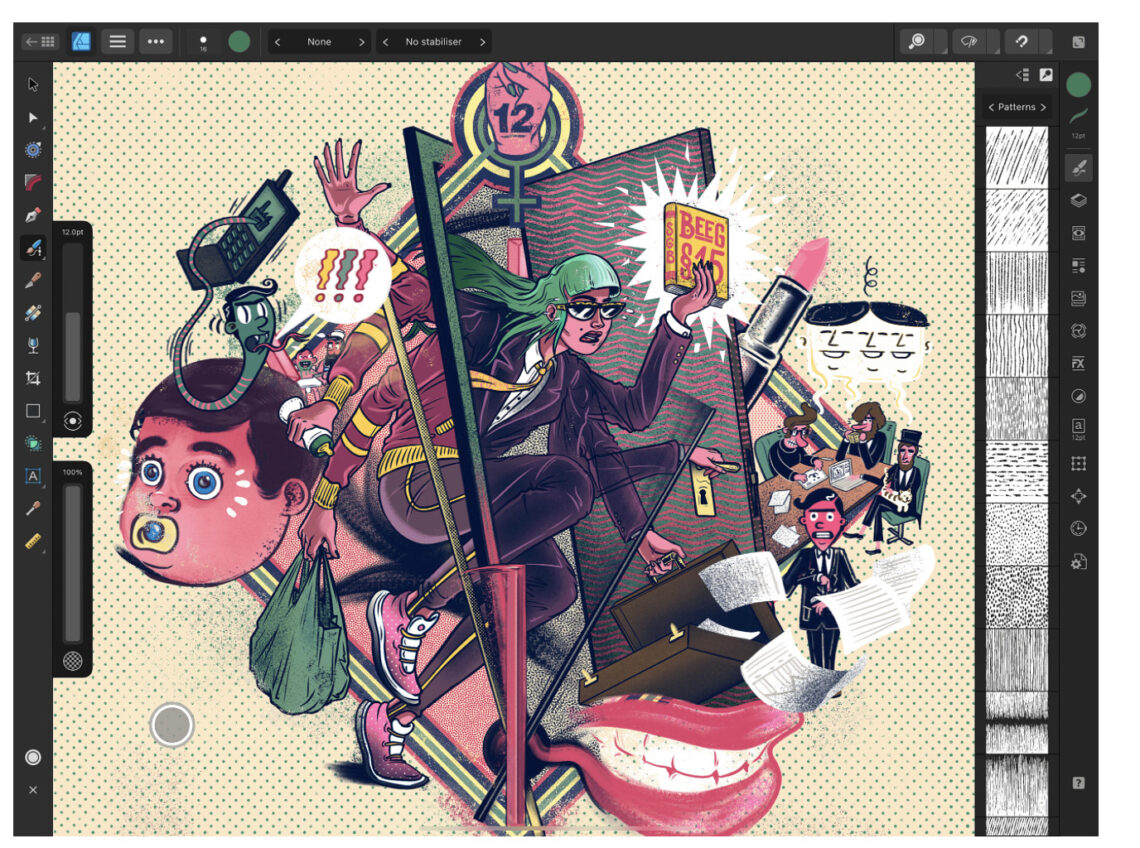
    App Art School – Redefining Processing of Illustrator and Designer on iPad with Affinity Designer iOS App

    2020-08-13
    best

    BEST Video Settings for Blackmagic Camera App! (2026)

    2026-02-27
  • AppArt
    App Art School,  APPart,  Creative Tutorials,  News,  Technical Tutorials

    AppArt School – Using albums in Photos on iPhone

    2025-06-09 / Comments Off on AppArt School – Using albums in Photos on iPhone

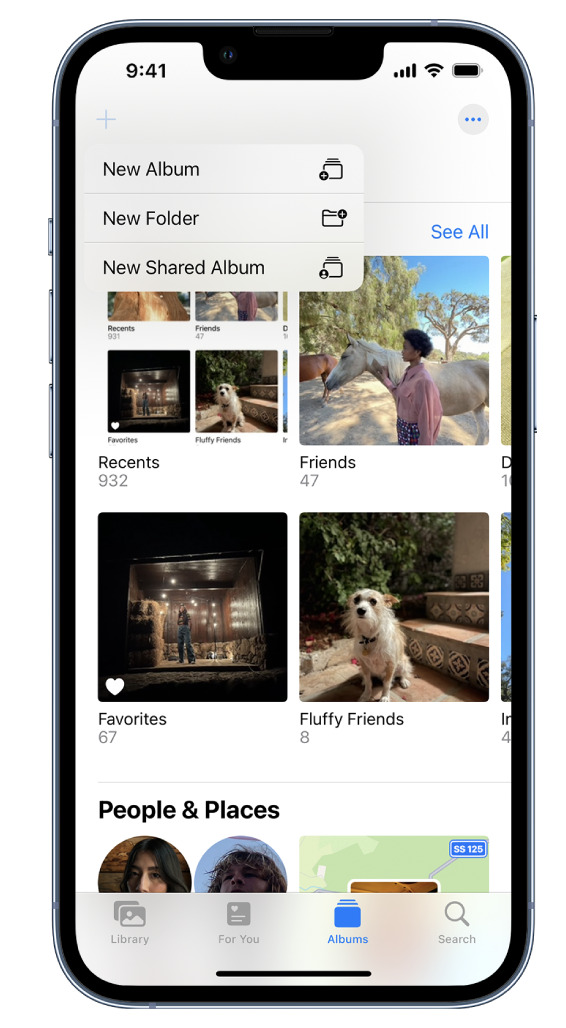
    AppArt School – Using albums in Photos on iPhone Use albums in the Photos app to view and organize your photos and videos. Tap Albums to view your photos and videos organized into different categories and media types, like Videos, Portrait, and Slo-mo. You can also look at your photos arranged on a world map in the Places album, or browse your photos based on who’s in them in the People album. The Recents album shows your entire photo collection in the order that you added them to your library and the Favorites album shows photos and videos that you marked as favorites. If you use iCloud Photos, albums are…

    read more
    Joanne Carter

    You May Also Like

    Procreate

    How to Create a Text Layer in Procreate

    2025-09-18
    best

    BEST Video Settings for Blackmagic Camera App! (2026)

    2026-02-27
    mobile art

    App Art School – Transforming dreams into digital art using Affinity Photo for iPad with Manuel Camino

    2020-08-24
  • app
    App Art School,  APPart,  Creative Tutorials,  News,  Technical Tutorials

    AppArt School – What are the Best Ten iOS Art Apps for Digital Painting and Illustration?

    2025-05-03 / Comments Off on AppArt School – What are the Best Ten iOS Art Apps for Digital Painting and Illustration?

    AppArt School – What are the best ten iOS art apps for digital painting and illustration? Here are ten highly regarded iOS art apps for digital painting and illustration: Procreate: Procreate is a powerful and feature-rich app that offers an extensive range of tools and brushes. It provides a fluid and responsive drawing experience with advanced layering, blending modes, and customizable brushes. Adobe Fresco: Adobe Fresco combines the feel of traditional painting with the versatility of digital tools. It offers realistic brush options, intuitive interface, and seamless integration with other Adobe Creative Cloud apps. Autodesk Sketchbook: Autodesk Sketchbook is a professional-grade app that provides a wide variety of brushes and…

    read more
    Joanne Carter

    You May Also Like

    Procreate

    Intro to Procreate Dreams

    2026-01-21
    apps icolorama

    AppArt School – How to Get Creative with the iColorama Painting App

    2023-05-11
    art

    Distressed FX Plus Update and Work-Around

    2024-03-20
  • appart
    App Art School,  APPart,  Creative Tutorials,  News,  Technical Tutorials

    AppArt School – Ten iOS Video Apps to Enhance Your Instagram Posts

    2025-05-03 / Comments Off on AppArt School – Ten iOS Video Apps to Enhance Your Instagram Posts

    AppArt School – Ten iOS Video Apps to Enhance Your Instagram Posts If you’re specifically looking for Apple iOS video apps to enhance your Instagram posts, here are ten popular options: InShot: InShot is a versatile video editing app that offers a wide range of features such as trimming, cutting, merging, applying filters, adding music, text, and stickers to your videos. It’s user-friendly and provides various editing tools to create engaging content. Adobe Premiere Rush: Adobe Premiere Rush is a powerful video editing app that provides professional-grade editing tools in a user-friendly interface. It allows you to edit videos, add transitions, apply color filters, and even edit audio. It seamlessly…

    read more
    Joanne Carter

    You May Also Like

    procreate

    How to Import new Fonts in Procreate

    2025-09-16
    appart

    AppArt School – New immersive AR experience brings student creativity to life

    2023-07-12
    slow shutter

    AppArt School – Top 10 iOS Slow Shutter Apps

    2023-05-16
  • afterlight
    App Art School,  APPart,  Creative Tutorials,  News,  Technical Tutorials

    AppArt School – How to use the Afterlight app to improve your Street Photography

    2025-05-02 / Comments Off on AppArt School – How to use the Afterlight app to improve your Street Photography

    AppArt School – How to use the Afterlight app to improve your Street Photography Here are 10 steps to help you use the Afterlight app to improve your street photography: Open Afterlight and import your street photography image. Adjust the brightness, contrast, and exposure of the image using the app’s basic editing tools. This can help bring out the details and colors in your street photography. Use the app’s sharpening tool to enhance the details in your image. This can help make the street scenes appear sharper and more detailed. Experiment with the app’s various filters to find one that suits your street photography. You can adjust the strength of…

    read more
    Joanne Carter

    You May Also Like

    AppArt

    AppArt School – Top 10 iOS Apps for Advanced Mobile Photographers

    2025-05-02
    procreate

    Procreate Brush Studio: Grain

    2025-09-01
    Procreate

    How to Create a Text Layer in Procreate

    2025-09-18
  • apps
    App Art School,  APPart,  Creative Tutorials,  News,  Technical Tutorials

    AppArt School – Top 10 iOS Apps to Make your Instagram Posts Great

    2025-05-02 / Comments Off on AppArt School – Top 10 iOS Apps to Make your Instagram Posts Great

    AppArt School – Top Ten iOS apps that can aid in creating and enhancing Instagram posts: Instagram: The first and most important app for Instagram users is the Instagram app itself. It allows you to post photos and videos, engage with other users, and stay up to date with the latest trends and hashtags. Canva: Canva is a graphic design app that offers a range of templates and design elements for creating professional-looking visuals. You can use it to create custom images and graphics for your Instagram posts. VSCO: VSCO is a popular photo editing app that offers advanced editing tools and filters for fine-tuning color, exposure, and tone. It…

    read more
    Joanne Carter

    You May Also Like

    procreate

    How to use Clipping Masks in Procreate

    2025-10-06
    affinity

    Complete Beginners’ Guide To Affinity 2025

    2025-11-05
    RAW

    How to Shoot Open-Gate RAW Video on Any iPhone (No SSD Required)

    2025-12-19
  • AppArt
    App Art School,  APPart,  Creative Tutorials,  News,  Technical Tutorials

    AppArt School – Ten Good iOS Photo Editing Apps for Beginners

    2025-05-02 / Comments Off on AppArt School – Ten Good iOS Photo Editing Apps for Beginners

    AppArt School – 10 Good iOS Photo Editing Apps for Beginners There are many photo editing apps available for beginners, each with its own unique features and user interface. Here are some popular options: Snapseed: This is a free photo editing app developed by Google that offers a wide range of editing tools and filters. VSCO: VSCO is a popular photo editing app that offers a wide range of filters and editing tools. It also has a built-in camera app, making it easy to take and edit photos all in one place. Adobe Lightroom: Adobe Lightroom is a powerful photo editing app that is designed for both beginners and professionals.…

    read more
    Joanne Carter

    You May Also Like

    procreate

    How to fill an area using ColourDrop in Procreate

    2025-10-30
    halide

    App Photo School – Adjust exposure with a swipe – Halide RAW Manual camera for iPhone

    2020-10-21
    Moment

    Moment Pro Camera II – Tutorial

    2025-11-28
  • AppArt
    App Art School,  APPart,  Creative Tutorials,  News,  Technical Tutorials

    AppArt School – Top 10 iOS Apps for Advanced Mobile Photographers

    2025-05-02 / Comments Off on AppArt School – Top 10 iOS Apps for Advanced Mobile Photographers

    AppArt School – Top 10 iOS Apps for Advanced Mobile Photographers Here are ten iOS photo apps that are popular among advanced mobile photographers: Lightroom: Adobe’s photo editing app allows for advanced editing and organization of photos. It features advanced color grading tools, presets, and the ability to sync edits across devices. VSCO: This app offers advanced photo editing tools and filters for fine-tuning color, exposure, and tone. It also features a built-in camera app for capturing high-quality images. Snapseed: A powerful photo editing app that offers advanced features like selective adjustments, masking, and healing tools. ProCamera: A high-quality camera app that offers advanced control over exposure, focus, and white…

    read more
    Joanne Carter

    You May Also Like

    affinity

    App Art School – Vector inking and colouring in Affinity Designer for iPad with Monez

    2020-09-03
    ProRes

    ProRes ‘Almost’ RAW vs 12-Bit DCG RAW Video Shootout! (iPhone 17 Pro vs Pixel 10 Pro)

    2025-12-12
    procreate

    How to Clear your Layer or Selection in Procreate

    2025-10-23
  • photos
    App Art School,  APPart,  Creative Tutorials,  News,  Technical Tutorials

    AppArt School – Search for photos on iPhone

    2023-08-18 / Comments Off on AppArt School – Search for photos on iPhone

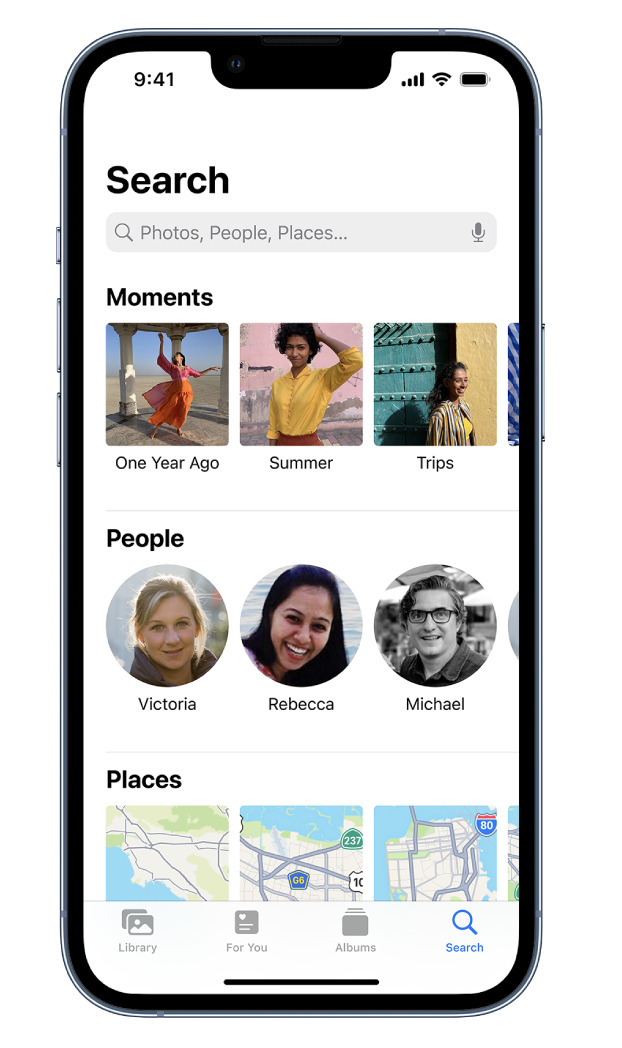
    AppArt School – Search for photos on iPhone When you tap Search in the Photos app , you see suggestions for moments, people, places, and categories to help you find what you’re looking for, or rediscover an event you forgot about. You can also type a keyword into the search field—for example, a person’s name, date, or location—to help you find a specific photo. Tap Search, then tap the search field at the top of the screen to search by any of the following: Date (month or year) Place (city or state) Business names (museums, for example) Category (beach or sunset, for example) Events (sports games or concerts, for example)…

    read more
    Joanne Carter

    You May Also Like

    AppArt

    AppArt School – What are the best photo storage apps for backing up my photos?

    2023-04-28
    procreate

    Procreate – Brush Studio: Dynamics

    2025-08-20
    ProRes

    ProRes ‘Almost’ RAW vs 12-Bit DCG RAW Video Shootout! (iPhone 17 Pro vs Pixel 10 Pro)

    2025-12-12
  • AppArt
    App Art School,  APPart,  Creative Tutorials,  News,  Technical Tutorials

    AppArt School – Use albums in Photos on iPhone

    2023-08-08 / Comments Off on AppArt School – Use albums in Photos on iPhone

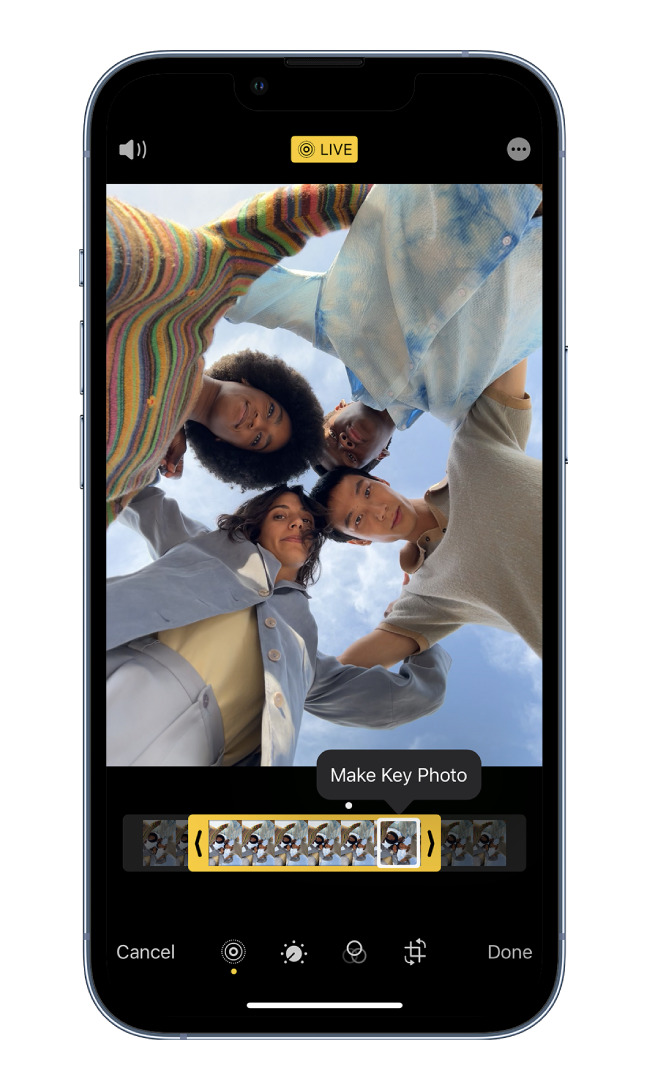
    AppArt School – Use albums in Photos on iPhone Use albums in the Photos app to view and organize your photos and videos. Tap Albums to view your photos and videos organized into different categories and media types, like Videos, Portrait, and Slo-mo. You can also look at your photos arranged on a world map in the Places album, or browse your photos based on who’s in them in the People album. The Recents album shows your entire photo collection in the order that you added them to your library and the Favorites album shows photos and videos that you marked as favorites. If you use iCloud Photos, albums are stored…

    read more
    Joanne Carter

    You May Also Like

    RAW

    How to develop RAW files non-destructively with Affinity Photo 2

    2023-02-06
    Blackmagic

    Best iPhone Filmmaking Apps 2026

    2026-02-17
    procreate

    How to Merge Layers with a pinch in Procreate

    2025-10-17
 Older Posts

Visit our online Print Gallery

    ©TheAppWhisperer 2026
    • News
    • INTERVIEWS
    • TUTORIALS
    • FEATURES
    • About
    • GALLERY
    Ashe Theme by WP Royal.