
PureShot – Major Update Released Today
The latest update to the uber popular PureShot app from Jag.gr developers, the same ones as 645 Pro, 6×7 and 6×6 will be released a little later on today.
The developers explain:
‘The app remains much the same—feedback as been overwhelmingly positive so we didn’t want to mess with the core philosophy behind it—but we’ve responded to the demands of our customers by implementing:
* A sophisticated image-saving pipeline system that supports shooting lots of full-resolution, high-quality images
* Three-shot burst and bracket modes
* A faster-access menu system
* A Full Screen viewfinder option for iPhone and iPod touch with 3.5-inch display
We’ve posted more details below from their website on this update. It’s free, if you have previously downloaded PureShot, if not, you can download it here. It retails for $1.99/£1.49.

From the developer’s blog:
‘Until now, PureShot—like most apps—just chucked its images at the Camera Roll and let Apple’s built-in processes sort out how they’d be saved. And that works just fine as along as you’re saving small images and doing so infrequently. However, the standard approach doesn’t cope too well with trying to save several images at once—which is what happens if you shoot quickly and especially if you shoot full-resolution images in a higher quality than standard, such as with PureShot’s MAX-Quality JPEGs or dRAW TIFFs. If the number of images being saved exceeds the maximum that the built-in buffer can handle, then everything goes awry.
So we’ve built, in essence, a system for pipelining the images. We don’t ask the standard “save-to-Camera-Roll” process to deal with any more than one shot at a time, with our internal system only feeding that process a new image when it’s ready for it.
The end result of this is that you can shoot lots and lots of full-resolution, high-quality images in sequence, and they’ll all get saved in due course.
It also provides a level of security. Should something cause a problem with your iPhone or iPad while PureShot is busy saving, you can re-start the app, and it will carry on saving files where it left off.
Burst and Bracket
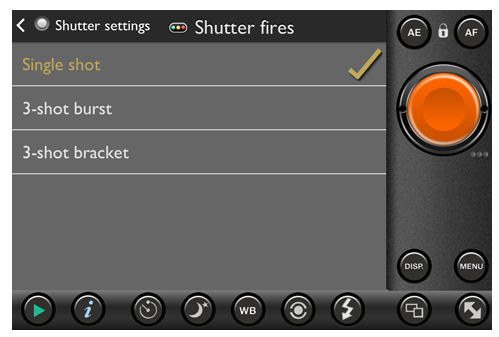
We’ve also added two new alternatives for what happens when you trigger the shutter release. By default, you shoot a single photograph (as you’d expect!). However, go to the Shutter settings menu and you can also opt for a three-shot burst or a three-shot bracket:
If you select the three-shot burst, each time you release the shutter you iPhone or iPad will take three photographs, one after the other, as fast as it can (which is really pretty fast on iPhone 5, if a bit less quick on older hardware).
The three-shot bracket is a little different: it’s lets you take three closely-grouped shots with different exposures. You may want to do this to provide “cover” in situations where exposure is tricky to assess, or to combine later into a single High Dynamic Range (HDR) photograph.
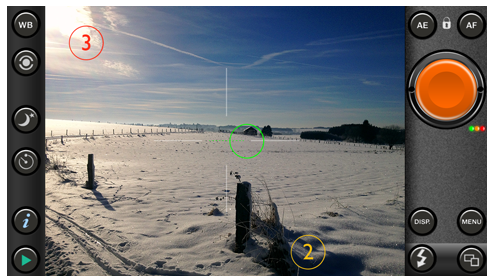
With the three-shot bracket you get two (numbered) circles that let you select a spot-metered exposure point-of-inerest for the second and third shots of the sequence—here shown with the standard spot-metering point-of-interest indicator, although you can also take the “standard” shot with matrix metering. When you move these around the viewfinder you can seen the effect that their location will have as they temporarily “take over” the metering while you’re dragging them.
Once they’re where you want—and, if you choose to display the exposure information, you can be very precise and set them, say, 1 Ev apart—you release the shutter and three differently exposed shots are taken. Please be aware that there is a gap of just over a second between each shot because iPhones and iPads take time to adjust their exposure!
Going large

You may have noticed a new button on the first screenshot, above (from an iPhone 4S). This is used to trigger the new Full Screen option for iPhone and iPod touch devices with 3.5-inch displays *:
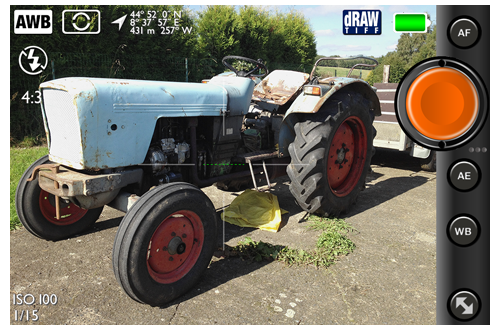
Press this button, and you get the biggest possible 4:3 viewfinder on your device, together with the bare minimum of controls needed for capturing your shot—the shutter release button and the AE-L, AF-L and WB-L buttons. If you need access to anything else, just tap the Full Screen button again and you’re back with the standard viewfinder.
This is a great addition for those who want to concentrate on the shot with as much visual information as possible.
Menu
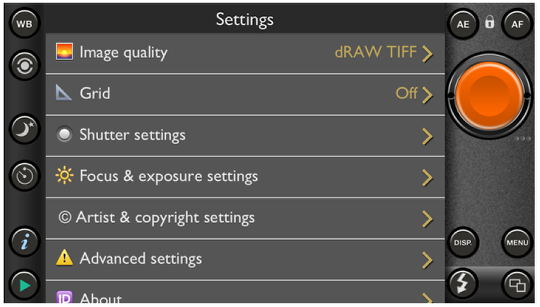
Going back to the first screenshot, you may also have noticed that the menu system has changed. The menu used to pop up over the entire display (a standard iOS “modal” view). However, that meant you had to navigate your way out of it once you’d changed a settings—two or three taps that weren’t really necessary. So we’ve put it inside the viewfinder (just as you’d find with a normal digital camera). Once you’ve made your change, just tap on the MENU button again (or, indeed, any other button) and it will be gone!
There’s lots more new in PureShot 2.0, but most of it is very much “under the covers”, designed to make the experience of taking pictures as pleasant—and effective—as possible’.

Joanne Carter
Joanne Carter BA (Hons), ARPS is a British photographer, photography journalist, editor and curator, and the founder and editorial director of TheAppWhisperer.com, an independent international photography publication established in 2009.She holds a First Class Honours degree in Photography and is an Associate of the Royal Photographic Society (ARPS).Her journalism, criticism and editorial work have appeared in The Times, The Sunday Times, The Guardian, Financial Times, BBC, Vogue Italia, LensCulture, Popular Photography and NikonPro, among other international publications.Through TheAppWhisperer, she brings together academic knowledge, professional photographic expertise and more than 17 years of specialist editorial experience to examine contemporary photography, mobile imaging, computational photography, photographic applications and emerging imaging technologies.
2 Comments
Robert Lancaster
This is one of the best apps around.
If you don’t already have it … get it!
‘Nuff said.
Mike
Still no B&W mode. I’m bummed. KitCam is now my go to app for highest quality imagery. Pity. I wanted to like this app as much as I like 6×6.