Pro HDR – Updated
Pro HDR is a very popular app for iPhone photography and it has just been updated with faster rendering, new filters and more. Take a look at What’s New below. This is a free update, if you have previously downloaded this app. If not, you can download it here. It retails for $1.99/£1.49/download. What’s New? Faster rendering, lots of great new filters, volume-button shutter release, more frames, choose frame style and thickness independently, more complete EXIF data saved (includes compass heading and date/time), fixed self-timer bug on iPad, supports larger image resolutions (up to 12 megapixels).
Midland Sun Headphones – Review
We’ve been testing these headphones for a few weeks back at theappwhisperer HQ and we’re quite impressed. The marketing claim of these headphones is that they help you ‘beat the heat’ as they’re ‘cooling headphones’. They are lined with cotton and have a ‘transpiring’ fabric on the outside, in order to keep your ears cool. Well, we are not entirely convinced they keep our ears cool but they are quite comfortable nonetheless. Take a look at our review below… They’re quite compact headphones but do not fold up tightly, they are incredibly lightweight though. They come complete with two cables, one cable acts as a answer/control, so you…
Snapseed for Desktop – Updated
Leading photography software developer Nik Software today released an update to its popular Snapseed for Mac and Windows desktop computers. Snapseed is an innovative photo enhancement and sharing app with a powerful suite of imaging filters to make any image extraordinary. The 1.2 version update includes new features, bug fixes, and a free demo version option. The update is free to registered owners of Snapseed Desktop. Snapseed Desktop normally retails for € 15,95, but until August 16, 2012 customers can purchase the electronic download for € 7,99 direct from www.snapseed.com. New Features and Updates • Undo—Now one can undo filters that have been applied to the images. • Resize Photos—When…
PHOTOanalytics – Temporarily Free – Save $74.99
This app allows you to analyse your fotolio Portfolio. Analyse your portfolio with the new quote of sale for every image and decide which image is more effective. With one view you can see all the information for every image: reference number, date of your upload, price of sale, amount of views, downloads and the qoute of sales. The developers are planning to show you how much money you have get with one image that you can see the return of investment for every image or for one shooting. You can download the app for free here.
PhotoMarkr – Watermark Your Photos – Temporarily Free
PhotoMarkr lets you add your personal watermark to your iPhone and iPod touch photos and screenshots. This is a great tool for all photographers who like posting their work online. Just set it up once, and then apply your watermark to any photo with the click of a button. This app is temporarily free and you can download it here. Features – Create a watermark from text, or import a custom watermark as an image – Position watermark anywhere on your photo – Move, rotate and resize your watermark – Change watermark transparency PhotoMarkr always saves a full-res original, and a full-res copy of your photo with…
Part – Updated And Free Temporarily
Part analyzes your photo creating a single shape and accompanying color. With a tap your shape multiplies. Tap or swipe again. You chose when to stop the division, and what part of the image is most important. This app has just been updated, check out What’s New below. To celebrate the update the app is temporarily free. You can download it here. To celebrate your wonderful talent, Part now has so many new shapes you can add to your palette by tapping the lock in the options menu. Once you’ve selected the ones you like, cycle them in to your creation with the shapes button in the option…
Photo Art Camera – Our Daily App Giveaway
Welcome once again to our Daily App Giveaway section of theappwhisperer. We value our readers so much and that’s why we want to share our love of apps with you. Each day we give away free apps, better make us your home page 😉 Today we’re giving away Photo Art Camera apps, each worth $1.99/£1.49. Photo Art Camera is another brand new iOS app with very high resolution, it offers high quality textures and effects that will make unique and impressive transformations to your images. Would you like to try this app for free? If so, like us on Facebook (see bottom of home page), join our ever expanding Twitter…
Avid Studio – Updated
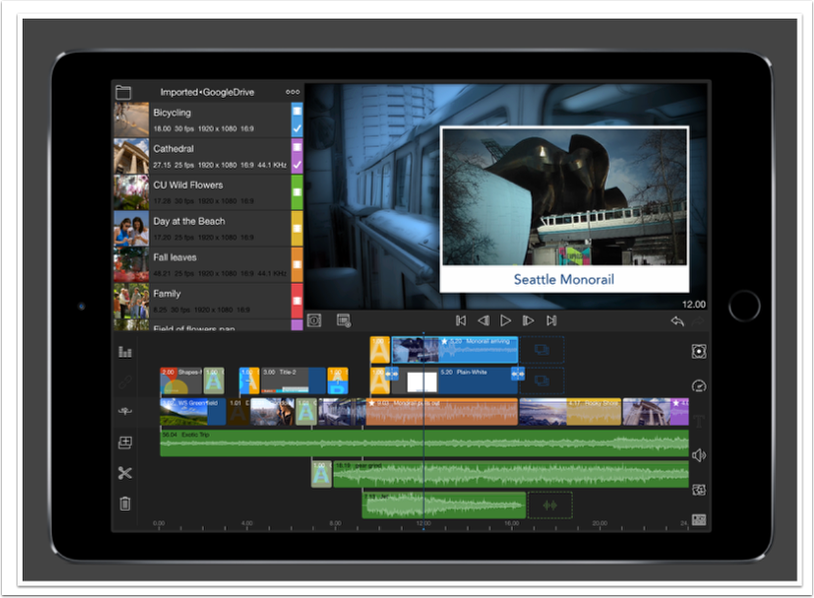
Big-screen moviemaking comes to the touchscreen with Avid® Studio for iPad. We’ve distilled the world’s leading film-editing technology into an easy-to-use app that enables you to edit video, audio, and photos at the speed of your creativity. Swiftly arrange clips in the Storyboard, make precision edits using the Timeline, and add high-quality transitions, effects, voiceover, and a soundtrack. Then share your movie via YouTube, Facebook, and more—or export to Avid Studio for the PC and continue editing with even more advanced tools. This app has just been updated with some excellent new features, check out What’s New below. This is a free update, if you have previously downloaded this app.…
360 Panorama – Temporarily Free
Take stunning 360 panoramas everywhere. 360 Panorama turns your iPhone, iPod Touch, or iPad into a full featured 360 degree panoramic camera. Easily capture immersive panoramas in seconds and instantly share your 360 view with the world. Simply pan the camera and watch as images are stitched seamlessly. 360 Panorama captures the scene in a way you never could with a traditional camera. This app usually retails for $0.99/£0.69 but today you can pick it up for free. Click here to download.
Olloclip Tutorial – How To Create An Incredible Macro Still Life Image Using An Olloclip
The Olloclip lens system consists of three lenses. A wide-angle, fish-eye and a macro lens. The macro lens magnifies your image roughly around ten times. It allows you to get close to focus on your subjects with your iPhone, usually within 12 to 15 mm of your subject. With the Olloclip macro lens I had to learn how close to get to my subject in practice and when to back up. Initially, I tended to get in very close to my subject and then have to back up to get some kind of focus. It does help to have your iPhone on some kind of tripod/support to keep your hand…