Best Apps for Colourising Black and White Photos (2026)
Top Mobile Apps to Restore and Colourise Old Photos on iPhone & Android
Colourising black-and-white photographs has moved from a specialist process to something that can now be done directly on a mobile phone. What was once slow and highly manual is now often handled by AI — but the quality of the result still depends on the tools you choose and how you use them.
The best apps don’t simply add colour. They interpret tone, texture and light, attempting to reconstruct something that feels believable rather than artificial. Some prioritise speed, others control, and a few allow you to move between the two.
In this guide, we’ve selected the best mobile apps for colourising black and white photos in 2026 — all available on iPhone and Android, and all capable of producing strong, usable results.
Quick Comparison
| App | Best For | Platform | Key Feature |
|---|---|---|---|
| Remini | Portrait restoration | iOS / Android | AI face colourisation |
| Colourise (Photomyne) | Old photos | iOS / Android | One-tap colour |
| PicsArt | Manual control | iOS / Android | Brush + layers |
| Photoshop Express | Refinement | iOS / Android | AI + manual tools |
| Lightroom Mobile | Colour grading | iOS / Android | Tone + colour control |
| Snapseed | Local edits | iOS / Android | Selective adjustments |
| Face Restore | Faces | Android | AI portrait colour |
| EnhanceFox | Old images | iOS / Android | AI restoration |
Remini
Download (Android): https://play.google.com/store/apps/details?id=com.bigwinepot.nwdn.international
Download (iPhone): https://apps.apple.com/app/remini-ai-photo-enhancer/id1470373330

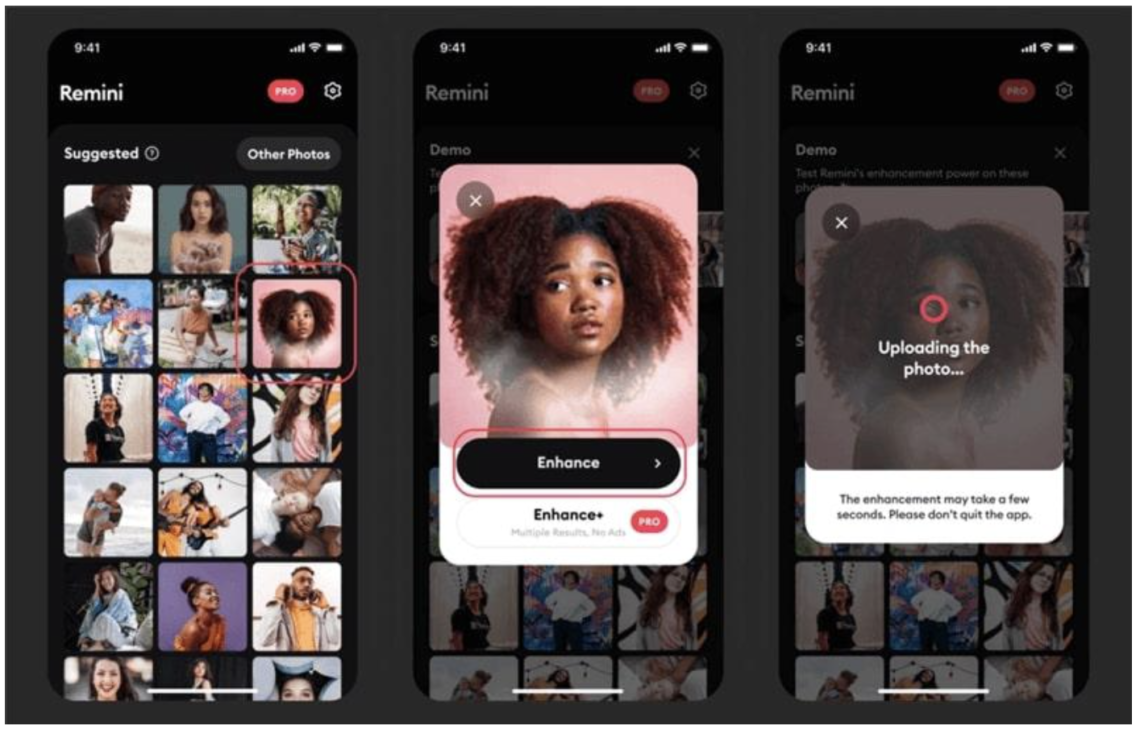
Remini has become one of the most widely used apps for restoring and colourising black-and-white photographs, particularly when faces are involved. Its AI models are tuned towards portraiture, meaning skin tones, eyes and facial detail are handled with more care than in broader tools.
The process is almost entirely automated. You upload an image, and within seconds, a colourised version is generated. What makes it effective is the way colour is applied after the detail has been reconstructed, giving the image a sense of coherence rather than making it appear layered.
It can occasionally lean towards over-smoothing, but used selectively, it produces some of the most convincing mobile results.
Best for: Portraits and facial detail
Colourise (Photomyne)
Download (Android): https://play.google.com/store/apps/details?id=com.photomyne.colorize
Download (iPhone): https://apps.apple.com/app/colorize-color-to-old-photos/id1505450662

Colourise by Photomyne is built specifically for one purpose: turning black and white images into colour photographs quickly and convincingly.
The results tend to be balanced, avoiding the overly saturated look that can make colourised images feel artificial. It works particularly well with family photographs and everyday scenes where realism matters more than dramatic effect.
There’s very little manual control, but that simplicity is precisely what makes it useful.
Best for: Fast, natural-looking colourisation
PicsArt
PicsArt was also listed in our Best Apps to Remove Objects from Photos in 2026 – Clean Up Your Images Effortlessly
Download (Android): https://play.google.com/store/apps/details?id=com.picsart.studio
Download (iPhone): https://apps.apple.com/app/picsart-photo-video-editor/id587366035

PicsArt offers a more deliberate approach. Rather than relying entirely on automation, it allows you to manually introduce colour using brushes, layers and blending modes.
This is particularly useful where AI tools struggle — fabrics, backgrounds or objects with ambiguous tonal information. It requires more time, but also allows for greater accuracy and creative control.
In practice, it works best alongside AI apps, refining and correcting rather than replacing them.
Best for: Manual colourisation and control
Adobe Photoshop Express
Download (Android): https://play.google.com/store/apps/details?id=com.adobe.psmobile
Download (iPhone): https://apps.apple.com/app/adobe-photoshop-express/id331975235

Photoshop Express sits between automation and control. While it includes AI-driven features, its strength lies in refining colour once it has been introduced.
Adjustments to temperature, tint and vibrancy allow you to correct colour that feels slightly off, bringing balance back into the image. It is particularly useful when an automated result needs subtle correction rather than a complete rework.
It doesn’t replace dedicated colourisation tools, but it significantly improves their output.
Best for: Refining AI colourisation
Adobe Lightroom Mobile
Adobe Lightroom Mobile was also listed in our Best Apps to Remove Objects from Photos in 2026 – Clean Up Your Images Effortlessly
Also, Adobe Lightroom: The Biggest AI Updates of 2025 [Guide]
Download (Android): https://play.google.com/store/apps/details?id=com.adobe.lrmobile
Download (iPhone): https://apps.apple.com/app/adobe-lightroom-for-iphone/id878783582

Lightroom Mobile becomes essential once colour has been added. It allows you to balance tones, refine colour relationships and create consistency across an image or a series.
The colour grading tools, particularly curves and split toning, allow for a more considered finish. Where AI introduces colour, Lightroom shapes it.
It rewards patience but produces the most convincing results when used carefully.
Best for: Final colour grading and consistency
Snapseed
Snapseed was also listed in our Best Apps to Remove Objects from Photos in 2026 – Clean Up Your Images Effortlessly
Download (Android): https://play.google.com/store/apps/details?id=com.niksoftware.snapseed
Download (iPhone): https://apps.apple.com/app/snapseed/id439438619

Snapseed plays a quieter but equally important role. Its selective adjustment tools allow you to refine specific areas of a colourised image without affecting the whole.
This is particularly useful when certain tones — such as skin or sky — need adjustment. It allows for correction without disrupting the balance of the entire photograph.
It doesn’t generate colour, but it resolves it.
Best for: Local adjustments and precision
Face Restore
Download (Android): https://play.google.com/store/apps/details?id=ai.face.restore

Face Restore focuses specifically on portraits. It uses AI to rebuild facial detail before applying colour, which helps produce a more integrated result.
It is particularly effective with older or damaged images where faces have deteriorated over time. The results can feel slightly stylised, but often restore clarity and presence.
Best for: Restoring and colourising faces
EnhanceFox
Download (Android): https://play.google.com/store/apps/details?id=com.changpeng.enhancefox
Download (iPhone): https://apps.apple.com/app/enhancefox-ai-photo-enhancer/id1574781489

EnhanceFox combines restoration and colourisation into a single workflow. It sharpens, repairs and then applies colour, producing results that feel more complete than colour alone.
It is particularly useful for low-resolution or damaged images, where multiple corrections are needed. The automation is strong, though sometimes heavy-handed, so results benefit from refinement elsewhere.
Best for: Full restoration and colourisation
Final Thoughts
Colourising black and white photographs on mobile is no longer about a single app. The most convincing results come from combining tools — using AI to introduce colour, then refining, correcting and balancing it.
What matters is not just the technology, but how it is used. The best apps offer a starting point. The final image still depends on judgement.
FAQs
What is the best app to colourise black and white photos?
Remini and Colourise (Photomyne) are among the most effective for fast AI colourisation, while Lightroom and Snapseed refine results.
Are colourised photos accurate?
Not entirely. AI tools interpret images based on data, so results are approximations rather than exact representations.
Can I colourise photos for free?
Yes, most apps listed offer free versions, though some features require a subscription.
You may also be interested in our other best guides to mobile photography
Best AI Photo Editing Apps in 2026
Best Android Photography Apps – 2026 Edition
Best Manual Camera Apps for Android (2026) – DSLR Control on Your Phone
Best Mobile Photography Apps (2026 Edition)
Best long-exposure eApps for iPhone 2026 edition
Best Camera Apps to Reduce iPhone Processing (2026 Edition)
The Best Camera & Editing Apps for Android – Tested and Updated – 2026 Edition
• Best Mobile Photography Apps (2026 Edition)
• Best Camera Apps to Reduce iPhone Processing (2026 Edition)
• Best Mobile Filmmaking Apps (2026 Edition)
• Best Black and White Photography Apps for iPhone (2026 Edition)
• Best Portfolio Apps and Websites for Photographers (2026 Edition)
• Blackmagic Camera Settings Guide
• Best way to use Blackmagic’s camera remote control (2026)
• Snapseed vs Lightroom Mobile
• Best iPhone Camera Apps for Photographers
• 10 Apps Secretly Draining Your Phone’s Battery – 2026 Edition
• Best Way To Create More Dynamic Travel Photos with Lightroom on Mobile
___________________________________________
Please support us
TheAppWhisperer has always had a dual mission: to promote the most talented mobile artists of the day and to support ambitious, interested viewers worldwide. Over the years, TheAppWhisperer has gained readers worldwide and created new spaces for that exchange.
All this work thrives with the support of our community. Your support helps protect our independence, and we can keep delivering open, global promotion of mobile artists. Every contribution, however big or small, is valuable for our future.

Joanne Carter
Joanne Carter, creator of the world’s most popular mobile photography and art website— TheAppWhisperer.com— TheAppWhisperer platform has been a pivotal cyberspace for mobile artists of all abilities to learn about, to explore, to celebrate and to share mobile artworks. Joanne’s compassion, inclusivity, and humility are hallmarks in all that she does, and is particularly evident in the platform she has built. In her words, “We all have the potential to remove ourselves from the centre of any circle and to expand a sphere of compassion outward; to include everyone interested in mobile art, ensuring every artist is within reach”, she has said. Promotion of mobile artists and the art form as a primary medium in today’s art world, has become her life’s focus. She has presented lectures bolstering mobile artists and their art from as far away as the Museum of Art in Seoul, South Korea to closer to her home in the UK at Focus on Imaging. Her experience as a jurist for mobile art competitions includes: Portugal, Canada, US, S Korea, UK and Italy. And her travels pioneering the breadth of mobile art includes key events in: Frankfurt, Naples, Amalfi Coast, Paris, Brazil, London. Pioneering the world’s first mobile art online gallery - TheAppWhispererPrintSales.com has extended her reach even further, shipping from London, UK to clients in the US, Europe and The Far East to a global group of collectors looking for exclusive art to hang in their homes and offices. The online gallery specialises in prints for discerning collectors of unique, previously unseen signed limited edition art. Her journey towards becoming The App Whisperer, includes (but is not limited to) working for a paparazzi photo agency for several years and as a deputy editor for a photo print magazine. Her own freelance photographic journalistic work is also widely acclaimed. She has been published extensively both within the UK and the US in national and international titles. These include The Times, The Sunday Times, The Guardian, Popular Photography & Imaging, dpreview, NikonPro, Which? and more recently with the BBC as a Contributor, Columnist at Vogue Italia and Contributing Editor at LensCulture. Her professional photography has also been widely exhibited throughout Europe, including Italy, Portugal and the UK. She is currently writing several books, all related to mobile art and is always open to requests for new commissions for either writing or photography projects or a combination of both. Please contact her at: joanne@theappwhisperer.com