• ONLINE GALLERY and PRINT SALES
  • About Us
  • Vogue
    • LensCulture Articles
  • News
  • COLUMNS
    • COLUMNISTS
    • Draw the Line – Mobile Art as an Expression
    • StreetWise
    • Streets Ahead
    • Portrait of an Artist
    • APPart
    • Appstrax
    • Mobile Movies
    • Artistic Anarchy – Mobile Collusions
    • Ask Misho
    • Fly On The Wall
    • iFoto Fairchild
    • iObsess
    • Koci
    • iSights
    • Mobile Macro Photography
    • Photo Education & Accessibility
    • ItalianBrother
    • Mobile Photo Essays
    • Kuster
    • PictureBook
    • Portrayal
    • The Guetta Fringe
    • parallel II perspectives
    • The New Renaissance
    • Is There An App For That?
    • Vision & Voice
    • Tiny Shutter
    • The Picture Project
    • The App Nerds Workshop
    • StreetVIEW
    • Spare Moments
    • Shooting Star
  • INTERVIEWS
    • IntImate Interview
    • Reviews
    • High-Brow Interviews
    • TrueView Interviews
    • App Developer Interviews
    • A Day In The Life Of …
    • ‘Impossible’ Project Interviews
    • A Picture’s Worth…
    • Olloclip Interviews
    • Brought To Light
    • Extension Of The I
    • Artists’ Corner
    • Building Mobile Bridges with Instagram
    • Photo App Lounge
    • Spotlight
    • Photographs and text
    • Spotlight
    • Alternative Mobile Photography Processing
    • Pro Columns
  • TUTORIALS
    • Creative Tutorials
      • Technical Tutorials
      • Video Tutorials
      • Hardware Tutorials
      • Viral SmartPhone Photography & Video Techniques
  • FEATURES
    • Tip Of The Day
    • Tickle Your Fancy
    • Saturday Poetry
    • Giveaways
    • Video Reviews
    • Drone
    • Apps
      • Amazon Appstore
      • Samsung Apps
      • Android Apps
      • BlackBerry Apps
      • 645 PRO
      • PhotoToaster
      • Windows Apps
      • Analog Camera
      • Color Lake
      • Etchings
      • Photo & Video
      • Image Blender
      • PhotoStation
      • MyPadLive
      • ProCamera
      • ProCam
      • Wood Camera
      • Photo Tool Apps
    • Apple Watch
    • iBooks Photo Books
    • Hardware
    • Exhibitions
    • Creative Grants and Residencies
    • Photographic TED Talks
    • Mob-Entrepreneurs
    • Photography & Art Magazines
      • Photography Books
    • Indiegogo & Kickstarter Campaigns
    • Instagram Mobile Photographers To Follow Now
    • Mobile Photography Courses
    • Podcasts
    • SECTIONS
    • RUMORS
    • Pic of the Day
    • Whisperings…
    • Mini Mobile Portfolio Reviews (MMPR)
  • App Art School
  • SHOWCASES
  • Contact Us
    • Twitter
    • Instagram
    • YouTube
  • Support Us
  • Events
  • Venues
  • ONLINE GALLERY and PRINT SALES
  • About Us
  • Vogue
    • LensCulture Articles
  • News
  • COLUMNS
    • COLUMNISTS
    • Draw the Line – Mobile Art as an Expression
    • StreetWise
    • Streets Ahead
    • Portrait of an Artist
    • APPart
    • Appstrax
    • Mobile Movies
    • Artistic Anarchy – Mobile Collusions
    • Ask Misho
    • Fly On The Wall
    • iFoto Fairchild
    • iObsess
    • Koci
    • iSights
    • Mobile Macro Photography
    • Photo Education & Accessibility
    • ItalianBrother
    • Mobile Photo Essays
    • Kuster
    • PictureBook
    • Portrayal
    • The Guetta Fringe
    • parallel II perspectives
    • The New Renaissance
    • Is There An App For That?
    • Vision & Voice
    • Tiny Shutter
    • The Picture Project
    • The App Nerds Workshop
    • StreetVIEW
    • Spare Moments
    • Shooting Star
  • INTERVIEWS
    • IntImate Interview
    • Reviews
    • High-Brow Interviews
    • TrueView Interviews
    • App Developer Interviews
    • A Day In The Life Of …
    • ‘Impossible’ Project Interviews
    • A Picture’s Worth…
    • Olloclip Interviews
    • Brought To Light
    • Extension Of The I
    • Artists’ Corner
    • Building Mobile Bridges with Instagram
    • Photo App Lounge
    • Spotlight
    • Photographs and text
    • Spotlight
    • Alternative Mobile Photography Processing
    • Pro Columns
  • TUTORIALS
    • Creative Tutorials
      • Technical Tutorials
      • Video Tutorials
      • Hardware Tutorials
      • Viral SmartPhone Photography & Video Techniques
  • FEATURES
    • Tip Of The Day
    • Tickle Your Fancy
    • Saturday Poetry
    • Giveaways
    • Video Reviews
    • Drone
    • Apps
      • Amazon Appstore
      • Samsung Apps
      • Android Apps
      • BlackBerry Apps
      • 645 PRO
      • PhotoToaster
      • Windows Apps
      • Analog Camera
      • Color Lake
      • Etchings
      • Photo & Video
      • Image Blender
      • PhotoStation
      • MyPadLive
      • ProCamera
      • ProCam
      • Wood Camera
      • Photo Tool Apps
    • Apple Watch
    • iBooks Photo Books
    • Hardware
    • Exhibitions
    • Creative Grants and Residencies
    • Photographic TED Talks
    • Mob-Entrepreneurs
    • Photography & Art Magazines
      • Photography Books
    • Indiegogo & Kickstarter Campaigns
    • Instagram Mobile Photographers To Follow Now
    • Mobile Photography Courses
    • Podcasts
    • SECTIONS
    • RUMORS
    • Pic of the Day
    • Whisperings…
    • Mini Mobile Portfolio Reviews (MMPR)
  • App Art School
  • SHOWCASES
  • Contact Us
    • Twitter
    • Instagram
    • YouTube
  • Support Us
  • Events
  • Venues
    • Adobe Photoshop Camera
      App Art School,  News

      App Art School – Adding Grit with Adobe Photoshop Camera

      2020-07-30 / Comments Off on App Art School – Adding Grit with Adobe Photoshop Camera

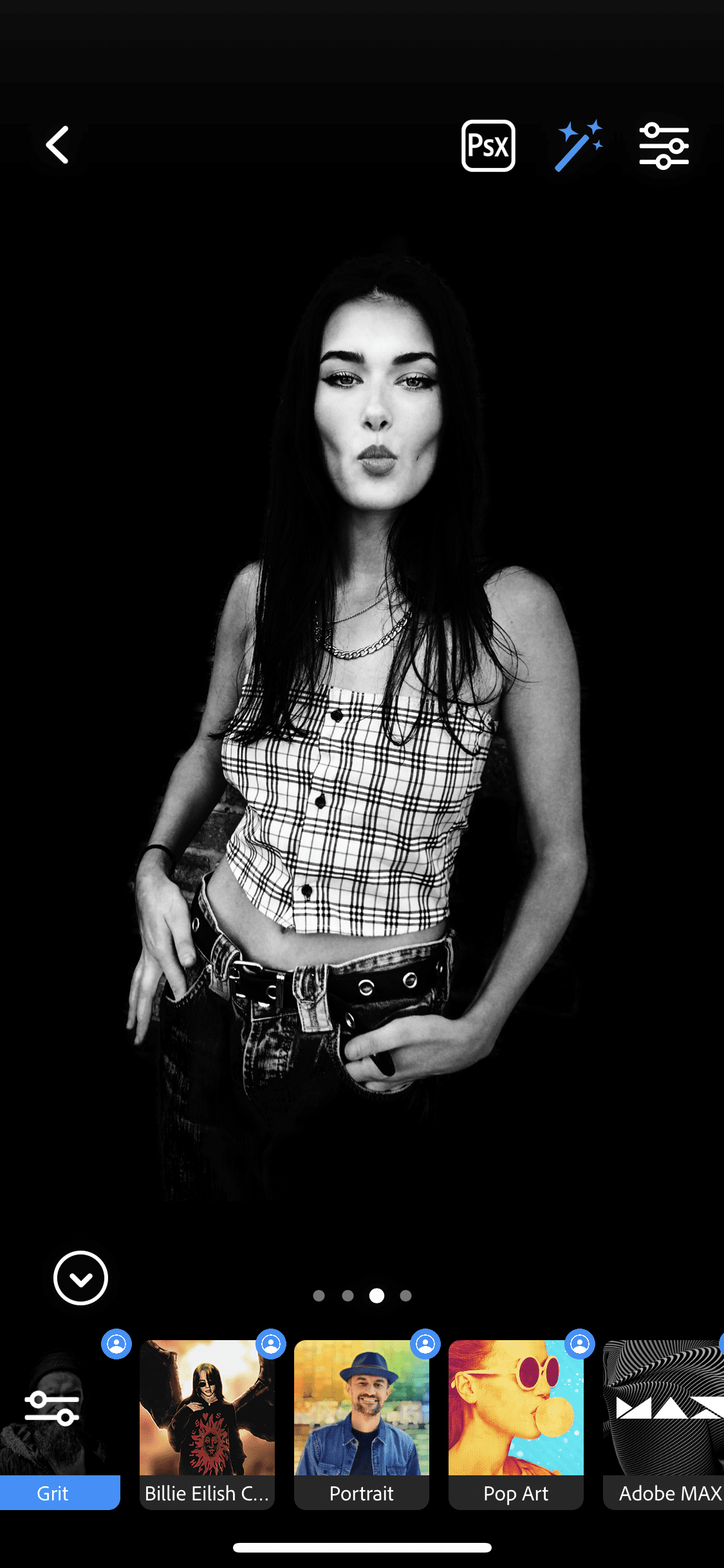
      Welcome to our brand new section within TheAppWhisperer.com entitled – App Art School. Within this section we publish a range of tutorials from beginner, intermediate to professional editing techniques to help you adjust your photo art in the best possible way. Adobe Photoshop Camera is a new, intelligent camera app that understands the best lenses and filters for your photos — before you even take the shot. It’s available on both iOS (Apple) and Android (Google Playstore) platforms. New filters are added each week and they’re really comprehensive. In the steps below, you’ll see how simple it is to apply the Grit filter to your image. You will require an Adobe…

      read more
      Joanne Carter

      You May Also Like

      tips

      Top Ten iPhone Tips by Apple

      2021-12-23
      AppArt

      AppArt School – Using albums in Photos on iPhone

      2025-06-09
      appart

      AppArt School – How to Edit Live Photos on iPhone

      2023-08-07
    • iOS Apps,  iPad Apps,  iPhone Apps,  News

      Introducing Adobe Photoshop Camera – AI-First Camera App that Brings Photoshop Magic to the Palm of Your Hand

      2019-11-05 / Comments Off on Introducing Adobe Photoshop Camera – AI-First Camera App that Brings Photoshop Magic to the Palm of Your Hand

      The smartphone camera and social media have fundamentally changed the way people of all skill levels create and share their own stories. And while the industry has pushed the limits on hardware, the software magic for photography on your phone has been limited, so say Adobe. Adobe believe the world is ready for the next chapter, where it’s not just about more mega-pixels, but how you can tell your story in a unique way. Given Adobe’s mission to empower creativity for all, they’re excited to introduce Adobe Photoshop Camera, an app that re-imagines what’s possible with smartphone photography. Photoshop Camera is a new, AI-powered mobile camera app that brings incredible…

      read more
      Joanne Carter

      You May Also Like

      lightroom

      Master Lightroom Mobile from Beginner to Pro (2025)

      2025-12-03

      Procreate Beginners Series – Part Three | Editing Tools

      2025-07-02
      Photos

      How to Hide Photos on iPhone 17 / 17 Pro Max – Hide Photo Settings

      2025-11-25

    Visit our online Print Gallery

      ©TheAppWhisperer 2025
      • ONLINE GALLERY and PRINT SALES
      • About Us
      • Vogue
      • News
      • COLUMNS
      • INTERVIEWS
      • TUTORIALS
      • FEATURES
      • App Art School
      • SHOWCASES
      • Contact Us
      • Support Us
      • Events
      • Venues
      Ashe Theme by WP Royal.